
Windshield wiper blades
Cleaning
If your windshield is not clear after using the windshield washer or if a wiper blade chatters when running, wax or other material may be on the blade or windshield.
Clean the outside of the windshield with a washer solution or a mild detergent. Your windshield is clean if beads do not form when rinsing with clear water.
Clean each blade by wiping it with a cloth soaked in a washer solution or a mild detergent.
Then rinse the blade with clear water. If your windshield is still not clear after cleaning the blades and using the wiper, replace the blades.

Worn windshield wiper blades can damage the windshield and impair driver vision.
Replacing
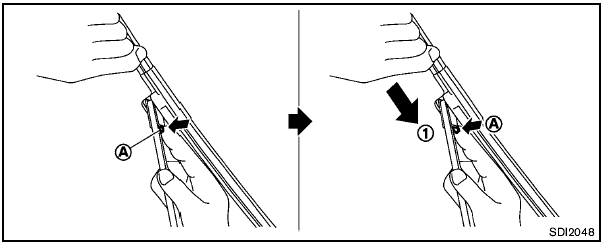
Replace the wiper blades if they are worn.
1. Lift the wiper arm away from the windshield.
2. Push and hold the release tab A , and move the wiper blade down the wiper arm 1 .
3. Insert the new wiper blade onto the wiper arm until a click sounds.
4. Rotate the wiper blade so that the dimple is in the groove.
- After wiper blade replacement, return the wiper arm to its original position; otherwise it may be damaged when the hood is opened.
- Make sure the wiper blades contact the glass; otherwise the arm may be damaged from wind pressure.
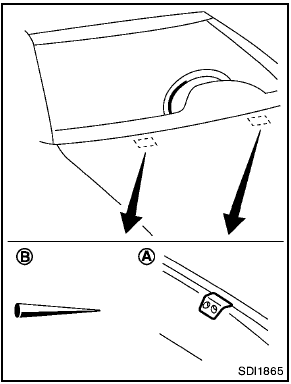
Be careful not to clog the washer nozzle A .
This may cause improper windshield washer operation. If the nozzle is clogged, remove any objects with a needle or small pin B . Be careful not to damage the nozzle.
See also:
Cleaning exterior
In order to maintain the appearance of your vehicle, it is important to take
proper care of it.
To protect the paint surfaces, wash your vehicle as soon as you can:
- after a rainfall to prevent p ...
Vehicle identification
Vehicle Identification Number (VIN)
plate
The Vehicle Identification Number (VIN) plate is attached at the location shown in the illustration. The VIN
serves as the primary identification ...
Difference between predicted and actual distances. How to park with predicted course lines
Difference between predicted and actual distances
Basic Information
The guidelines displayed on the monitor and their apparent positions on the ground are intended only as
approximate references. ...