
Fuses
Engine compartment
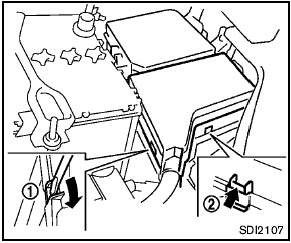

Never use a fuse of a higher or lower amperage rating than that specified on the fuse box cover. This could damage the electrical system or cause a fire.
If any electrical equipment does not operate, check for an open fuse.
1. Be sure the ignition switch and the headlight switch are turned off.
2. Open the engine hood.
3. Remove the air cleaner duct. (See “Engine compartment check locations” earlier in this section.) 4. Remove the fuse/fusible link holder cover using a suitable tool 1 and pushing the tab 2 .
5. Remove the fuse with the fuse puller located in the passenger compartment fuse box.
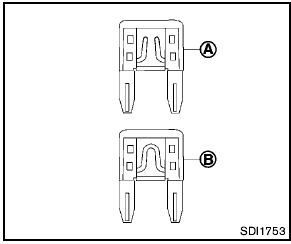
6. If the fuse is open A , replace it with a new fuse B .
7. If a new fuse also opens, have the electrical system checked and repaired by a NISSAN dealer.
Fusible links
If any electrical equipment does not operate and fuses are in good condition, check the fusible links. If any of these fusible links are melted, replace only with genuine NISSAN parts.
Passenger compartment
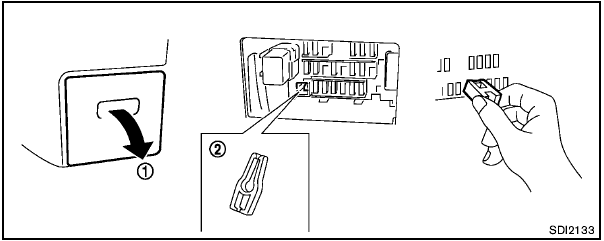
Never use a fuse of a higher or lower amperage rating than that specified on the fuse box cover. This could damage the electrical system or cause a fire.
If any electrical equipment does not operate, check for an open fuse.
1. Be sure the ignition switch and the headlight switch are turned off.
2. Pull to remove the fuse box cover 1 .
3. Remove the fuse with the fuse puller 2 .
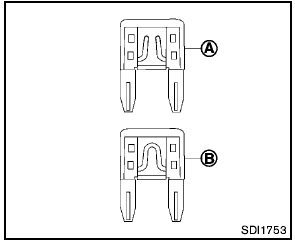
4. If the fuse is open A , replace it with a new fuse B .
5. If a new fuse also opens, have the electrical system checked and repaired by a NISSAN dealer.
Extended storage switch (if so equipped)
If any electrical equipment does not operate, remove the extended storage switch and check for an open fuse.
NOTE:
If the extended storage switch malfunctions, or if the fuse is open, it is not necessary
to replace the switch. In this case, remove the extended storage switch and replace
it with a new fuse of the same rating.
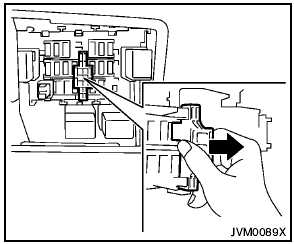
How to remove the extended storage switch:
1. To remove the extended storage switch, be sure the ignition switch is in the “OFF” or “LOCK” position.
2. Be sure the headlight switch is in the “OFF” position.
3. Remove the fuse box cover.
4. Pinch the storage switch and pull it in the direction illustrated.
See also:
If your vehicle is stolen
If your vehicle is stolen, you should change the
codes of any non-rolling code device that has
been programmed into HomeLink®. Consult the
Owner’s Manual of each device or call the manufacturer
...
Instrument panel
Vent, used to direct airflow into the cabin and help distribute heating, cooling, or ventilation from the
climate control system.
Headlight/turn signal switch, positioned for conv ...
Engine cooling system
The engine cooling system is filled at the factory
with a pre-diluted mixture of 50% Genuine
NISSAN Long Life Antifreeze/Coolant (blue) and
50% water to provide year-round anti-freeze
and coolant ...