
Instrument panel
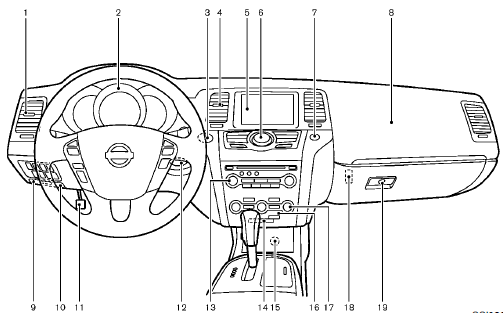
1. Side ventilator
2. Meters and gauges
3. Push-button ignition switch
4. Center ventilator
5. Center display
— Center color display
— Navigation system
6. Heater/air conditioner control or Center
multi-function control panel
— Navigation system
— Vehicle information and setting buttons
— Bluetooth® Hands-Free Phone System
(models with navigation system)
— Bluetooth® Hands-Free Phone System
(models without navigation system)
7. Hazard warning flasher switch
8. Front passenger supplemental air bag
9. Hood release handle
10. Fuse box cover
11. Parking brake
12. Intelligent Key port
13. Audio system
— Clock
14. Front passenger air bag status light
15. Power outlet
16. Rear window and outside mirror defroster
switch
17. Heater/air conditioner control or Audio
system
18. Trunk release power cancel switch (Cross-
Cabriolet models)
19. Glove box
*: if so equipped
**: Refer to the separate Navigation System Owner’s
Manual (if so equipped).
See also:
Opening the fuel-filler door
The fuel-filler door automatically unlocks when
the driver’s door is unlocked.
1. Unlock the fuel-filler door using one of the
following operations:
● Unlock the driver’s door with t ...
Emergency call (SOS) button
Emergency support
Basic Information
NissanConnect Services provide a range of emergency-related services designed to support the subscribed vehicle
and its driver when urgent assistance is ne ...
Engine compartment
CAUTION
Never use a fuse of a higher or lower
amperage rating than that specified on
the fuse box cover. This could damage
the electrical system or cause a fire.
If any electrical equipment doe ...