
Meters and gauges
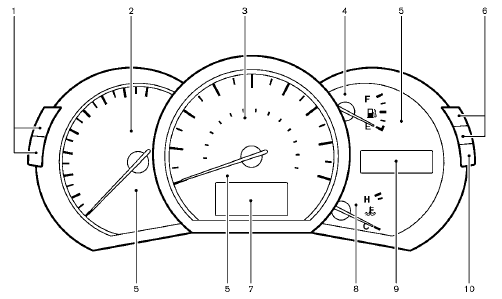
1. Instrument brightness control switch
2. Tachometer
3. Speedometer
4. Fuel gauge
5. Warning/indicator lights
6. Trip computer switch
7. Dot matrix liquid crystal display
— Trip computer
8. Engine coolant temperature gauge
9. Odometer/twin trip odometer/Continuously Variable
Transmission (CVT) position indicator
10. RESET switch for trip odometer
The needle indicators may move slightly after the ignition switch is pushed to the LOCK position. This is not a malfunction.
CAUTION
• For cleaning, use a soft cloth, dampened with water. Never use a rough cloth, alcohol, benzine, thinner or any kind of solvent or paper towel with a chemical cleaning agent.
They will scratch or cause discoloration
to the lens.
• Do not spray any
liquid such as
water on the meter lens. Spraying
liquid may cause the system to
malfunction.
See also:
Rear window wiper and washer switch (Hardtop
models)
WARNING
In freezing temperatures the washer
solution may freeze on the rear window
glass and obscure your vision. Warm
the rear window with the defroster
before you wash the rear window.
CAUTION ...
During a call
During a call there are several command options
available. Press the button on the steering
wheel to mute the receiving voice and enter
commands.
• “(digits)” — Use the Send command to
...
Intelligent Key battery replacement
CAUTION
Be careful not to allow children to
swallow the battery and removed parts.
Replace the battery as follows:
1. Remove the mechanical key from the key.
2. Insert a small screwdriver into ...