
Rear window and outside mirror defroster switch
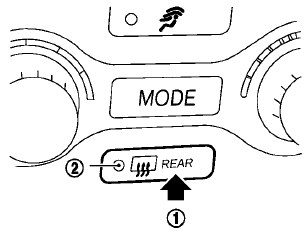
Type A
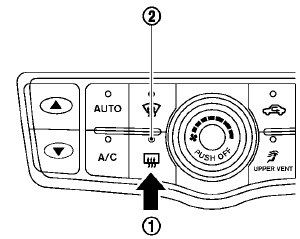
Type B
To defog/defrost the rear window glass and outside mirrors (if so equipped), start the engine and push the switch 1 on. The indicator light 2 will come on. Push the switch again to turn the defroster off.
It will automatically turn off in approximately 15 minutes.
CAUTION
• When
cleaning the inner side of the
rear window, be careful not to
scratch or damage the rear window
defroster.
• Do not use the
rear window defroster
switch while the soft top is being
operated or fully opened. The heat
may damage the soft top material
and/or components (CrossCabriolet
models).
See also:
Manual operation
Fan speed control
Use the fan speed control buttons on the control panel or the corresponding keys on the climate control screen to
adjust the fan speed manually. Select a lower setting for gentl ...
Glove box
WARNING
Keep glove box lid closed while driving
to help prevent injury in an accident or a
sudden stop.
To open the glove box, pull the handle 1 .
To close, push the lid in until the lock lat ...
NISSAN Advanced Air Bag System (front seats)
Hardtop models
1. Crash zone sensor
2. Supplemental front-impact air bag modules
3. Front seat-mounted side-impact supplemental
air bag modules
4. Occupant classification sensor (pattern sensor ...