
Storage box (if so equipped)
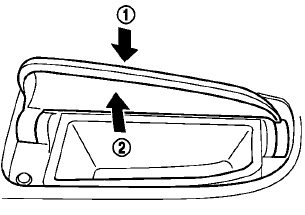
To open, push the storage box lid 1 as illustrated.
The inner tray can be removed2 as illustrated.
Do not place valuable items in the storage box.
Do not use the storage box as an ashtray.
See also:
Towing your vehicle
When towing your vehicle, all State (Provincial in
Canada) and local regulations for towing must
be followed. Incorrect towing equipment could
damage your vehicle. Towing instructions are
availabl ...
Jump starting
To start your engine with a booster battery, the
instructions and precautions below must be
followed.
WARNING
• If done incorrectly, jump starting
can lead to a battery explosion,
resulting in ...
During a call
There are some options available during a call.
Select one of the following displayed on the
screen, if necessary:
Hang up:
Finish the call.
Use Handset:
Transfer the call to the cellular ph ...