
Cargo floor box (if so equipped for Hardtop models)
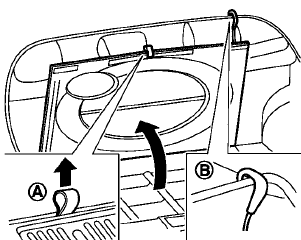
Type A
Type A
1. To open the cargo floor box, pull the strap
A .
2. Remove the strapB from the back side of
the board and hang it on the lip of the lift
gate.
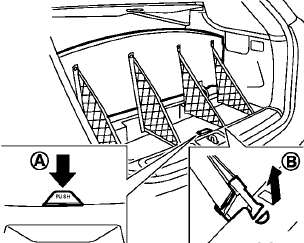
Type B
Type B
To open the cargo floor box, pushA . To close, push the lid until the lock latches.
The net partitions can be removedB to make a larger storage space.
The cargo floor box needs to be removed when you need a spare tire. (See “Flat tire” in the “6. In case of emergency” section.)
CAUTION
To avoid damage, do not load more than 22 lbs (10 kg) of cargo into the cargo floor box.
See also:
Engine
This spark ignition system complies with the Canadian standard ICES-002. ...
Safety note
- Do not disassemble or modify this system. If you do, it may result in accidents,
fire, or electric shock.
- Do not use this system if you notice any abnormality, such as a frozen screen
or la ...
Compass (if so equipped)
When the ignition switch is turned to the ON position, the compass display
B will indicate the direction of the vehicle’s heading.
If the display reads “C”, calibrate the compass by drivi ...