
Locking with inside lock knob
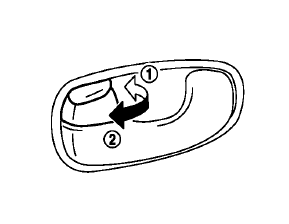
To lock the door individually, move the inside lock knob to the lock position1 then close the door.
To unlock, move the inside lock knob to the unlock position2 .
When locking the door without Intelligent Key, be sure not to leave the Intelligent Key inside the vehicle.
See also:
Manual operation
Manual operation
Pull the lock lever 1 down and adjust the
steering wheel forward or rearward to the
desired position.
Push the lock lever up securely to lock the
steering wheel in place.
...
When traveling or registering your vehicle in another country
When planning to drive your NISSAN vehicle
in another country, you should first find
out if the fuel available is suitable for your vehicle’s
engine.
Using fuel with an octane rating that is t ...
Fuses
Engine compartment
Never use a fuse of a higher or lower amperage rating than that specified
on the fuse box cover. This could damage the electrical system or cause a fire.
If any electrical e ...