
Door locks/unlocks precaution
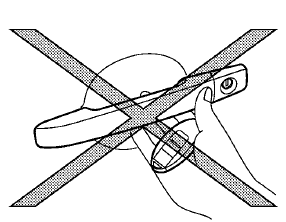
• Do not push the door handle request
switch
with the Intelligent Key held in your hand as
illustrated. The close distance to the door
handle will cause the Intelligent Key system
to have difficulty recognizing that the Intelligent
Key is outside the vehicle.
• After locking with the door handle request
switch, verify the doors are securely locked
by testing them.
• When locking the doors using the door
handle request switch, make sure to have
the Intelligent Key in your possession before
operating the door handle request switch to prevent the Intelligent Key from
being left in
the vehicle.
• The door handle request switch is
operational
only when the Intelligent Key has been
detected by the Intelligent Key system.
• To prevent the Intelligent Key from being
left
inside the vehicle or the trunk, make sure you
carry the key with you and then lock the
doors or the trunk.
• Do not pull the door handle before pushing
the door handle request switch. The door
will be unlocked but will not open. Release
the door handle once and pull it again to
open the door.
• The Intelligent Key system
(opening/closing
doors with the door handle request switch)
can be set to remain inactive on the center
display (if so equipped). (See “Vehicle
information and settings” in the “4. Monitor,
heater, air conditioner, audio, phone and
voice recognition systems” section.)
See also:
Other supplemental front-impact air
bag precautions
WARNING
Do not place any objects on the steering wheel pad or on the instrument panel. Also, do not place any
items between any occupant and the steering wheel or instrument panel. If the f ...
Conditions the remote start will not work
The remote start will not operate if any of the
following conditions are present:
● The ignition switch is placed in the ON position.
● The hood is not securely closed.
● The haz ...
AWD warning light
The AWD warning light is located in the meter.
The AWD warning light illuminates when the
ignition switch is pushed to the ON position. It
turns off soon after the engine is started.
If any ...