
Hardtop models
CAUTION
• Do not store the main sun visor
before storing the extension sun
visor.
• Do not pull the extension sun visor
forcedly downward.
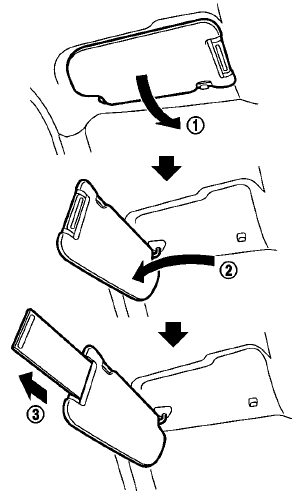
1. To block out glare from the front, swing
down the main sun visor1 .
2. To block glare from the side, remove the
main sun visor from the center mount and
swing it to the side2 .
3. Draw out the extension sun visor 3 from
the main sun visor to block from further
glare.
See also:
Brake system
Basic Information
The Nissan Murano brake system uses two separate hydraulic circuits. If one hydraulic circuit develops a
malfunction, braking force will remain available at two wheels through t ...
Control panel buttons — color screen with navigation system (if so equipped)
Control panel buttons — color screen with navigation system (if so equipped)
1. (brightness control) button
2. Display screen
3. MAP button*
4. NAV button*
5. TRAF button*
6. SETUP button
...
Seat belt maintenance
● To clean the seat belt webbing, apply a
mild soap solution or any solution recommended
for cleaning upholstery or carpet.
Then wipe with a cloth and allow the seat
belts to dry in the sh ...