
Rear window wiper and washer switch

In freezing temperatures the washer solution may freeze on the rear window glass and obscure your vision. Warm the rear window with the defroster before you wash the rear window.

- Do not operate the washer continuously for more than 30 seconds.
- Do not operate the washer if the reservoir tank is empty.
- Do not fill the window washer reservoir tank with washer fluid concentrates at full strength. Some methyl alcohol based washer fluid concentrates may permanently stain the grille if spilled while filling the window washer reservoir tank.
- Pre-mix washer fluid concentrates with water to the manufacturer’s recommended levels before pouring the fluid into the window washer reservoir tank. Do not use the window washer reservoir tank to mix the washer fluid concentrate and water.
If the rear window wiper operation is interrupted by snow or ice, the wiper may stop moving to protect its motor. If this occurs, turn the wiper switch to the OFF position and remove the snow or ice that is on and around the wiper arms. In approximately 1 minute, turn the switch on again to operate the wiper.
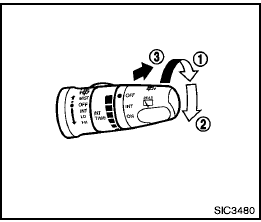
The rear window wiper and washer operate when the ignition switch is in the ON position.
Turn the switch clockwise from the OFF position to operate the wiper.
1 Intermittent (INT) — intermittent operation (not adjustable)
2 Low (ON) — continuous low speed operation
Push the switch forward 3 to operate the washer. Then the wiper will also
operate several times.
See also:
Engine block heater (if so equipped)
Engine block heaters are used to assist with cold
temperature starting.
The engine block heater should be used when
the outside temperature is 20°F (-7°C) or lower.
WARNING
● Do not use ...
Safety note
- Do not disassemble or modify this system. If you do, it may result in accidents,
fire, or electric shock.
- Do not use this system if you notice any abnormality, such as a frozen screen
or la ...
Spark plugs
Be sure the engine and ignition switch are off and that the parking brake
is engaged securely.
Be sure to use the correct socket to remove the spark plugs. An incorrect
socket can damage the ...