
Air conditioner specification label
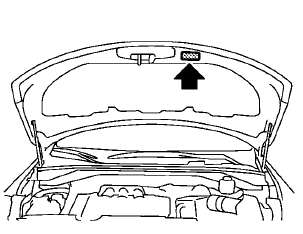
The air conditioner specification label is attached as shown.
See also:
Basic Information. RAB system operation
Basic Information
WARNING Failure to follow the warnings and operating instructions for the Rear Automatic
Braking (RAB) system could result in a collision, serious injury, or death.
The RAB ...
Event Data Recorders (EDR)
Basic information
This Nissan Murano is equipped with an Event Data Recorder (EDR). The primary purpose of the EDR is to capture
information during certain crash or near-crash events, such as air ...
Vehicle Dynamic Control (VDC) off switch
The vehicle should be driven with the Vehicle
Dynamic Control (VDC) system on for most driving
conditions.
If the vehicle is stuck in mud or snow, the VDC
system reduces the engine output to r ...