
Instrument brightness control
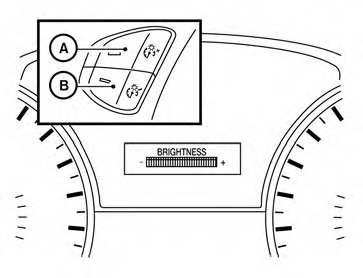
Push the “+” button A to increase the brightness of instrument panel lights when driving at night.
Push the “-” button B to decrease the brightness of instrument panel lights when driving at night.
See also:
Three-way catalyst
The three-way catalyst is an emission control
device installed in the exhaust system. Exhaust
gases in the three-way catalyst are burned at
high temperatures to help reduce pollutants.
WARNING
&# ...
Basic Information. I-FCW system operation
Basic Information
WARNING Failure to follow the warnings and operating instructions for the Intelligent Forward
Collision Warning (I-FCW) system could result in a collision, serious injury, or ...
CrossCabriolet models
1. To block out glare from the front, swing
down the sun visor1 .
2. To block glare from the side, remove the sun
visor from the center mount and swing it to
the side2 . ...