
Door locks/unlocks precaution
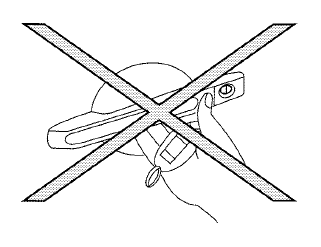
● Do not push the door handle request switch
with the Intelligent Key held in your hand as
illustrated. The close distance to the door
handle will cause the Intelligent Key system
to have difficulty recognizing that the Intelligent
Key is outside the vehicle.
● After locking with the door handle request
switch, verify the doors are securely locked
by testing them.
● To prevent the Intelligent Key from being left
inside the vehicle, make sure you carry the
Intelligent Key with you and then lock the
doors.
● Do not pull the door handle before pushing
the door handle request switch. The door
will be unlocked but will not open. Release
the door handle once and pull it again to
open the door.
See also:
In-cabin microfilter
The air conditioning system is equipped with an
in-cabin microfilter which collects dirt, pollen,
dust, etc. To make sure the air conditioner heats,
defogs, and ventilates efficiently, replace the
...
Operating tips
CAUTION
● Do not use alcohol, benzine or thinner
to clean the camera. This will cause
discoloration. To clean the camera,
wipe with a cloth dampened with a diluted
mild cleaning agent and t ...
Heated seats (if so equipped)
Do not use or allow occupants to use the seat heater if you or the occupants
cannot monitor elevated seat temperatures or have an inability to feel pain in those
body parts in contact with the s ...