
Manual operation (if so equipped)
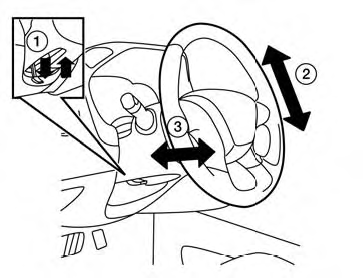
Tilt and telescopic operation
Pull the lock lever 1 down:
● Adjust the steering wheel forward or backward
in direction 3 to the desired position.
● Adjust the steering wheel up or down in
direction 2 to the desired position.
Push the lock lever 1 up firmly to lock the steering wheel in place.
See also:
Emergency engine shut off
To shut off the engine in an emergency situation
while driving, perform the following procedure:
– Rapidly push the push-button ignition switch 3
consecutive times in less than 1.5 seconds, or
â ...
Lift gate (Hardtop models)
WARNING
• Always be sure the lift gate has
been closed securely to prevent it
from opening while driving.
• Do not drive with the lift gate open.
This could allow dangerous exhaust
gases t ...
Passenger compartment. Instrument panel
Passenger compartment
Power moonroof, if so equipped, located above the seating area and operated through the interior controls.
Console box, providing covered storage between the ...