
Rearview mirror (if so equipped)
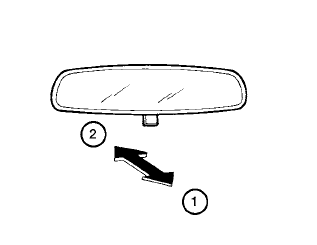
The night position 1 reduces glare from the headlights of vehicles behind you at night.
Use the day position 2 when driving in daylight hours.
WARNING
Use the night position only when necessary, because it reduces rear view clarity.
See also:
How to switch the display
A : Original screen before the RearView
Monitor is operated
B : Rear-wide view screen
C : Rear view screen
1 : Shift lever is moved into the R(Reverse)
position
2 : Shift lever is moved out of ...
Connecting procedure
1. Push the PHONE button or the
button,
and select the “Connect Phone” key.
2. When a PIN code appears on the screen,
operate the compatible Bluetooth® cellular
phone to enter the PIN ...
Voice adaptation mode
The Voice Adaptation mode allows up to two
users with different dialects to train the system
to improve recognition accuracy. By repeating a
number of commands, the users can create a
voice model ...