
Automatic anti-glare rearview mirror (if so equipped)
The inside mirror is designed so that it automatically dims during night time conditions and according to the intensity of the headlights of the vehicle following you. The automatic anti-glare feature is activated when the ignition switch is in the ON position.
The indicator light will illuminate when the automatic anti-glare feature is operating.
NOTE:
Do not hang any objects over the sensors 1 or apply glass cleaner to the sensors.
Doing so will reduce the sensitivity of the sensors, resulting in improper operation.
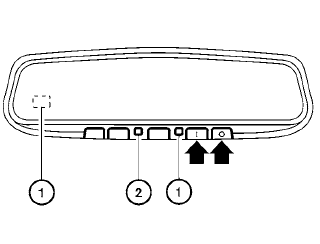
Type A - Without compass
Type A and Type B
The indicator light 2 will illuminate when the automatic anti-glare feature is operating.
To turn off the automatic anti-glare feature, press:
● the  button for inside mirrors
without
compass.
button for inside mirrors
without
compass.
● the  button for inside mirrors
with
compass.
button for inside mirrors
with
compass.
The indicator light will turn off.
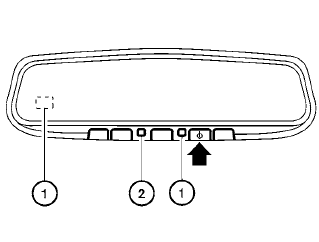
Type B - With compass
To turn on the automatic anti-glare feature again, press:
● the  button for inside mirrors
without
compass.
button for inside mirrors
without
compass.
● the  button for inside mirrors
with
compass.
button for inside mirrors
with
compass.
The indicator light will turn on.
For information on HomeLink® Universal Transceiver (if so equipped) operation, see the “HomeLink® Universal Transceiver” in the “Instruments and controls” section of this manual.
For information on the compass display (if so equipped), see “Compass display” in the “Instruments and controls” section of this manual.
See also:
Three-way catalyst
The three-way catalyst is an emission control
device installed in the exhaust system. Exhaust
gases in the three-way catalyst are burned at
high temperatures to help reduce pollutants.
WARNING
&# ...
Automatic operation
Cooling and/or dehumidified heating
(AUTO)
This mode may be used all year round as the
system automatically works to keep a constant
temperature. Air flow distribution and fan speed
are also cont ...
Vehicle security system (if so equipped)
The vehicle security system provides visual and
audio alarm signals if someone opens the doors
or lift gate/trunk when the system is armed. It is
not, however, a motion detection type system
that ...