
View malfunction
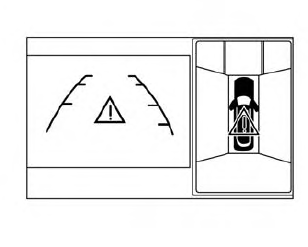
When the “!” icon is displayed on the screen, the Around View Monitor may not be calibrated correctly.
This will not hinder normal driving function but the system should be inspected by a NISSAN dealer.
See also:
How to park with predictive course lines
WARNING
• Always turn and check that it is
safe
to do so before backing up. Always
back up slowly.
• Use the displayed lines as a reference.
The lines are highly affected
by the number o ...
Cleaning exterior
In order to maintain the appearance of your vehicle, it is important to take
proper care of it.
To protect the paint surfaces, wash your vehicle as soon as you can:
- after a rainfall to prevent p ...
Difference between predicted and actual distances
The distance guide line and the vehicle width
guide line should be used as a reference only
when the vehicle is on a level, paved surface. The
distance viewed on the monitor is for reference
only ...