
Troubleshooting guide
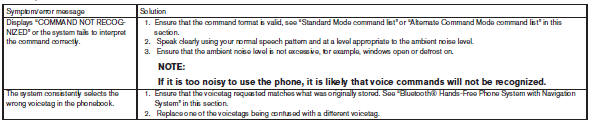
The system should respond correctly to all voice commands without difficulty. If problems are encountered, follow the solutions given in this guide for the appropriate error.
Where the solutions are listed by number, try each solution in turn, starting with number one, until the problem is resolved.
See also:
Precautions on cruise control
● If the cruise control system malfunctions, it
cancels automatically. The SET indicator
light in the vehicle information display then
blinks to warn the driver, see “Vehicle information
d ...
Instrument panel
1. Vent
2. Headlight/fog light (if so equipped)/turn
signal switch
3. Control panel and Vehicle Information
Display switches
4. Instrument brightness control
5. Driver supplemental air bag/Hor ...
Automatic Transmission (A/T)
Basic Information
WARNING
Do not press the accelerator pedal while shifting from P (Park) or N (Neutral) into R (Reverse), D
(Drive), or M (Manual shift mode). Keep the foot brake pedal f ...