
Cruise control
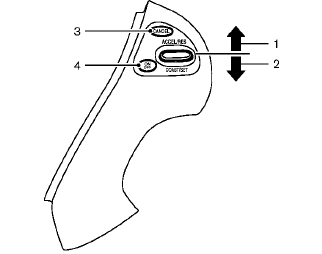
1. ACCEL/RES switch
2. COAST/SET switch
3. CANCEL switch
4. ON·OFF switch
See also:
Exhaust gas (carbon monoxide)
WARNING
● Do not breathe exhaust gases; they
contain colorless and odorless carbon
monoxide. Carbon monoxide is dangerous.
It can cause unconsciousness or
death.
● If you suspect t ...
Trunk light (CrossCabriolet models)
The light illuminates when the trunk lid is
opened. When the trunk lid is closed, the light
will turn off.
The light will also turn off after a period of
time when the light remains illuminated
a ...
Basic Information. RearView Monitor system operation
Basic Information
Display screen used to show the camera image, guide lines, and related visual information.
CAMERA button used to control available RearView Monitor display functions ...