
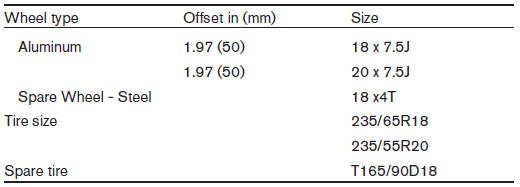
Wheels and tires
See also:
Manual operation (if so equipped)
Tilt and telescopic operation
Pull the lock lever 1 down:
● Adjust the steering wheel forward or backward
in direction 3 to the desired position.
● Adjust the steering wheel up or do ...
Tire chains
WARNING If tire chains are used on the Nissan Murano, they must provide sufficient clearance
between the tire and the nearest suspension, brake, or body component. Using chains of the wrong size o ...
Operating tips
● The images from a device that is connected
to the rear auxiliary input jacks cannot be
viewed on the front displays.
● It is not possible to switch the source to USB
(if so equipped) ...