
Vehicle identification number (VIN) plate
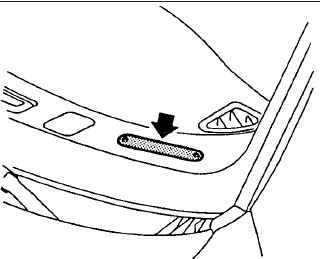
The vehicle identification number (VIN) plate is located as shown. This number is the identification for your vehicle and is used in the vehicle registration.
The vehicle identification number (VIN) number is also available through the center display screen.
See your “Navigation System Owner’s Manual” for further information.
See also:
Trunk open request switch
The trunk lid can be opened by pushing the
trunk open request switch A when the
Intelligent Key is within the operating range of
the trunk lock/unlock function regardless of the
inside loc ...
Fuel efficient driving tips
Follow these practical fuel-efficient driving tips to help the Nissan Murano use fuel more effectively. Smooth
vehicle control, sensible route planning, appropriate climate-control use, and regular ...
Locking with power door lock switch
Operating the power door lock switch will lock
or unlock all the doors. The switches are located
on the driver’s and front passenger’s door
armrests.
To lock the doors, push the power door ...