
Instrument panel
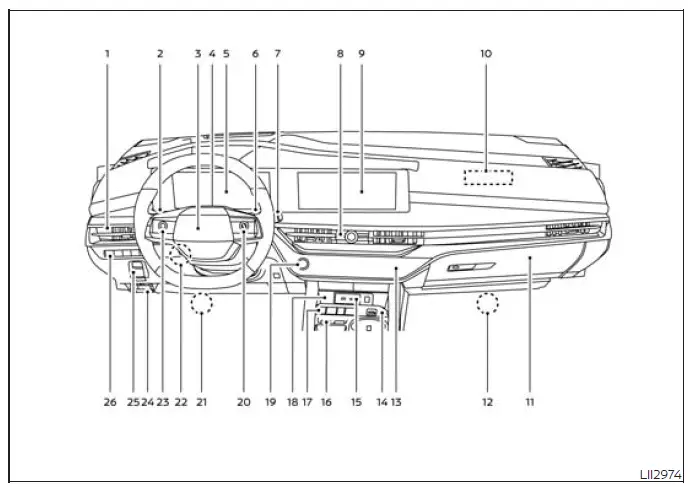
- Vent, used to direct airflow into the cabin and help distribute heating, cooling, or ventilation from the climate control system.
- Headlight/turn signal switch, positioned for convenient operation of exterior lighting and turn signal functions while driving.
- Supplemental air bag
Horn, integrated into the steering wheel area where the driver supplemental air bag is housed and the horn can be operated. - Driver monitor camera (if so equipped), located to support driver monitoring functions on models equipped with this feature.
- Meters and gauges
Warning and indicator lights
Vehicle information display, providing the driver with essential driving data, vehicle status information, and system alerts directly ahead of the steering wheel. - Paddle shifter, allowing the driver to make manual-style shift inputs when the vehicle system and selected driving mode permit.
- Wiper and washer switch
Rear window wiper and washer switch, used to operate windshield and rear window wiping and washing functions for improved visibility. - Hazard warning flasher switch
Audio system/Center display controls*, positioned in the center area for quick access to emergency hazard lights and related display or audio controls. - Center display*
Navigation display (if so equipped)*, serving as the main interface for compatible infotainment, vehicle information, and available navigation functions in the Nissan Murano. - Front passenger supplemental air bag, located in the instrument panel area ahead of the front passenger seat as part of the Supplemental Restraint System.
- Glove box, providing enclosed storage space on the front passenger side of the instrument panel.
- Front passenger supplemental knee air bag, positioned below the instrument panel area to help supplement lower-body restraint for the front passenger in certain frontal collision conditions.
- Heater and air conditioning controls, used to adjust cabin temperature, airflow, fan operation, and related climate settings.
- Drive Mode Selector, used to select the available driving mode that best suits road conditions or driver preference.
- USB ports*, provided for compatible device connection, charging, and media-related functions depending on equipment and system support.
- Idling Stop OFF switch, used to turn off the Idling Stop function when the driver chooses not to use it.
- Shift switches, used for selecting transmission operating positions according to normal vehicle operation.
- Magnetic Wireless charger, designed to hold and charge a compatible device without a cable when the device and charging conditions are suitable.
- Push-button ignition switch, used to start and stop the Nissan Murano when the proper key and operating conditions are present.
- Bluetooth Hands-Free Phone System/
Audio control switches*
Control panel and vehicle information display switches, allowing the driver to manage compatible phone, audio, menu, and display functions from the steering wheel area. - Driver supplemental knee air bag, positioned below the driver-side instrument panel to help support lower-body restraint in certain frontal collision conditions.
- Tilt and telescopic steering wheel control, used to adjust steering wheel position for a more suitable driving posture.
- ProPILOT Assist switches
Volume control switches*, located on the steering wheel area for convenient access to compatible driver assistance and audio volume controls. - Hood release, used to release the hood latch from inside the cabin before opening the hood from the front of the vehicle.
- Electronic parking brake
Automatic brake hold switch, used to operate the parking brake electronically and manage the brake hold function when conditions allow. - Steering Assist switch
Head Up Display (HUD) switch (if so equipped)
Heated steering wheel switch (if so equipped)
Liftgate instrument panel switch, grouped in the lower instrument panel area for access to steering assistance, available display, available comfort, and liftgate-related controls in the Nissan Murano.
*: Refer to the separate NissanConnect Owner's Manual for detailed information about compatible display, audio, phone, navigation, USB, and connected-system functions.
See also:
Supplemental air bag warning labels
1. SRS Air Bag Warning Labels
The warning labels are located on the surface
of the sun visor.
Warning labels about the supplemental frontimpact
air bag system are placed in the vehicle as
shown ...
Owner’s Manual/Service Manual order information
Genuine NISSAN Service Manuals for this model
year and prior can be purchased. A genuine
NISSAN Service Manual is the best source of
service and repair information for your vehicle.
This manual ...
Starting the engine
1. Apply the parking brake.
2. Move the shift selector to P (Park) or N
(Neutral). P (Park) is recommended.
The starter is designed not to operate if
the shift selector is in any of the driving
p ...