
Vehicle information display warnings and indicators
Basic Information
The following messages may appear in your vehicle information display. These warnings and indicators are designed to give the driver quick, practical information about key operation, vehicle status, system availability, and situations that may require attention.
Place the key near the start switch

This indicator appears when the battery of the Intelligent Key is low and when the Intelligent Key system and the vehicle are not communicating normally. In this situation, the Nissan Murano may need the Intelligent Key to be placed closer to the ignition switch so the system can recognize it properly.
If this appears, touch the ignition switch with the Intelligent Key while depressing the brake pedal. This helps the vehicle detect the key signal and continue the starting procedure when normal key communication is limited.
Key Battery Low

This indicator appears when the Intelligent Key battery is running out of power. The message is a reminder that the key battery should be replaced before the signal becomes too weak for normal operation.
If this indicator appears, replace the battery with a new one. Replacing it promptly helps maintain reliable locking, unlocking, and start-switch communication.
Key System Error See Owner's Manual

After the ignition switch is placed in the ON position, this warning appears for a period of time and then turns off. If it returns or remains active, the message should be treated as a sign that the Intelligent Key system needs attention.
The Key System Error message warns of a malfunction with the Intelligent Key system. Because this system is involved in vehicle access and starting, the warning should not be ignored.
If the warning appears while the engine is stopped, it may be impossible to start the engine. In that case, the vehicle may not recognize the key or may not complete the start authorization process.
If the warning appears while the engine is running, you can drive the vehicle. However, in these cases, have the system checked. It is recommended that you visit a NISSAN dealer for this service. Having the system inspected helps confirm whether the issue is related to the key, communication, or another part of the Intelligent Key system.
Key Not Detected

This warning appears when the Intelligent Key is left outside the vehicle with the ignition switch in the ON position. Make sure the Intelligent Key is inside the vehicle. The warning is especially useful when the key has been carried away by another person or placed outside the cabin while the vehicle is still on.
Brightness indicator

This indicator shows the brightness adjustment of the instrument panel. It provides a visual reference while the driver changes the display illumination level for better visibility in different lighting conditions.
Caution Steep slope

This indicator appears, and a chime sounds when the automatic brake hold function is activated while the vehicle is on a steep hill. Apply the foot brake to stop the vehicle moving. On a steep grade, the driver should be ready to control the brake pedal directly, because the message indicates that extra attention is needed to keep the Nissan Murano stationary.
Chassis Control System Error See Owner's Manual
This warning appears if the chassis control module detects a malfunction in the chassis control system. Have the system checked. It is recommended that you visit a NISSAN dealer for this service. Since chassis control functions are connected with vehicle stability and driving behavior, this warning should be inspected by qualified service personnel as soon as practical.
Check Rear Seat
When the system is enabled, this message appears when the vehicle comes to a complete stop, the vehicle is transitioned from the D (Drive) position to P (Park) position, and the driver exits the vehicle. This message alerts the driver, after a period of time, to check for items in the rear seats after the audible alert has been provided. The reminder is intended to draw attention to the rear seating area before the driver leaves the vehicle completely.
NOTE: This system is disabled until a driver enables it using the vehicle information display.
Check Rear Seat Alert is activated
When the system is enabled, this message appears when the Rear Door Alert system is active and can remind the driver to check the back seat. In the Nissan Murano, the message gives the driver options for handling the alert directly from the steering wheel controls.
-
Using the steering wheel switch, a driver can select "Dismiss Message" to clear the display for a period of time. If no selection is made, this message automatically turns off after a period of time. This temporarily removes the message from the display without changing the overall system setting.
-
Using the steering wheel switch, a driver can select "Disable Alert" to disable the horn alert for the remainder of the current trip. This selection affects the audible alert for that trip, rather than simply clearing the message from the screen.
WARNING
Selecting "Dismiss Message" during a stop within a trip temporarily dismisses the message for that stop without turning the system off. Alerts can be provided for other stops during the trip. Selecting "Disable Alert" turns off the Rear Door Alert system for the remainder of a trip and no audible alert will be provided. The driver should choose the option carefully, because one selection only clears the current message while the other changes alert behavior for the rest of the trip.
NOTE: This system is disabled until a driver enables it using the vehicle information display.
Door/liftgate Open

This warning appears when a door or the liftgate has been opened. It gives the driver a clear reminder to check the vehicle openings before driving away, especially if the warning appears after passengers have entered or exited the cabin.
Drive Mode Selector indicator
When a driving mode is selected using the Drive Mode Selector, the selected mode indicator is displayed below the gear position information. This makes it easy to see which drive mode is currently active while still keeping gear position information in the same viewing area.
-
STANDARD
-
ECO
-
SPORT
Electric shift control system indicator

This indicator appears when a malfunction occurs in the electric shift control system. Because this system is related to gear selection and vehicle operation, the message should be taken seriously when it appears.
When the master warning indicator appears, the chime sounds and the following message is displayed in the vehicle information display: "When parked apply parking brake". The warning is intended to remind the driver to secure the vehicle properly when parked.
When the ignition is placed in the OFF position, the chime sounds continuously. Ensure the parking brake is applied. Have the system checked. It is recommended that you visit a NISSAN dealer for this service. Until the system has been inspected, apply the parking brake carefully whenever the Nissan Murano is parked.
Headlight System Error: See Owner's Manual
This warning appears when the LED headlights are not functioning properly. Since headlight performance is important for nighttime visibility and for being seen by other road users, the warning should not be ignored.
If this warning appears, have your system checked. It is recommended that you visit a NISSAN dealer for this service.
Low Fuel

This warning appears when the fuel level in the fuel tank is getting low. Refuel as soon as it is convenient, preferably before the fuel gauge reaches 0 (Empty). There will be a small reserve of fuel in the tank when the fuel gauge needle reaches 0 (Empty). Refueling before the gauge reaches empty helps avoid unexpected stops and keeps the vehicle ready for normal driving.
Low Outside Temperature

This warning appears if the outside temperature is below 37ºF (3ºC). The temperature can be changed to display in Celsius or Fahrenheit. When this message appears, the driver should be aware that road surfaces may be cold, and driving conditions may require extra attention.
Low Washer Fluid

This warning appears when the windshield-washer fluid is at a low level. Add windshield-washer fluid as necessary. Keeping the washer fluid filled is important for maintaining windshield visibility when dirt, road spray, or weather conditions reduce the driver’s view.
Neutral Hold Mode has been activated
This message appears when the Neutral hold mode is activated. To exit the Neutral hold mode, place the vehicle in any other shift position other than N (Neutral). The message confirms that the vehicle has entered the mode and that the driver must select another shift position to leave it.
Neutral Hold Mode was not activated
This message appears when the Neutral hold mode is unavailable. To activate the Neutral hold mode, wait for a while without shifting and then perform the operations again. If the message appears, the requested operation has not been completed, so the driver should follow the procedure again only after the system is ready.
Neutral Hold Mode guidance
The "To Exit Vehicle in Neutral; Engine ON, Brake ON Push P, shift into N twice" message appears when the shift position is in the N (Neutral) position (Neutral hold mode is available). This guidance explains the required steps for leaving the Nissan Murano in Neutral under the appropriate conditions.
Power will turn off to save the battery
This message appears in the vehicle information display after a period of time if the ignition switch is in the ACC or the ON position and if the vehicle is in P (Park). The message lets the driver know that the vehicle is preparing to shut off electrical power to help reduce battery drain.
Power turned off to save the battery
This message appears after the ignition switch is automatically turned to off. It confirms that the vehicle has completed the power-saving action to help protect the battery from unnecessary discharge.
Press Brake Pedal
This warning appears in the following situations. It reminds the driver that brake pedal input is required before the requested operation can be completed safely:
-
The driver tries to release the electronic parking brake manually without depressing the brake pedal.
Press brake pedal to prevent rolling

This warning appears in the following situations. It is shown when the vehicle needs direct brake pedal input from the driver to help keep it from moving unexpectedly:
-
The vehicle is stopped on a steep hill and there is a possibility of moving backward, even if the electronic parking brake is applied. In this case, the driver should press the brake pedal to keep the vehicle securely stopped.
-
This warning appears and chime sounds if the vehicle moves while the automatic brake hold function is activated. Apply the foot brake to stop the vehicle moving. The chime and message work together to draw immediate attention to the need for brake pedal control.
Press brake to operate switch

This indicator appears if the automatic brake hold switch is pushed without depressing the brake pedal while the automatic brake hold function is activated. Depress the brake pedal and push the switch to deactivate the automatic brake hold function. The message is meant to prevent accidental operation of the switch and reminds the driver that brake pedal input is required before the system can be turned off safely.
Push brake and start switch to drive

This indicator appears when the shift position is in the P (Park) position. It tells the driver that the vehicle is ready for the next start or drive operation once the correct brake and ignition switch procedure is followed.
This indicator also appears when the vehicle has been started using the Remote Engine Start (if so equipped) function. In that situation, the Nissan Murano still requires the driver to press the brake pedal and use the ignition switch before normal driving operation can begin.
This indicator means that the engine will start by pushing the ignition switch with the brake pedal depressed. You can start the engine from any position of the ignition switch. The message gives a clear reminder of the required start sequence, especially after remote start or when the vehicle remains in Park.
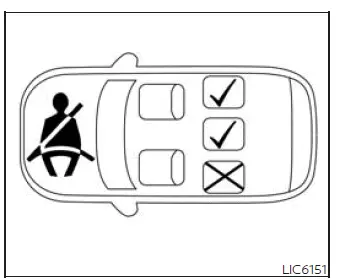
Display with rear seats only
Rear seat belt warning
-
 : Red seat: The corresponding seat
belt is not fastened. The red indication helps the driver quickly identify that a rear seating position
still needs attention.
: Red seat: The corresponding seat
belt is not fastened. The red indication helps the driver quickly identify that a rear seating position
still needs attention.
-
 : Green seat: The corresponding seat
belt is fastened. The green indication shows that the related rear seat belt has been buckled.
: Green seat: The corresponding seat
belt is fastened. The green indication shows that the related rear seat belt has been buckled.
-
This warning includes display of the seat belts for rear seating positions only. Rear seat belts that are unfastened will appear red, allowing the driver to check rear belt status directly from the vehicle information display.
-
If any rear seat belts are unfastened when the ignition switch is placed in the ON position, this warning will display for over 1 minute. This gives the driver time to notice the rear seat belt condition before or shortly after beginning a trip.
-
When a rear seat belt is changed from fastened to unfastened, this warning will display for over 1 minute, and the seat belt warning light will turn ON. The system uses both the message and the warning light to draw attention to the changed buckle status.
-
If the vehicle is driven above a certain speed during or after the rear seat belt buckle status change, this warning will display, the seat belt warning light will blink, and the chime will sound for over 1 minute. During this time, the warning and chime cannot be dismissed unless the rear seat belt is fastened again. Once the seat belt warning light and chime for the rear seat belt conditions have turned off, the display will also turn off. This sequence keeps the warning active long enough for the driver and rear passengers to recognize that a rear belt requires correction.
NOTE:
Opening and closing a rear door while stopped will reset this warning, similar to pushing the ignition switch to ON again. This means the rear seat belt status may be checked again after rear passenger activity.
Release Parking Brake
This warning appears in the message area of the vehicle information display when the parking brake is set and the vehicle is driven. If it appears, the driver should release the parking brake as appropriate before continuing, since driving with the parking brake applied can affect vehicle movement and may cause unnecessary wear.
Reminder: Turn OFF Headlights

This warning appears when the headlights are left in the ON position when exiting the vehicle. Place the headlight switch in the OFF or AUTO position. The reminder helps reduce the chance of leaving the lights on after parking the Nissan Murano, especially after nighttime driving or short stops.
Shipping Mode On Push Storage Fuse
This warning may appear if the extended storage switch is not pushed in. When this warning appears, push in the extended storage switch to turn off the warning. The message indicates that the vehicle is still in a storage-related mode and needs the switch position corrected for normal use.
Steep Slope Apply foot brake

This indicator appears, and chime sounds if the "Caution Steep slope" has appeared over about 3 minutes. Then the parking brake will automatically be applied and the braking force of the automatic brake hold function will be released, and the vehicle may move or roll away unexpectedly. Apply the foot brake to stop the vehicle moving. On a steep grade, the driver should take direct control with the brake pedal and not rely only on the automatic brake hold status.
Tire Pressure Low - Add Air

This warning appears when the low tire pressure warning light in the meter illuminates and low tire pressure is detected. The warning appears each time the ignition switch is placed in the ON position as long as the low tire pressure warning light remains illuminated. If this warning appears, stop the vehicle and adjust the tire pressures of all four tires to the recommended COLD tire pressure shown on the Tire and Loading Information label. Correct tire pressure is important for stable handling, tire wear, fuel efficiency, and overall driving confidence.
Transmission Shift Position indicator

This indicator shows the transmission shift position. When selecting a gear from the shift switches, the selected gear will be displayed clearly in the vehicle information display, helping the driver verify the current shift selection before moving or while driving.
If using the paddle shifters to engage manual shift mode, the shift range will be displayed. This gives the driver a direct reference to the selected manual shift range while using the paddle controls.
When parked apply parking brake

This message appears when a malfunction occurs in the electric shift control system below 5 mph (8 km/h). When this warning is shown, the driver should make sure the vehicle is secured properly when parked and pay close attention to the parking brake instruction.
Have the system checked. It is recommended that you visit a NISSAN dealer for this service. Because the message is connected with the electric shift control system, inspection by qualified service personnel is recommended to confirm proper operation.
AWD Error: See Owner's Manual

This warning appears when the all-wheel drive system is not functioning properly while the engine is running. If it appears in the Nissan Murano display, the driver should treat it as a system fault message and refer to the owner's manual for the required next steps.
AWD High Temp. Stop Vehicle

This warning may appear while trying to free a stuck vehicle due to increased oil temperature. The driving mode may change to 2-Wheel Drive (2WD). If this warning is displayed, stop the vehicle with the engine idling, as soon as it is safe to do so. Stopping the vehicle allows the system temperature to reduce before driving is continued.
Then if the warning turns off, you can continue driving. If the warning remains active or returns, drive cautiously and have the system inspected as appropriate.
Tire Size Incorrect: See Owner's Manual

This warning may appear if there is a large difference between the diameters of the front and rear wheels. Pull off the road in a safe area, with the engine idling. Check that all the tire sizes are the same, that the tire pressure is correct and that the tires are not excessively worn. On an AWD vehicle, matching tire size and condition are especially important because uneven rolling diameter can affect system operation.
Automatic Emergency Braking (AEB) with Pedestrian Detection emergency warning indicator

This indicator appears along with an audible warning, when the system detects the possibility of a forward collision. The visual alert and sound are intended to draw immediate attention to a potential hazard ahead, so the driver can respond quickly and maintain control.
Blind Spot Warning (BSW)/ Intelligent Blind Spot Intervention (I-BSI) indicator

This indicator appears when the BSW and/or I-BSI systems are engaged. It gives the driver a visible sign that the blind spot support functions are currently involved in monitoring or assisting under the applicable driving conditions.
This indicator also appears when the I-BSI system is unavailable. If the symbol is shown in that condition, the Nissan Murano is indicating that the related intervention function cannot currently operate as expected.
Cruise control indicator

This indicator shows the cruise control system status. It allows the driver to see whether cruise control is on, set, canceled, or waiting to resume a previously selected speed.
When cruise control is activated, a green circle will illuminate to indicate it is set. The vehicle information display will also display the speed the cruise control was set at. If you accelerate past the set speed, the speed will blink until you either cancel cruise control or go back to the set speed. If cruise control is on and canceled, the speed will be displayed to show the speed the vehicle will return to if the resume button is activated. This makes the cruise control screen useful not only for confirming activation, but also for understanding what speed the system will target when resumed.
Currently Unavailable
This message may appear when the Pro- PILOT Assist system, Intelligent Blind Spot Intervention (I-BSI) or the Intelligent Lane Intervention (I-LI) system is engaged. It means that one of the related driver assistance functions cannot continue operating under the present conditions.
Under the following conditions, the Pro- PILOT Assist, Intelligent Blind Spot Intervention (I-BSI) or the Intelligent Lane Intervention (I-LI) system is automatically canceled. The Nissan Murano display uses this message to show that the system has stopped providing that assistance and that the driver must rely on normal vehicle control:
-
When the VDC system is turned off The above system cannot be used in some situations (VDC operates, wheel slip and VDC system is off.) In these conditions, traction or stability-related operation may limit the availability of the assistance systems.
Driver Alertness - Take a Break?

This alert appears when the Intelligent Driver Alertness (I-DA) system has detected that the driver may be displaying fatigue or a lack of attention. When this message appears, it is a prompt to consider stopping safely and taking a break before continuing the trip.
Driving Aids temporarily limited

This message appears when the Automatic Emergency Braking (AEB) with Pedestrian Detection systems check is not completed correctly or when the vehicle is being towed. In this condition, the Nissan Murano is letting the driver know that the related forward support systems may not be fully ready to operate.
All forward driving aids may be temporarily limited or disabled. The driver should continue operating the vehicle normally and should not rely on these assistance features until the system check is complete or the condition causing the limitation has ended.
For additional information, see the following related systems and their operating details:
-
Automatic Emergency Braking (AEB) with Pedestrian Detection
-
ProPILOT Assist Systems
-
Intelligent Forward Collision Warning (I-FCW)
-
Intelligent Cruise Control (ICC)
-
Intelligent Lane Intervention (I-LI)
Driving Aids Temporarily disabled Clean sensor area See Owner's Manual
This message appears when the front radar sensor may be obstructed due to material or weather conditions that prevent the sensor from reading the area ahead properly:
-
mud, dirt, snow, ice, etc.
-
inclement weather (rain, fog, snow, etc.)
All forward driving aids are temporarily disabled until the system detects that the front radar sensor is no longer obstructed. Once the sensor area is clear and the system can read the road environment again, the affected functions can become available.
For additional information, see the following (if so equipped):
-
Automatic Emergency Braking (AEB) with Pedestrian Detection
-
ProPILOT Assist Systems
-
Intelligent Forward Collision Warning (I-FCW)
Driving Aids Temporarily limited Front Camera Too Hot

This message appears when the camera detects an interior temperature of more than 104ºF (40ºC). High cabin temperature can temporarily affect the front camera’s ability to support the driver assistance systems that depend on its view.
All forward driving aids may be temporarily limited or disabled until the system detects that the front camera has cooled. During this time, the driver should treat the assistance systems as unavailable or reduced and maintain full control of the vehicle.
For additional information, see these related systems and their operating conditions:
-
Automatic Emergency Braking (AEB) with Pedestrian Detection
-
ProPILOT Assist Systems
-
Intelligent Forward Collision Warning (I-FCW)
-
Intelligent Cruise Control (ICC)
-
Intelligent Lane Intervention (I-LI)
Driving Aids Temporarily limited Poor Visibility

This message may appear when the Steering Assist system is engaged. It indicates that visibility conditions or camera detection quality may be affecting the system’s ability to recognize lane markings reliably.
Under the following conditions, the Steering Assist system may be limited or cancelled:
-
When the wiper (HI) operates. Heavy rain or rapid wiper operation can make the front camera view less stable.
-
When lane markers in the traveling lane cannot be correctly detected for a period of time due to such items as a snow rut, reflection of light on a rainy day or several unclear lane markers are present. In these situations, the system may not have a clean lane reference to follow.
-
Strong light, such as sunlight or high beams from oncoming vehicles, enter the front camera and reduce its ability to detect the road markings ahead.
The system will be available when the above conditions no longer exist. Once the camera can clearly identify the driving lane again, Steering Assist can resume operation according to system conditions.
If the warning message continues to appear, stop the vehicle in a safe location, turn the engine off, and clean the windshield. A clear windshield is important because the front camera must have an unobstructed view to support these Nissan Murano driving aids.
Driving Aids Temporarily limited Radar interference

This message appears when the front radar sensor may be experiencing radio wave interference. When this occurs, the sensor may not be able to provide stable information to the systems that use front radar data.
All forward driving aids may be temporarily limited or disabled until the system detects that the front radar sensor is no longer experiencing interference. The driver should be prepared for the assistance functions to remain reduced until the interference condition clears.
For additional information, see the following systems, which may depend on forward detection when equipped:
-
Automatic Emergency Braking (AEB) with Pedestrian Detection
-
ProPILOT Assist Systems
-
Intelligent Forward Collision Warning (I-FCW)
-
Intelligent Cruise Control (ICC)
-
Intelligent Lane Intervention (I-LI)
Limited driver's aid VDC Setting OFF

This message indicates that certain driver assistance functions are limited because the VDC setting is OFF. In this condition, the Nissan Murano may restrict systems that depend on stability control status, and the driver should operate the vehicle with normal steering, braking, and speed control until the setting is restored or the message clears.
This message appears when the Vehicle Dynamic Control (VDC) system is off. In this condition, the Nissan Murano may reduce the availability of driver assistance features that depend on VDC status to operate correctly.
All forward driving aids may be temporarily limited or disabled. The driver should continue with normal steering, braking, and speed control and should not assume that the forward assistance systems are actively supporting the drive while this message is displayed.
For additional information, see the following related systems and their operating conditions:
-
Automatic Emergency Braking (AEB) with Pedestrian Detection
-
ProPILOT Assist Systems
-
Intelligent Forward Collision Warning (I-FCW)
-
Intelligent Cruise Control (ICC)
-
Intelligent Lane Intervention (I-LI)
-
Vehicle Dynamic Control (VDC) system
Forward Driving Aids temporarily disabled Front Sensor blocked See Owner's Manual
This message appears when the front radar sensor may be obstructed due to material on the sensor area or weather conditions that prevent the system from reading the road ahead properly:
-
mud, dirt, snow, ice, etc.
-
inclement weather (rain, fog, snow, etc.).
All forward driving aids are temporarily disabled until the system detects that the front radar sensor is no longer obstructed. Once the sensor area is clear and the system can monitor the forward area again, the affected functions may become available.
For additional information, see the following sections, especially if the Nissan Murano is equipped with these forward detection systems:
-
Automatic Emergency Braking (AEB) with Pedestrian Detection
-
ProPILOT Assist Systems
-
Intelligent Forward Collision Warning (I-FCW)
Hands on detection warning / Take Steering Control / Slowing to Stop

These warnings appear when the Steering Assist system is engaged and the following condition(s) occur. They are intended to get the driver's attention when steering input is required:
-
When not holding the steering wheel
-
When there is no steering wheel operation
Hold onto the steering wheel immediately. The driver must remain ready to steer, even when Steering Assist is active.
When the steering operation is detected, the warning turns off and the Steering Assist function is automatically restored. This indicates that the system has recognized driver input and can continue operating according to its normal conditions.
Idling Stop System

This indicator shows the Idling Stop System status. It provides a quick reference to the current state of the system so the driver can understand whether the function is active, available, or being indicated through the display.
Intelligent Lane Intervention (I-LI)/Intelligent Blind Spot Intervention (I-BSI)/ProPILOT Assist status indicator

This indicator shows when the I-LI, I-BSI or ProPILOT Assist system is engaged. It gives the driver a visible status reference for these assistance functions when they are operating under the required conditions.
Lane Departure Warning (LDW)/ Intelligent Lane Intervention (I-LI) indicator

This indicator appears when the LDW and/or Intelligent Lane Intervention (I-LI) systems are engaged. The display helps the driver recognize that lane-related warning or intervention support is active or involved in the current driving situation.
Malfunction See Owner's Manual

This warning appears when the Intelligent Driver Alertness (I-DA) system is not functioning properly. If this message is shown, the driver should refer to the Owner's Manual and have the system inspected as needed, because the alertness monitoring function may not be available.
Malfunction See Owner's Manual
This warning appears when one or more of the following systems (if so equipped) is not functioning properly. Since several driver assistance features can share sensors, control logic, or display warnings, a malfunction message should be treated as an indication that professional diagnosis may be required:
-
Automatic Emergency Braking (AEB) with Pedestrian Detection
-
Blind Spot Warning (BSW)
-
Intelligent Blind Spot Intervention (I-BSI)
-
Intelligent Forward Collision Warning (I-FCW)
-
Intelligent Lane Intervention (I-LI)
-
Lane Departure Warning (LDW)
-
ProPILOT Assist
-
Rear Automatic Braking (RAB)
-
Rear Cross Traffic Alert (RCTA)
-
Traffic Sign Recognition (TSR)
If one or more of these warning appears, have the system checked. It is recommended that you visit a NISSAN dealer for this service. Until the cause is corrected, the Nissan Murano driver should operate the vehicle without relying on the affected assistance feature.
Only Available with Cruise Control ON

This message appears when the selected function requires cruise control to be turned on before it can be used. Turn cruise control on first, then operate the related feature according to the instructions shown in the vehicle information display.
This message appears when the Steering Assist switch has been pushed while the cruise control is not switched on. In this situation, the system is reminding the driver that Steering Assist depends on cruise control being active before the related function can be used.
Parking Sensor

This indicator appears when the sensor is
activated. Pressing the
 button
while
the sonar screen is displayed will dismiss
this message until the next time the sensors
are activated. The Parking Sensor system
will remain on, unless it is disabled in
the vehicle information display. This allows the driver to clear the current message from the screen while
keeping the parking assistance function available for the next detection event.
button
while
the sonar screen is displayed will dismiss
this message until the next time the sensors
are activated. The Parking Sensor system
will remain on, unless it is disabled in
the vehicle information display. This allows the driver to clear the current message from the screen while
keeping the parking assistance function available for the next detection event.
Parking Sensor Error: See Owner's Manual
This warning appears when there is an error with the system. If this message is shown, the parking sensor function may not provide normal detection assistance, so the driver should use extra care when maneuvering and refer to the Owner's Manual for the proper action.
Parking Sensor Temporarily disabled
This warning appears when the sonar system detects a blockage. Dirt, snow, ice, or another obstruction near the sensor area may prevent normal operation until the blockage is removed and the system can detect the surrounding area correctly.
ProPILOT Assist indicators

These indicators show the ProPILOT Assist system status. The status is shown by color. The color-based display helps the driver understand whether the system is available, active, or in another operating state while monitoring the Nissan Murano assistance functions.
Rear Automatic Braking (RAB) system indicator

This indicator appears to indicate the status of the Rear Automatic Braking (RAB) system. It gives the driver a visual reference for the system condition when rear braking support is available or being monitored by the vehicle.
Rear Automatic Braking (RAB) system indicator

This indicator flashes in red and white alternately when the RAB system is activating. The flashing pattern is used to draw attention quickly when the system is responding to a situation behind the vehicle.
Speed Limit Sign indicator

This indicator may appear when the Traffic Sign Recognition system is engaged. When available, it provides a speed limit reference in the display so the driver can more easily notice the most recently detected road sign information.
Time for a break?

This indicator appears when the driver enables the timer alert function within the driver assistance settings and the selected set time is expired. The time is based on ignition on time and can be set up to six hours. This reminder is useful for longer drives, because it gives the driver a clear prompt when the selected driving-time interval has passed.
Steering Assist Not Available Cannot Detect Lane
This indicator may appear when the Steering Assist system is engaged. The Steering Assist system is automatically canceled when the lane markers in the traveling lane cannot be correctly detected for a period of time due to such items as a snow rut, reflection of light on a rainy day or several unclear lane markers are present. In these conditions, the system does not have a reliable lane reference, so the driver must steer the vehicle directly.
If you want to use the Steering Assist system again, cancel the ProPILOT Assist system and set it again when lane markers are clearly visible, or push the Steering Assist switch once. Once the road markings can be detected properly again, the Nissan Murano can make Steering Assist available according to the normal system conditions.
Steering Assist OFF

This indicator appears when the Steering Assist system is turned off. It confirms that the steering assistance function is not active, so the driver is responsible for all steering control.
Steering Assist ON

This indicator appears when the Steering Assist system is turned on. It shows that the function has been selected and may operate when the required road, driver, and system conditions are met.
Steering Assist status

This indicator appears when the Steering Assist system is engaged. The message gives the driver a direct status reference while the system is assisting under the appropriate operating conditions.
Step on Brake Now

This message may appear when the Intelligent Cruise Control (ICC) (with ProPILOT Assist) system is engaged and the following condition occurs. The warning is urgent because brake pedal input is required to keep the vehicle safely controlled:
-
While the vehicle is stopped by the Pro- PILOT Assist, the driver's door is opened but the electronic parking brake was not activated. In this case, the driver should step on the brake pedal immediately to help prevent unintended vehicle movement.
Step on the brake pedal immediately. This instruction requires prompt driver action to keep the vehicle controlled and prevent unintended movement.
Unavailable Adverse Weather

This message may appear when the Steering Assist system is engaged. It indicates that weather or road visibility conditions are interfering with the system’s ability to monitor the lane clearly enough for assisted steering operation.
Under the following conditions, the Steering Assist system is automatically canceled:
-
When the wiper (HI) operates. Heavy rain or severe weather can reduce the camera’s ability to maintain a stable view of the lane ahead.
-
When lane markers in the traveling lane cannot be correctly detected for a period of time due to such items as a snow rut, reflection of light on a rainy day or several unclear lane markers are present. In these situations, the system may not have a dependable lane reference to follow.
If you want to use the Steering Assist system again, cancel the ProPILOT Assist system and set it again when lane markers are clearly visible, or push the Steering Assist switch once. The Nissan Murano can make Steering Assist available again when the road markings and system conditions are suitable.
Unavailable: Camera Temperature High
This message appears when the camera detects an interior temperature of more than 104ºF (40ºC). When the camera area becomes too hot, the related assistance functions may be unavailable until the temperature drops and the camera can operate normally again.
Unavailable Low Visibility

This message may appear when the Steering Assist system is engaged. It means the system cannot rely on the front camera view because the windshield area or lighting conditions are preventing accurate detection.
Under the following condition, the Steering Assist system is automatically canceled:
-
The camera area of the windshield is fogged up or covered with dirt, water drops, ice, snow, etc. A clear windshield is necessary because the camera must be able to see the lane area ahead.
-
The camera received strong light, such as sunlight, high beam of an oncoming vehicle, etc. Strong glare can reduce the camera’s ability to identify lane markings correctly.
Unavailable Parking Brake is On

This message may appear when the Pro- PILOT Assist system is engaged. It tells the driver that the system cannot continue operating while the electronic parking brake is applied.
Under the following condition, the ProPILOT Assist system is automatically canceled:
-
The electronic parking brake is applied.
The above system cannot be used when the electronic parking is activated. Release or manage the parking brake according to normal vehicle operation before attempting to use the related assistance function again.
Unavailable Seatbelt is Unfastened

This message may appear when the Pro- PILOT Assist system is engaged. The system requires the driver’s seat belt to be fastened before the assisted driving function can remain active.
Under the following condition, the ProPILOT Assist system is automatically canceled:
-
When the driver's seat belt is not fastened
The above system cannot be used when the driver's seat belt is not fastened. Fastening the seat belt is part of the required operating conditions for this function.
Unavailable: Side Radar Obstruction
This message appears when the Blind Spot Warning (BSW), Intelligent Blind Spot Intervention (I-BSI), or Rear Cross Traffic Alert (RCTA) systems become unavailable because a radar blockage is detected. The affected side radar area should be checked for possible dirt, snow, ice, or other material that could prevent the system from monitoring nearby traffic properly.
Unavailable Slippery Road

This message may appear when the Pro- PILOT Assist system, Intelligent Blind Spot Intervention (I-BSI) or the Intelligent Lane Intervention (I-LI) system is engaged. It indicates that slippery road conditions or stability-related activity are limiting the availability of these assistance functions.
Under the following conditions, the Pro- PILOT Assist system, Intelligent Blind Spot Intervention (I-BSI) or the Intelligent Lane Intervention (I-LI) system is automatically canceled:
-
When the VDC system operates. This can happen when the vehicle is responding to reduced traction or stability-related conditions.
-
When a wheel slips. Wheel slip can prevent the system from maintaining the operating conditions needed for driver assistance support.
The above system cannot be used in some situations (VDC operates, wheel slip and VDC system is off.) In these conditions, the Nissan Murano driver should rely on normal steering, braking, and accelerator control until the road surface and system status allow the assistance features to become available again.
Vehicle ahead detection indicator

This indicator shows when the following systems are engaged and have detected a vehicle. It gives the driver a visual reference that a vehicle ahead has been recognized by the forward detection systems:
-
Automatic Emergency Braking (AEB) with Pedestrian Detection
-
Intelligent Forward Collision Warning (I-FCW)
-
ProPILOT Assist
See also:
Tilt/telescopic steering
WARNING
● Do not adjust the steering wheel while
driving. You could lose control of your
vehicle and cause an accident.
● Do not adjust the steering wheel any
closer to you than is ne ...
Phone selection
Up to 5 cellular phones can be registered to the
system. To switch to connect another cellular
phone, push PHONE button and select the
“Connected Phones” key. The registered cellular
phones ar ...
Safety note
WARNING
• Do not disassemble or modify this
system. If you do, it may result in
accidents, fire, or electric shock.
• Do not use this system if you notice
any abnormality, such as a frozen
s ...