
Headlight control switch
Basic Information
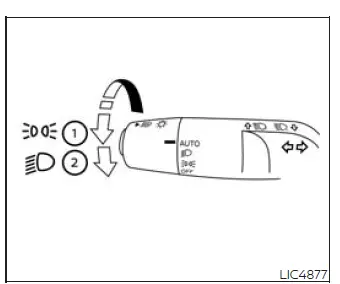
Type A (if so equipped)
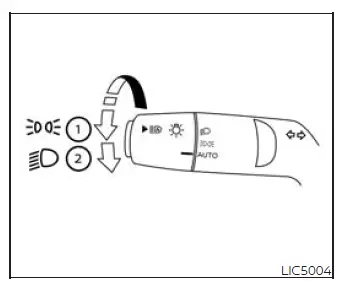
Type B (if so equipped)
Lighting
- Rotate the switch to the
 position, and the front parking, tail, license plate, and
instrument panel lights will come on. This setting is useful when exterior marker lighting and instrument
illumination are needed without turning on the full headlight beam.
position, and the front parking, tail, license plate, and
instrument panel lights will come on. This setting is useful when exterior marker lighting and instrument
illumination are needed without turning on the full headlight beam. - Rotate the switch to the
 position, and the headlights will come on and all the other lights
remain on. In this position, the Nissan Murano provides full headlight operation together with the
supporting exterior and instrument panel lighting.
position, and the headlights will come on and all the other lights
remain on. In this position, the Nissan Murano provides full headlight operation together with the
supporting exterior and instrument panel lighting.
CAUTION Use the headlights with the engine running to avoid discharging the vehicle battery. Leaving the lights on while the engine is not running can place a heavy load on the electrical system, especially during extended stops.
Autolight system
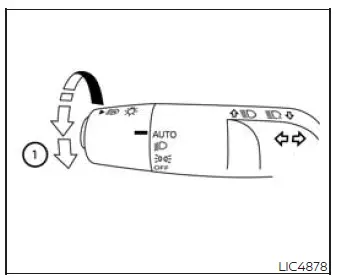
Type A (if so
equipped)
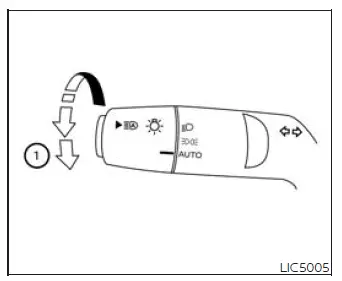
Type B (if so
equipped)
The autolight system allows the headlights to turn on and off automatically. It monitors outside light conditions and helps manage exterior lighting without requiring the driver to rotate the switch each time lighting changes. The autolight system can:
- Turn on the headlights, front parking, tail, license plate and instrument panel lights automatically when it is dark. This helps the driver maintain proper lighting when entering tunnels, parking structures, shaded roads, or nighttime conditions.
- Turn off all the lights (except daylight running lights) when it is light. When surrounding brightness improves, the system can reduce unnecessary lighting automatically.
- Keep all the lights on for a period of time after you place the ignition switch in the OFF position and all doors are closed. This delay can provide useful lighting around the vehicle after parking.
NOTE: Autolight activation sensitivity and the time delay for autolight shutoff can be adjusted. These settings allow the driver to fine-tune how quickly the system reacts and how long the lights remain on after shutdown.
To turn on the autolight system:
1. Turn the headlight switch to the AUTO position 1. This selects automatic lighting control instead of a fixed manual lighting position.
2. Place the ignition switch in the ON position. The system then becomes ready to control the lights according to the detected outside brightness.
3. The autolight system automatically turns the headlights on and off. In the Nissan Murano, this makes daily lighting operation more convenient while still allowing the driver to choose another switch position when manual control is preferred.
Initially, if the ignition switch is turned off and a door is opened and left open, the headlights remain on for a period of time. If another door is opened while the headlights are on, then the timer is reset. This behavior gives the driver and passengers extra lighting around the vehicle while entering or leaving the cabin.
To turn the autolight system off, turn the switch to the OFF (if so equipped),  , or
, or  position. Selecting one of these positions changes operation from automatic lighting to the selected manual
lighting mode.
position. Selecting one of these positions changes operation from automatic lighting to the selected manual
lighting mode.
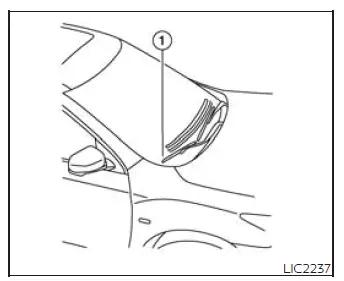
Be sure you do not put anything on top of the autolight sensor located in the top side 1 of the instrument panel. The autolight sensor controls the autolight; if it is covered, the autolight sensor reacts as if it is dark out and the headlights will illuminate. If this occurs while parked with the engine off and the ignition switch placed in the ON position, your vehicle's battery could become discharged. Keeping the sensor area clear allows the Nissan Murano autolight system to read ambient light correctly and prevents unnecessary headlight operation.
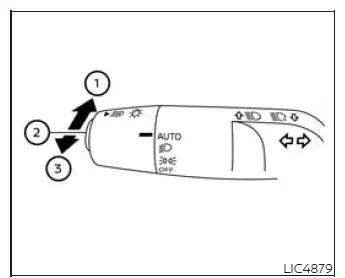
Headlight beam select
- To activate the high beam headlights, push the combination switch lever forward while the low beam
headlights are turned on. The high beams will illuminate immediately, and the corresponding
 high beam indicator light will
appear in the instrument cluster, confirming that the function has been engaged.
high beam indicator light will
appear in the instrument cluster, confirming that the function has been engaged. - Pull the lever back toward you to switch from the high beams to the low beams. Returning to the low beam setting helps improve visibility for approaching drivers while maintaining safe nighttime driving conditions.
- Pull the lever toward you and then release it to momentarily flash the high beams. This feature can be used
to signal other road users or briefly illuminate the road ahead.
The low beam headlights do not have to be switched on for the headlight flash function to operate, allowing quick signaling whenever necessary.
High Beam Assist
Basic Information
The High Beam Assist system in the Nissan Murano is designed to improve nighttime visibility while reducing the need for repeated manual headlight adjustments. Under normal driving conditions, the system becomes operational when the vehicle reaches speeds of approximately 25 mph (40 km/h) or higher.
If the system detects an approaching vehicle or identifies another vehicle traveling ahead while the high beams are active, it will automatically change the headlights to the low beam setting. Once the road ahead is clear again and appropriate conditions are detected, the system can return to the high beams automatically, helping provide better forward illumination without unnecessarily dazzling other road users.
WARNING
- The High Beam Assist system is provided as a driving convenience and should never replace the driver's judgment or attention. Always remain alert to changing road conditions, monitor surrounding traffic, and manually switch between the high and low beams whenever the situation requires.
- The system may not automatically change between the high and low beams under certain environmental or
traffic conditions. In these situations, manually operate the headlights to ensure safe visibility for
yourself and other drivers.
- During adverse weather conditions such as rain, fog, snow, strong wind, or other situations that reduce visibility.
- When nearby light sources resemble vehicle headlights or taillights and may interfere with system recognition.
- When the headlights of an approaching or preceding vehicle are switched off, partially blocked, contaminated, discolored, or incorrectly aimed.
- When there is a sudden or continuous change in surrounding brightness.
- While driving on roads with rolling hills, elevation changes, or uneven terrain.
- When traveling along roads with numerous bends or sharp curves.
- When highly reflective traffic signs, mirrors, or other reflective objects direct bright light toward the front of the vehicle.
- When a trailer, cargo container, or another object being towed by a vehicle ahead reflects intense light.
- When one or both headlights on your Nissan Murano are dirty, damaged, or not operating correctly.
- When the vehicle is tilted because of a flat tire, towing, uneven loading, or similar conditions that may affect headlight alignment.
- The timing of automatic switching between the low and high beams may vary depending on surrounding
conditions, including:
- The brightness and intensity of the headlights from approaching or preceding vehicles.
- The speed, direction, and movement of approaching or leading vehicles.
- Situations where only one headlight or taillight of another vehicle is visible.
- When the detected vehicle is a motorcycle, scooter, or another two-wheeled vehicle.
- Road characteristics such as inclines, curves, intersections, or changes in pavement level.
- The number of passengers and the amount of luggage carried, which may influence the vehicle's attitude and headlight aim.
High Beam Assist operation
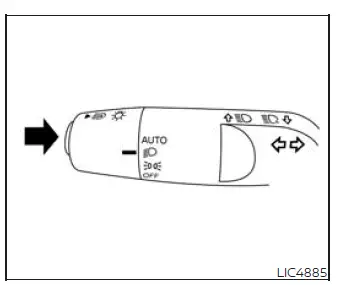
To activate the High Beam Assist system, start the engine, turn the headlight switch to the AUTO position, and
push the High Beam Assist switch in the direction shown in the illustration. When the headlights are operating
and the system is active, the  High Beam Assist indicator light will
illuminate in the meter, confirming that automatic high beam control is available.
High Beam Assist indicator light will
illuminate in the meter, confirming that automatic high beam control is available.
If the High Beam Assist indicator light does not illuminate under the conditions described above, the system may not be operating correctly. Have the High Beam Assist function inspected as soon as practical. It is recommended that you take the Nissan Murano to a NISSAN dealer for diagnosis and service.
When vehicle speed decreases below approximately 16 mph (25 km/h), the headlights automatically operate using the low beams. This prevents the high beams from remaining active at lower speeds where traffic, pedestrians, intersections, and nearby objects may require reduced headlight intensity.
To deactivate the High Beam Assist system, push the switch again. The driver can then control the high and low beam headlights manually using the headlight control lever.
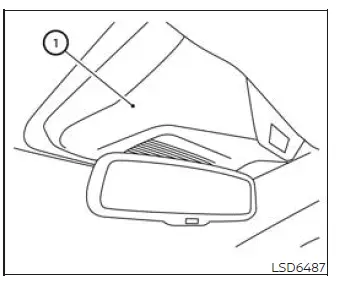
Ambient image sensor maintenance
The ambient image sensor 1 used by the High Beam Assist system is positioned on the windshield in front of the inside rearview mirror. The sensor monitors light and traffic conditions ahead, so the surrounding windshield area must remain unobstructed and undamaged. To support proper system operation and reduce the possibility of a malfunction, observe the following precautions:
- Always keep the windshield clean, especially the area directly in front of the ambient image sensor. Dirt, moisture, ice, snow, or other deposits may restrict the sensor's view and affect High Beam Assist performance.
- Do not attach stickers, decals, transparent films, electronic devices, or accessories to the windshield near the ambient image sensor. Even clear material may interfere with the sensor's ability to evaluate light sources correctly.
- Do not strike, scratch, or otherwise damage the windshield or trim around the ambient image sensor. Never
touch the sensor lens, because fingerprints, contamination, or physical damage may interfere with its
operation.
If the ambient image sensor or the surrounding windshield area is damaged in an accident, have the system inspected. It is recommended that you visit a NISSAN dealer to ensure that the sensor remains correctly positioned and functions as intended.
Battery saver system
The battery saver system helps reduce unnecessary battery discharge by automatically switching off certain exterior and interior lights after a period of time when the ignition switch is placed in the OFF position and all doors are closed. The system can automatically turn off the following lights:
- The headlights when the headlight switch is left in the
 or
or  position.
 - The interior lights when they are left in the ON position. After the headlights have been switched off
automatically while the headlight control remains in the
 or
or  position, they can be turned on again by
moving the headlight switch to AUTO or OFF and then returning it to the
position, they can be turned on again by
moving the headlight switch to AUTO or OFF and then returning it to the  or
or  position.
CAUTION
Although the battery saver feature automatically switches off the headlights after a period of time, it should not be relied upon as the normal method of turning off the lighting system. Whenever the engine is not running, move the headlight switch to the AUTO or OFF position to reduce electrical consumption and help prevent the Nissan Murano battery from becoming discharged.
See also:
Audio operation precautions
Radio
Push the ignition switch to the ACC or ON
position and push the radio band select button
to turn on the radio. If you listen to the radio with
the engine not running, the ignition switch
sh ...
Freeing a frozen door lock
To prevent a door lock from freezing, apply
deicer through the key hole. If the lock becomes
frozen, heat the key before inserting it into the
key hole or use the remote keyless entry keyfob. ...
Supplemental air bag warning light
The supplemental air bag warning light,
displaying in the instrument panel,
monitors
the circuits for the air bag systems, pretensioners
and all related wiring.
When the ignition switch is ...