
Extended storage switch
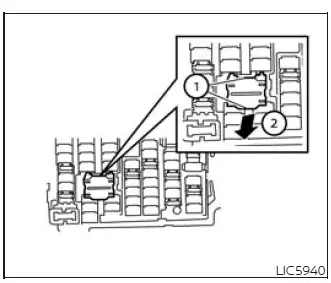
The extended storage switch is used during vehicle shipping and long storage preparation. In the Nissan Murano, this switch is located in the fuse panel below the steering column and above the pedals. If certain electrical equipment does not operate as expected, check that the extended storage switch has been pushed fully into place.
Before inspecting the extended storage switch, make sure the ignition switch and headlights are turned off. This helps ensure the switch can be checked safely and correctly.
How to put the vehicle into extended storage mode:
- Pull the extended storage switch fully out to place the vehicle into extended storage mode.
How to take the vehicle out of extended storage mode:
- Push the extended storage switch fully into place to return the Nissan Murano from extended storage mode to normal electrical operation.
See also:
Forward-facing child restraint installation using LATCH
Refer to all Warnings and Cautions in the “Child
Safety” and “Child Restraints” sections before
installing a child restraint.
Follow these steps to install a forward-facing
child restrai ...
Securing the load (Hardtop models)
There are tie down hooks located in the cargo
area as shown. The tie down hooks can be used
to secure cargo with ropes or other types of
straps.
Do not apply a total load of more than 22
lb. (9 ...
Sunglasses holder (Hardtop models)
WARNING
Keep the sunglasses holder closed
while driving to prevent an accident.
To open the sunglasses holder, push1 .
CAUTION
• Do not use
for anything other than
glasses.
• Do not lea ...