
Power windows
Basic Information
WARNING
- Make sure all passengers keep their hands, arms, and other body parts inside the vehicle while it is moving and before any window is closed. Use the window lock switch when necessary to help prevent unexpected operation of the power windows.
- To help avoid the risk of injury or death from unintended operation of the vehicle or its systems, including window entrapment or accidental door lock activation, do not leave children, people who require assistance, or pets unattended in your vehicle. In warm weather, the temperature inside a closed vehicle can rise quickly and create a serious risk of injury or death for people and animals.
The power windows operate when the ignition switch is in the ON position, and they may also operate for a limited period after the ignition switch is placed in the OFF position. If the driver's door or passenger's door is opened during this period, power window operation is canceled.
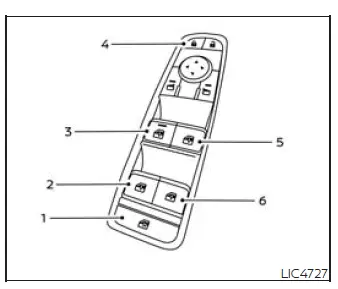
Driver's side power window switch
- Window lock button
- Left rear passenger side switch
- Driver's side switch
- Power door lock/unlock switch
- Front passenger side switch
- Right rear passenger side switch
The driver's side control panel is equipped with switches that allow the driver to open or close all of the windows from one location.
To open a window, push the corresponding switch down to the detent and continue holding it until the window reaches the desired position.
To close a window, pull the corresponding switch up to the detent and continue holding it until the window reaches the desired position.
Locking passengers' windows
When the window lock button is pressed and the indicator illuminates, the rear passenger windows cannot be operated using the rear passengers' power window switches.
While the window lock is active, the rear passenger windows can only be operated from the main driver's side switch panel. To cancel the passenger window lock, press the window lock button again.
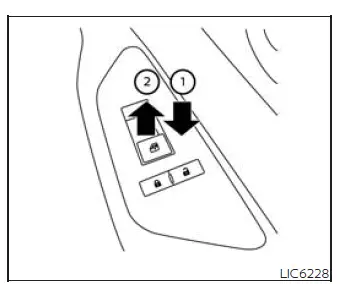
Front passenger's power window switch
The front passenger's window switch operates only the corresponding passenger window.
To open the window partially, lightly push the switch down 1 until the desired window position is reached. To close the window partially, pull the switch up 2 until the window reaches the desired position.
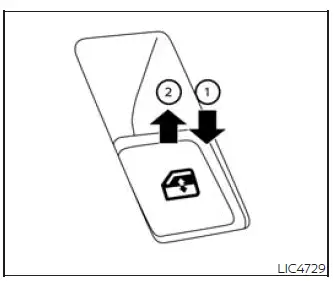
Rear power window switch
The rear power window switches operate only their corresponding rear windows. To open the window, push the switch down and hold it 1. To close the window, pull the switch up 2 until the desired position is reached.
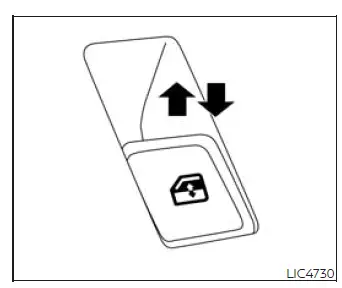
Automatic operation
To fully open a window equipped with automatic operation, push the window switch down to the second detent and release it. The switch does not need to be held. The window will open fully by itself. To stop the window while it is opening, lift the switch upward.
Auto-reverse function (if so equipped)
The auto-reverse function can activate when a window is being closed using automatic operation.
Depending on the environment or driving conditions, the auto-reverse function may activate if the system detects an impact, resistance, or load similar to something being caught in the window.
WARNING There are small areas immediately before the fully closed position where obstruction detection may not occur. Before closing any window, make sure all passengers have their hands and other body parts safely inside the Nissan Murano.
If the vehicle battery is disconnected, replaced, or jump started, the power window auto-reverse function may not operate properly. Have the power window auto-reverse system re-initialized. It is recommended that you visit a NISSAN dealer for this service.
If the control unit detects something caught in a window equipped with automatic operation while the window is closing, the window will immediately lower to help reduce the risk of entrapment.
See also:
Digital Versatile Disc (DVD) Player Operation (models with Navigation
System)
Precautions
Start the engine when using the DVD entertainment
system.
Movies will not be shown on the front display
while the vehicle is in any drive position to reduce
driver distraction. Audi ...
Horn
Horn
To sound the horn, push the center pad area of the steering wheel.
Do not disassemble the horn. Doing so could affect proper operation of the
supplemental front air bag system.
Tampering ...
Ending a call
To finish the call, perform one of the following
procedures:
● Select the “Hang up” key on the “Call in
Progress” display.
● Press the button on the steering
wheel. ...