
NISSAN Intelligent Key Operation
Basic information
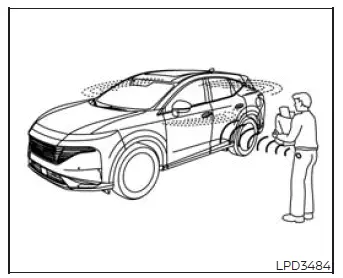
The Intelligent Key system allows you to lock or unlock the doors without removing the Intelligent Key from your pocket, handbag, or another convenient carrying location.
When the Intelligent Key is in your possession and within the specified operating range, you can lock or unlock all doors by pressing a door handle request switch. This feature provides convenient access to the Nissan Murano while allowing the key to remain securely with you.
Locking doors
Basic information
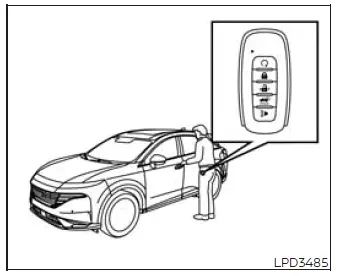
1. Press the P (Park) button, place the ignition switch in the LOCK position, and confirm that the Intelligent Key is in your possession before leaving the vehicle.
2. Close all doors completely. Make sure no door remains partially open before attempting to lock the vehicle with a request switch.
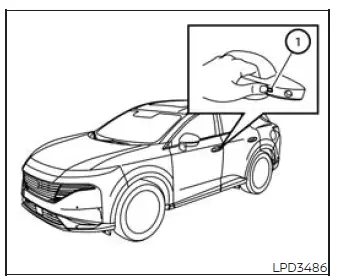
3. While carrying the Intelligent Key, press any exterior door handle request switch 1. The key must be detected within the required operating range for the locking command to be accepted.
4. All doors and the rear liftgate will lock together. Check that the doors and liftgate are fully closed so the Nissan Murano can be secured correctly.
5. The hazard indicator lights will flash twice, and the exterior chime will sound twice to confirm that the locking operation has been completed.
NOTE:
- The request switches for all doors and the liftgate can be deactivated by setting the Ext. Door Switch feature to OFF in the "Vehicle Settings" menu on the vehicle information display. When this setting is disabled, the corresponding exterior switches will not operate the Intelligent Key locking and unlocking functions.
- The doors can be locked with a door handle request switch even when the ignition switch is not in the LOCK position. Always verify the ignition status and confirm that the vehicle has been left in a safe condition before walking away.
- The doors will not lock when a door handle request switch is pressed while the driver's door is open. The doors can still be locked with the mechanical key even when one or more doors remain open.
- If the Intelligent Key is detected inside the vehicle, the doors will not lock through a door handle request switch, and a warning chime will sound. However, when one Intelligent Key remains inside the vehicle, the doors can still be locked by using another registered Intelligent Key from outside.
WARNING After locking the doors with a request switch, always verify that they are securely locked by carefully checking the exterior door handles. Failing to confirm the locking operation could leave one or more doors unlocked, reducing the safety and security of the vehicle.
CAUTION
- Before pressing a request switch to lock the doors, make sure the Intelligent Key is in your possession. This reduces the possibility of leaving the key inside the passenger compartment or cargo area.
- A request switch operates only when the Intelligent Key system detects a registered key within the appropriate operating range. If the switch does not respond, check the key's location and try the operation again.
Lockout protection
The Intelligent Key system includes lockout protection to reduce the possibility of accidentally locking the Intelligent Key inside the vehicle. When the system detects the key in the Nissan Murano under applicable conditions, it may prevent the request-switch locking operation and provide a warning chime.
When the driver's door is open and the doors have been locked, leaving the Intelligent Key inside the vehicle and then closing the driver's door will cause all doors to unlock automatically. This lockout-protection response helps reduce the possibility of accidentally securing the key inside the Nissan Murano.
NOTE: The doors may not lock when the Intelligent Key is held in the same hand used to press the exterior request switch. The close position of the key can make it difficult for the system to determine whether the key is inside or outside the vehicle. Place the Intelligent Key in a pocket, handbag, or your other hand before attempting to lock the doors.
CAUTION Lockout protection may not operate reliably under the following conditions, so always confirm that the Intelligent Key is in your possession before closing and locking the vehicle:
- When the Intelligent Key is placed on top of the instrument panel, where its position may prevent the system from detecting it correctly.
- When the Intelligent Key is stored inside the glove box or within a storage compartment.
- When the Intelligent Key is placed inside one of the door pockets.
- When the Intelligent Key is positioned inside, beneath, or close to metallic materials that may interfere with radio-wave communication.
Unlocking doors
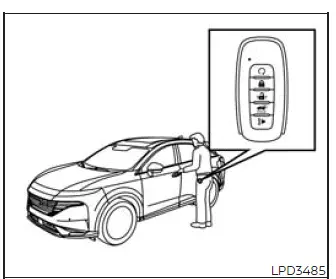
1. Carry the registered Intelligent Key with you and make sure it is within the operating range of the door handle request switch.
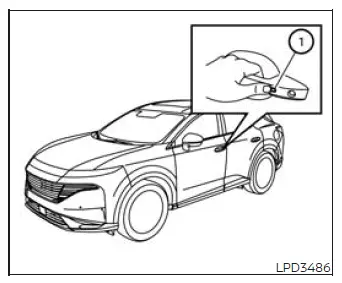
2. Press the door handle request switch 1 while the Intelligent Key remains in your possession.
- When the request switch on the driver's door handle is pressed, only the driver's door will unlock.
- To unlock all remaining doors, press the driver's door handle request switch a second time within 60 seconds of the first operation.
- When the request switch on the front passenger's door is pressed, all doors will unlock at the same time.
- To make all doors unlock with a single press of the driver's door request switch, deactivate the Selective Unlock feature through the "Vehicle Settings" menu in the vehicle information display.
3. The hazard indicator lights will flash once, and the exterior chime will sound once to confirm that the unlocking command has been accepted.
NOTE: The request switches for all doors can be deactivated by setting the Ext. Door Switch feature to OFF through the "Vehicle Settings" menu in the vehicle information display. When this feature is disabled, the exterior door request switches will not unlock the doors.
If a door handle is pulled at the same moment the doors are being unlocked, the corresponding door may remain locked because the handle has not returned to its normal resting position.
Release the door handle and allow it to return fully to its original position. The door should then unlock normally. If it remains locked after the handle has returned, press the door handle request switch again before attempting to open the door.
All doors will lock again automatically unless at least one of the following actions is performed within 60 seconds after the request switch is pressed. This automatic relocking function helps keep the Nissan Murano secured when the doors are unlocked but no entry is made.
- Open any door before the 60-second period expires.
- Press the ignition switch.
Using the interior lights
The interior lights may illuminate for a limited period when a door is opened, providing temporary lighting inside the passenger compartment.
The interior lights can be switched off before the normal illumination period ends by performing any of the following operations:
- Place the ignition switch in the ON position.
- Close the driver's door and lock it securely.
- Touch the interior light switch to turn the lights off manually.
See also:
California perchlorate advisory
Some vehicle parts, such as lithium batteries, may contain perchlorate material.
The following advisory is provided: “Perchlorate Material - special handling
may apply, See www.dtsc.ca.gov/ hazar ...
How to use SETTING button
Models with navigation system
Models without navigation system
The display as illustrated will appear when the
SETTING button is pushed.
Items displayed on the screen may vary depending
on ...
Brake fluid
For additional brake fluid information, see
“Capacities and recommended fuel/lubricants”
in the “9. Technical and consumer information”
section of this manual.
WARNING
• Use only new fl ...