
How to use the remote keyless entry function
Basic information
The remote keyless entry function allows all door locks to be controlled using the buttons on the Intelligent Key. Under suitable conditions, the remote function can operate from a distance of up to 33 ft (10 m) from the Nissan Murano, allowing the vehicle to be locked or unlocked without using a door handle request switch.
The actual operating distance may vary depending on conditions around the vehicle. Nearby structures, physical obstructions, radio-frequency interference, and the position of the Intelligent Key can affect how reliably the command is received.
The remote keyless entry function will not operate under the following conditions:
- When the Intelligent Key is outside the specified operational range or the signal cannot reach the vehicle reliably.
- When the Intelligent Key battery is discharged and can no longer transmit a sufficient signal.
CAUTION Before locking the doors with the Intelligent Key, confirm that the key is in your possession and has not been left inside the passenger compartment or cargo area.
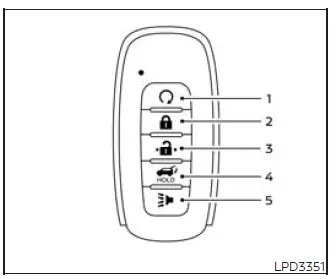
Type A
-
 (remote
engine start) button
(remote
engine start) button
-
 (lock) button
-
 (unlock) button
-
 (liftgate) button
-
 (panic) button
Locking doors
1. Place the ignition switch in the LOCK position before attempting to secure the vehicle with the remote keyless entry function.
2. Close all doors completely and make sure the rear liftgate is properly closed.
3. Press the
 button on the Intelligent
Key while remaining within its effective operating range.
button on the Intelligent
Key while remaining within its effective operating range.
4. The hazard indicator lights will flash twice, and the horn will sound once to confirm that the locking command has been received.
5. All doors will lock. Before walking away from the Nissan Murano, verify that the locking operation has been completed successfully.
WARNING After locking the doors with the Intelligent Key, check that they are securely locked by carefully operating the exterior door handles. Failure to verify the result could leave one or more doors unintentionally unlocked, reducing the safety and security of the vehicle.
Unlocking doors
1. Press the
 button
on the Intelligent Key once to unlock the driver's door.
button
on the Intelligent Key once to unlock the driver's door.
2. The hazard indicator lights will flash once, confirming that the driver's door has been unlocked.
3. Press the
 button again
within 60 seconds to unlock all remaining doors.
button again
within 60 seconds to unlock all remaining doors.
NOTE: The operation of the Selective Unlock feature can be adjusted through the "Vehicle Settings" menu in the vehicle information display. The selected setting determines whether one door or all doors unlock when the remote function is used.
All doors will lock again automatically unless one of the following actions is performed within 60 seconds after
pressing the
 button.
This automatic relocking function helps keep the vehicle secured when it has been unlocked remotely but no door
is opened.
button.
This automatic relocking function helps keep the vehicle secured when it has been unlocked remotely but no door
is opened.
- Open any door before the 60-second period expires.
- Press the ignition switch.
Using the interior lights
The interior lights may illuminate temporarily when a door is opened, providing visibility inside the passenger compartment while entering or leaving the Nissan Murano.
The lights can be switched off before the normal illumination period ends by performing any of the following operations:
- Place the ignition switch in the ON position.
- Close the driver's door and lock it.
- Touch the interior light switch to turn the lights off manually.
Opening window(s) (if so equipped)
The Intelligent Key can be used to open the window or windows equipped with automatic operation at the same time. This function is available only on vehicles fitted with the corresponding automatic window feature.
Before using the remote window-opening function, all doors must be fully closed and the Intelligent Key must remain outside the vehicle.
To open the window or windows equipped with automatic operation, first unlock all doors, and then press and hold
the
 button on the Intelligent Key for more than 3 seconds. Continue holding the button long enough for the remote
opening command to activate.
button on the Intelligent Key for more than 3 seconds. Continue holding the button long enough for the remote
opening command to activate.
The door window or windows equipped with automatic operation will continue to open for as long as the
 button on the Intelligent Key is
pressed and held. Release the button when the windows reach the desired position.
button on the Intelligent Key is
pressed and held. Release the button when the windows reach the desired position.
To interrupt the opening movement of the window or windows equipped with automatic operation, release the
 button. The windows will stop at
their current position when the command is discontinued.
button. The windows will stop at
their current position when the command is discontinued.
- The Intelligent Key cannot be used to close any window. Each open window must be closed using the appropriate switch inside the Nissan Murano.
- Using the remote window-opening operation will also unlock all doors.
Releasing the rear liftgate
The rear liftgate can be opened or closed remotely with the Intelligent Key by performing the following operations while remaining within the applicable operating range:
- Press and hold the
 button for longer than 1
second to begin opening the rear liftgate.
button for longer than 1
second to begin opening the rear liftgate.
- Press and hold the
 button again for longer
than 1 second to begin closing the rear liftgate.
button again for longer
than 1 second to begin closing the rear liftgate.
If the
 button is pressed while the liftgate is opening
or closing, the liftgate motors will stop and the liftgate will remain in its current position. Press and hold
the
button is pressed while the liftgate is opening
or closing, the liftgate motors will stop and the liftgate will remain in its current position. Press and hold
the
 button again for longer than 1 second to
restart operation in the opposite direction.
button again for longer than 1 second to
restart operation in the opposite direction.
Using the panic alarm
If you are near the Nissan Murano and feel threatened or need to attract attention, press and hold the
 button on the Intelligent Key for longer than 0.5
seconds. The panic function activates an audible alarm and the vehicle lights to help draw attention to the
area.
button on the Intelligent Key for longer than 0.5
seconds. The panic function activates an audible alarm and the vehicle lights to help draw attention to the
area.
The panic alarm and headlights will remain active for a limited period unless the alarm is canceled earlier using one of the available methods.
The panic alarm stops when any of the following occurs:
- The alarm completes its programmed operating period.
- Any button on the Intelligent Key is pressed.
- The request switch on the driver's or front passenger's door is pressed while the Intelligent Key is within operating range of the corresponding door handle.
Trailer light check (if so equipped)
If a hitch receiver accessory is installed on the vehicle, the trailer light check function allows one person to verify trailer light operation without requiring another person to press the brake pedal or activate each turn signal. The check can be started with the Intelligent Key or through the Towing Settings menu in the vehicle information display.
NOTE: The trailer light check function may remain available even when no receiver is installed.
To start the trailer light check using the Intelligent Key, complete the following steps:
1. Point the Intelligent Key toward the Nissan Murano and remain within the remote keyless entry operating range.
2. Press and release the
 (lock) button.
3. Within 2 seconds, press and hold the
 (lock) button again for at least
2 seconds. Continue holding it until the horn sounds once and the parking lights illuminate, confirming that the
check sequence has started.
(lock) button again for at least
2 seconds. Continue holding it until the horn sounds once and the parking lights illuminate, confirming that the
check sequence has started.
The following lighting events will occur in sequence:
- The left turn signal lights on the vehicle and connected trailer will flash for 5 seconds.
- The right turn signal lights on the vehicle and connected trailer will flash for 5 seconds.
- The stop lights on the vehicle and connected trailer will illuminate for 5 seconds.
- When the engine is running, the complete sequence will repeat a total of four times.
The front parking lights and rear tail lights will remain illuminated throughout the lighting events described above.
NOTE: If the trailer lights do not operate correctly, inspect the trailer connections and bulbs. If the vehicle lights do not illuminate, refer to "Exterior and interior lights". If the trailer light check sequence does not begin, confirm that all of the following vehicle conditions have been met:
- The vehicle is stationary at 0 mph (0 km/h).
- The brake pedal is not depressed.
- The left and right turn signals are switched off.
- The trailer light check configuration has not been disabled and remains available in the Towing Settings menu of the vehicle information display.
- The hazard warning switch is not turned on.
- The shift position is set to P (Park).
- The vehicle is within the operating range of the remote keyless entry function.
Horn beeps on lock feature
If preferred, the horn confirmation that sounds when the doors are locked can be deactivated through the
Intelligent Key. When this feature is turned off and the
 button is pressed, the hazard indicator lights will flash twice without a horn beep. When the
 button is pressed, neither the hazard indicator lights nor the horn will operate as confirmation.
NOTE: The horn confirmation setting can also be changed through the appropriate menu on the vehicle information display, allowing the driver to select the preferred locking response for the Nissan Murano.
To deactivate:
Press and hold the
 and
and
 buttons simultaneously for at least 5
seconds. The hazard indicator lights will flash three times to confirm that the horn beeps on lock feature has
been deactivated.
buttons simultaneously for at least 5
seconds. The hazard indicator lights will flash three times to confirm that the horn beeps on lock feature has
been deactivated.
To activate:
Press and hold the
 and
and
 buttons simultaneously for at least 5
seconds again. The hazard indicator lights will flash once and the horn will sound once, confirming that the
horn beep feature has been reactivated.
buttons simultaneously for at least 5
seconds again. The hazard indicator lights will flash once and the horn will sound once, confirming that the
horn beep feature has been reactivated.
Deactivating the horn confirmation for door locking does not disable or silence the horn when the vehicle alarm is triggered. The setting changes only the audible response associated with normal remote locking.
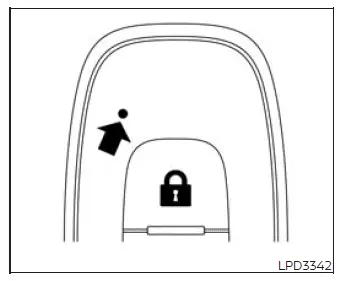
Approach unlock function
When you approach the Nissan Murano while carrying the Intelligent Key, the approach unlock function can automatically unlock the vehicle after the key is detected within the applicable area. This function is disabled in the default vehicle settings and must be enabled through the vehicle information display before it can operate.
Walk away lock function
When you move away from the vehicle while carrying the Intelligent Key, the walk-away lock function can automatically lock the doors after the system determines that the key has left the applicable detection area.
This function is disabled by default. It can be enabled through the appropriate settings in the vehicle information display when automatic locking after leaving the vehicle is preferred.
NOTE:
- When the doors are secured by the walk-away lock function, the hazard indicator lights will flash twice as confirmation. Before leaving the Nissan Murano unattended, check the doors to make sure the locking operation has completed successfully.
- The walk-away lock function may not operate under any of the following conditions:
- When one or more doors or the rear liftgate are not closed securely.
- When the engine is running.
- When the Intelligent Key is detected inside the vehicle.
- When the Intelligent Key has been placed outside the vehicle for an extended period rather than being carried away immediately. Opening and closing a door will reactivate the walk-away lock function.
Setting memory function
The positions and preferences of the supported settings can be linked to an individual Intelligent Key. Once stored, the corresponding memorized settings can be recalled separately for each registered key, allowing different drivers to retain their preferred vehicle configuration.
To use the memory function, adjust the climate control, navigation system, if so equipped, and audio system according to the driver's preferences. Complete the desired adjustments before linking them to the Intelligent Key.
After selecting the preferred settings, lock the doors with the Intelligent Key. This allows the vehicle to associate the current supported settings with that specific key.
Each Intelligent Key can be linked with an individual driver's preferences, making it possible for multiple drivers to use their own stored settings when operating the vehicle.
To activate and recall the memorized settings, perform the following procedure:
1. Carry the Intelligent Key that has been linked to the memorized driver settings. Make sure the correct registered key is in your possession before approaching the Nissan Murano.
2. Unlock the doors by pressing the
 button on the Intelligent Key.
3. Place the ignition switch in the ON position.
The supported settings associated with that Intelligent Key will then begin to activate, allowing the stored preferences for the corresponding driver to be recalled.
Warning signals
To help prevent unexpected vehicle movement caused by incorrect Intelligent Key operation and to reduce the risk of unauthorized use, the Nissan Murano may sound a chime or buzzer inside or outside the vehicle. A corresponding warning message may also appear in the instrument panel to identify the condition that requires attention.
Whenever a chime or beep sounds, or a warning appears on the display, check the condition of the vehicle and confirm the location and status of the Intelligent Key before continuing.
Troubleshooting guide
Confirm the location of every Intelligent Key registered to the vehicle. If another registered key is inside the Nissan Murano or within detection range, the system may recognize that key and respond differently from what the driver expects.
- When the driver's door is opened to exit the vehicle, the Door/liftgate open warning appears on the display.
- The ignition switch may be in the ACC position. Place the ignition switch in the ON position, or close the driver's door to address the displayed condition.
- When the door is closed after leaving the vehicle, the No Key Detected warning appears on the display, the
exterior chime sounds three times, and the interior warning chime sounds for approximately three seconds.
- The engine may still be running while the Intelligent Key is outside the vehicle. Place the ignition switch in the OFF position before walking away.
- When the door is closed after exiting the vehicle, a Rear Door Alert message appears on the display, the
horn sounds three times twice, or a "Check Rear Seat" warning is shown.
- The Rear Door Alert function may have been activated.
Inspect the rear seating area for passengers, pets, and any articles that may have been left behind. After checking the rear seat, press the OK button to clear the Rear Door Alert warning message.
- The Rear Door Alert function may have been activated.
- When the door is closed after the doors have been locked with the power door lock switch, the exterior chime
sounds for approximately three seconds and all doors unlock automatically.
- The Intelligent Key may have been left inside the vehicle. Remove the key and keep it in your possession before attempting to lock the doors again.
- When the door handle request switch or the
 button on the Intelligent Key is pressed to lock the doors, the exterior chime sounds for approximately two
seconds.
button on the Intelligent Key is pressed to lock the doors, the exterior chime sounds for approximately two
seconds.- The Intelligent Key may be detected inside the vehicle. Take the key with you, close the doors securely, and repeat the locking operation.
- When the ignition switch is pressed to start the engine, the Key Battery Low message appears on the display.
- The Intelligent Key battery charge may be low. Replace the discharged battery with a new one so the key can continue communicating reliably with the vehicle.
- When the ignition switch is pressed to start the engine, the "Place the key near the start switch" warning appears on the display and the interior chime sounds three times. Move the Intelligent Key close to the ignition switch as directed by the warning.
- The Intelligent Key may not be detected inside the vehicle. Confirm that the registered key is with you and
located within the passenger compartment.
- If the Key System Fault message appears when the ignition switch is pressed, the system has detected a condition affecting Intelligent Key operation.
- This message may indicate a malfunction in the Intelligent Key system. It is recommended that the Nissan Murano be inspected by a NISSAN dealer.
See also:
Meters and gauges
Meters and gauges
1. Tachometer
2. Vehicle information display
3. Speedometer
4. Warning/indicator lights
5. Engine coolant temperature gauge
6. switch (twin trip odometer control
and brigh ...
Storages
Cup holders
- Avoid abrupt starting and braking when the cup holder is being used to prevent
spilling the drink. If the liquid is hot, it can scald you or your passenger.
- Use only soft cups in ...
Troubleshooting guide
If the soft top stops halfway during operation or does not operate normally,
follow the procedures shown in the following table. If the procedures in the
following table do not solve the symptom, i ...