
Steering wheel. Sun visors
Steering wheel
Basic information
WARNING
- Never adjust the steering wheel while driving. Taking your hands or attention away from controlling the vehicle could cause a loss of control and result in a collision.
- Do not position the steering wheel closer to your body than necessary for comfortable and effective steering. The driver's air bag deploys with considerable force. An occupant who is not properly restrained, is leaning forward, sitting sideways, or is otherwise out of the correct seating position faces a greater risk of serious injury or death in a collision. Contact with the air bag during deployment can also cause severe or fatal injury. Sit upright with your back firmly against the seatback, maintain as much practical distance from the steering wheel as possible, and always wear the seat belt correctly.
Manual operation
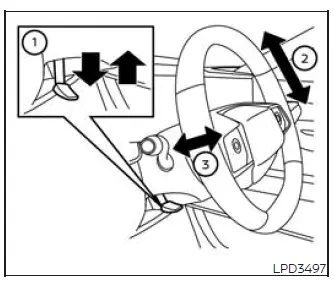
Tilt and telescopic operation
Push lock lever 1 downward to release the steering column for adjustment:
- Move the steering wheel upward or downward in direction 2 until the preferred tilt position is reached.
- Move the steering wheel forward or backward in direction 3 until the preferred telescopic position is reached.
After completing the adjustment, pull lock lever 1 firmly upward to secure the steering wheel. Before driving the Nissan Murano, gently move the wheel to confirm that it is locked and cannot shift from the selected position.
Power operation
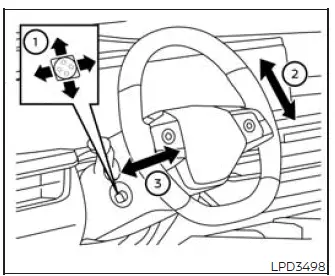
Tilt and telescopic operation
Use adjustment switch 1 to move the steering wheel in the required direction:
- Move the switch in direction 2 to raise or lower the steering wheel to the desired tilt position.
- Move the switch in direction 3 to bring the steering wheel closer or move it farther away to the desired telescopic position.
Entry/Exit function
When equipped with the memory seat system, the steering wheel automatically moves upward when the driver's door is opened while the ignition switch is in the LOCK position. This movement creates additional space to make entering and leaving the driver's seat easier. After the driver's door is closed and the ignition switch is pressed, the steering wheel returns to its stored driving position.
Sun visors
Basic information
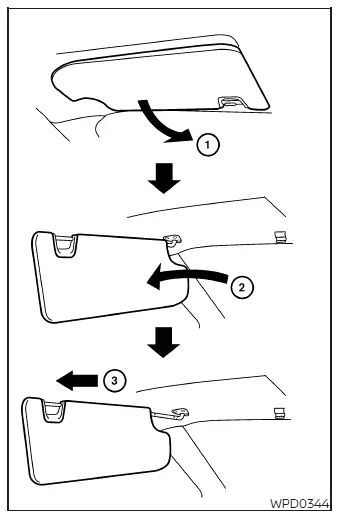
1. To reduce glare coming through the windshield, swing the main sun visor downward to position 1.
2. To block glare entering through a side window, release the main sun visor from its center mounting point and rotate it toward the side to position 2.
3. To increase the covered area, slide the visor extension inward or outward in direction 3 as needed.
CAUTION
- Before returning the sun visor to its stored position, slide the extension completely back to its original position. Stowing the visor while the extension remains deployed may cause damage.
- Do not pull the visor extension downward with excessive force. The extension is designed to slide horizontally and may be damaged by improper movement.
Vanity mirrors
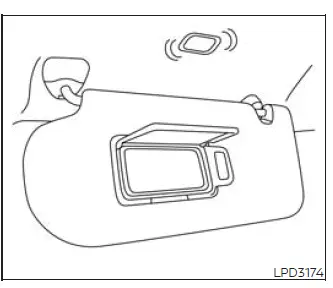
To use the vanity mirror, lower the sun visor and open the mirror cover.
The vanity mirror light illuminates automatically while the cover is open, providing additional visibility. Close the cover after use to switch off the light.
Card holder
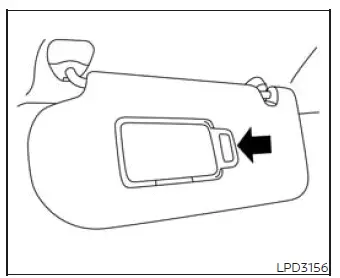
Driver's and passenger's side
To use the card holder, slide the card securely beneath the visor clip. Do not read or examine information stored in the holder while driving the Nissan Murano, because doing so may distract attention from the road.
See also:
How to use INFO button
The display screen shows vehicle and navigation
information for your convenience.
The information shown on the screen should be
a guide to determine the condition of the vehicle.
See the follo ...
Seats, seat belts and Supplemental Restraint System (SRS)
Seats, seat belts and Supplemental Restraint System (SRS)
1. Supplemental front-impact air bags
2. Front seat-mounted side-impact supplemental air bags
3. Seat belts
4. Head restraints
— Fron ...
Exterior front
Exterior front
1. Front view camera*
2. Hood
3. Headlight and turn signal lights
— Switch operation
— Bulb replacement
4. Windshield wiper and washer
— Switch operation
— Blade repla ...