
Basic Information. MOD system operation
Basic Information
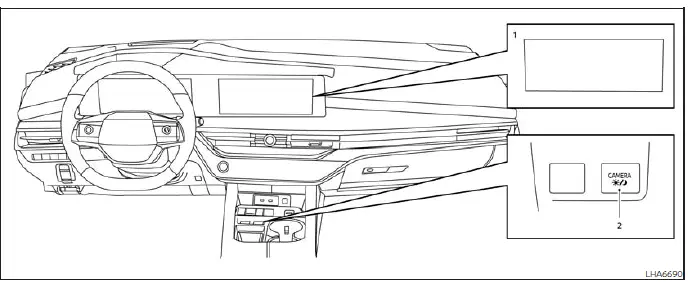
- Display screen used to show the available camera views, MOD status icons, and visual detection frames.
- CAMERA button used to activate the camera display and access the available viewing modes.
WARNING
- Failure to observe the warnings and instructions for the correct use of the Moving Object Detection (MOD) system could result in a collision, serious injury, or death.
- The MOD system does not replace attentive vehicle operation and is not designed to prevent contact with
people, vehicles, or other objects around the Nissan Murano.
Before and during every maneuver, check the outside mirrors and rearview mirror, look through the windows, and turn to inspect the surrounding area directly. Proceed only after confirming that the intended path is clear.
- The system is deactivated when vehicle speed exceeds 5 mph (8 km/h). MOD operation becomes available again after the speed falls below this threshold and the required operating conditions are satisfied.
- The MOD system is not designed to identify stationary objects around the vehicle. Curbs, walls, posts, parked vehicles, and other nonmoving obstacles may not generate an alert.
The MOD system can notify the driver when it detects moving objects near the vehicle. This assistance may be useful when backing out of a garage, maneuvering through a parking lot, entering or leaving a parking space, and performing other low-speed movements where nearby activity may be difficult to see.
The MOD system uses image-processing technology to analyze the camera image currently shown on the display. When movement is identified within an active detection area, the system provides visual and audible indications to help draw the driver's attention to that part of the surroundings.
MOD system operation
The MOD system turns on automatically when the required operating conditions are met:
- When the shift position is set to R (Reverse).
- When vehicle speed decreases below approximately 5 mph (8 km/h) while the camera screen is displayed.
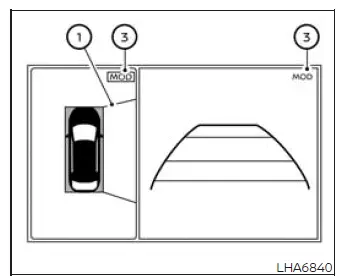
Front and bird's-eye view
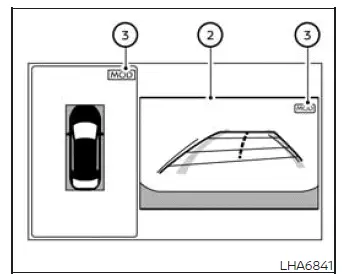
Rear and bird's-eye view
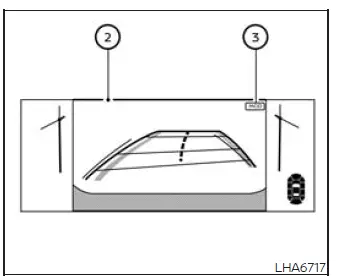
Rear and front-side view
Front and front-side view
Front-wide view
Rear-wide view
When a camera image is displayed, MOD operation varies according to the selected shift position, vehicle speed, and active camera view:
- When the shift position is set to P (Park) or N (Neutral) and the vehicle is stopped, the MOD system
monitors for moving objects within the bird's-eye view. The system does not operate if either front door is
open.
If the outside mirrors are folded, the camera coverage may be altered and MOD may not operate correctly.
- When the shift position is set to D (Drive) and vehicle speed is below approximately 5 mph (8 km/h), the MOD system detects moving objects within the front view.
- When the shift position is set to R (Reverse) and vehicle speed is below approximately 5 mph (8 km/h), the
MOD system detects moving objects within the rear view.
The MOD system does not operate while the liftgate is open.
The MOD system does not monitor for moving objects in the front-side view. Because detection is unavailable in this camera mode, the MOD icon is not shown on the screen when the front-side view is selected.
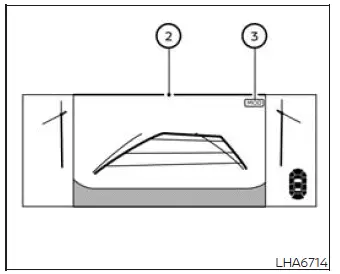
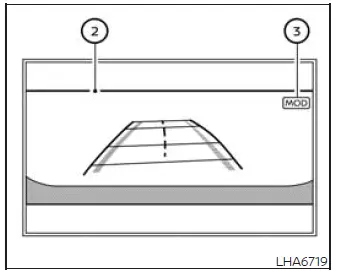
When the system detects a moving object near the Nissan Murano, a chime sounds and a highlighted frame appears around the camera view in which the movement was identified. The frame remains visible for as long as the MOD system continues to detect movement in that area.
NOTE: While the Rear Cross Traffic Alert chime is sounding, if so equipped, the MOD system will not produce a separate chime.
In the bird's-eye view, frame 1 appears on the corresponding front, rear, right, or left camera image according to the area in which the moving object is detected. This helps the driver identify which side of the vehicle requires attention.
In the front-view and rear-view modes, frame 2 is displayed within the applicable camera image when movement is detected.
A green MOD icon 3 appears in a view where the MOD system is active and available. A gray MOD icon is shown when MOD is not operating in the selected view or under the current conditions.
When the MOD system has been switched off, MOD icon 3 is not displayed. The absence of the icon indicates that Moving Object Detection alerts are not currently available.
See also:
CD/DVD/USB memory care and cleaning
CD/DVD
• Handle a CD/DVD by its edges. Never
touch
the surface of the disc. Do not bend the
disc.
• Always place the discs in the storage case
when they are not being used.
• To clean ...
Glove box
Open the glove box by pulling the handle. Use the
master key when locking 1 or unlocking 2 the
glove box.
WARNING
Keep glove box lid closed while driving to
help prevent injury in an accident o ...
Tire chains
CAUTION
Tire chains/cables should not be installed
on 235/55R20 size tires. Installation of the
tire chains/cables on 235/55R20 size tires
will cause damage to the vehicle. If you
plan to use tir ...