
Turning MOD on and off
To enable or disable the Moving Object Detection (MOD) system, use the steering-wheel controls and complete the following steps:
1. Using the
 buttons on the
steering wheel, highlight and select "Settings" in the vehicle information display.
buttons on the
steering wheel, highlight and select "Settings" in the vehicle information display.
2. Using the scroll dial or
 buttons on the steering
wheel, select "Driver Assistance," then press the OK button to open the menu.
buttons on the steering
wheel, select "Driver Assistance," then press the OK button to open the menu.
3. Select "Parking Assist" and press the OK button to access the available parking-assistance settings.
4. Select "Moving Object," then press the OK button to toggle the MOD system ON or OFF. The selected setting determines whether Moving Object Detection is available when its operating conditions are met.
MOD system limitations
WARNING
The following conditions describe important limitations of the MOD system. Failure to operate the Nissan Murano in accordance with these limitations and to check the surrounding area directly could result in a collision, serious injury, or death.
- Do not rely on the MOD system when towing a trailer. The trailer may interfere with the camera image or detection area, preventing the system from operating correctly.
- Excessive interior or exterior noise, including a high audio-system volume or sound entering through an open window, may make the MOD warning chime difficult or impossible to hear.
- MOD performance may be reduced by environmental conditions, lighting, camera visibility, and the
appearance of surrounding objects, including the following situations:
- There is little visual contrast between a moving object and the background, making the movement difficult for the image-processing system to distinguish.
- A blinking or rapidly changing light source affects the camera image.
- Strong light, such as direct sunlight or another vehicle's headlights, shines toward a camera and reduces image clarity.
- A camera is not in its normal orientation, such as when one of the outside mirrors is folded.
- Dirt, water droplets, rain residue, ice, or snow obstructs a camera lens.
- The displayed position of a moving object does not change enough for the system to recognize its movement.
- The MOD system may interpret flowing water droplets on a camera lens, white exhaust smoke, moving shadows, or similar visual changes as moving objects and may provide an alert.
- Detection may be limited by the speed, direction, distance, or shape of a moving object. Certain objects may therefore be detected late or may not be detected at all.
- If the Nissan Murano is damaged near a camera mounting location, the camera may become misaligned or its surrounding bodywork may be bent. This can alter the detection area and prevent the MOD system from identifying moving objects correctly.
- In extremely high or low temperatures, the camera image may appear unclear and objects may be difficult to distinguish. This condition does not necessarily indicate a malfunction.
NOTE: The normally green MOD icon changes to orange when any of the following conditions occurs:
- The MOD system has detected a malfunction.
- The temperature of a system component has reached a high level. In this condition, the orange icon will blink.
- The rearview camera has detected an obstruction or blockage. The orange icon will blink while this condition is present.
If the MOD icon remains illuminated in orange after the surrounding conditions have returned to normal, have the system inspected. It is recommended that you visit a NISSAN dealer for this service.
System maintenance
CAUTION
- Do not clean a camera with alcohol, benzine, thinner, or similar solvents. These substances may damage the surface or cause discoloration.
- Do not scratch, strike, or otherwise damage a camera, because camera damage may reduce image quality and adversely affect the monitor display.
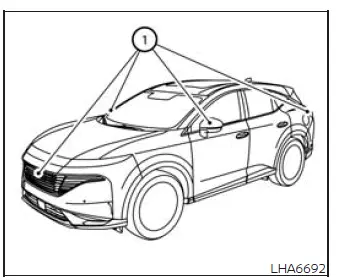
If dirt, rain residue, water, ice, or snow accumulates on any camera 1, the MOD system may not detect movement or operate correctly. Gently clean the affected camera with a soft cloth dampened with a diluted mild cleaning agent, then wipe the surface with a clean, dry cloth. Avoid applying excessive pressure while cleaning the lens or camera housing.
See also:
Precautions on supplemental restraint system
This Supplemental Restraint System (SRS) section
contains important information concerning
the following systems:
● Driver and passenger supplemental frontimpact
air bag (NISSAN Advanced Air ...
Three-way catalyst
The three-way catalyst is an emission control
device installed in the exhaust system. Exhaust
gases in the three-way catalyst are burned at
high temperatures to help reduce pollutants.
WARNING
†...
Precautions when starting and driving
WARNING
● Do not leave children or adults who
would normally require the assistance
of others alone in your vehicle. Pets
should also not be left alone. They
could accidentally injure thems ...