
Parking brake
Basic Information
WARNING
- Always make sure the parking brake is fully released before driving. Operating the Nissan Murano with the parking brake applied can overheat the braking components, reduce braking performance, and increase the risk of an accident.
- Never attempt to release the parking brake while standing outside the vehicle. Remain properly seated in the driver's seat and maintain control of the brake pedal whenever the parking brake is released.
- Do not rely on the transmission shift buttons as a substitute for the parking brake. Whenever the vehicle is parked, select P (Park) and confirm that the parking brake is fully engaged.
- To reduce the risk of injury or death caused by unintended operation of the vehicle or its systems, never leave children, people who require assistance, or pets unattended inside the vehicle. The passenger compartment of a closed vehicle can also heat up rapidly on a warm day, creating dangerous or potentially fatal conditions for occupants and animals.
Electronic parking brake (switch type)
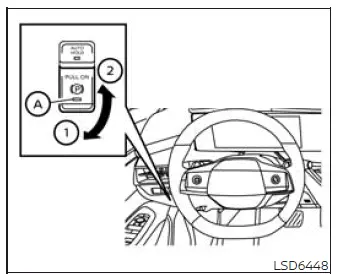
The electronic parking brake can be applied or released by operating the parking brake switch. The switch allows the driver to secure the vehicle without using a conventional mechanical parking brake lever.
WARNING
- Before leaving the Nissan Murano, select P (Park) and verify that the electronic parking brake warning light is illuminated, confirming that the parking brake has been applied. The warning light may remain illuminated for a short period after the driver's door is locked; this is part of normal operation.
CAUTION When parking in an area where the outside temperature is below 32°F (0°C), an applied parking brake may freeze and become difficult to release.
For secure parking under these conditions, place the transmission in P (Park) and block the wheels firmly to prevent unintended vehicle movement.
NOTE:
- To leave the electronic parking brake released after the engine is turned off, place the ignition switch in the OFF position, depress and hold the brake pedal, and push the parking brake switch downward before opening the driver's door.
- If the electronic parking brake system malfunctions, including a condition caused by a discharged vehicle battery, NISSAN recommends having the system inspected by a NISSAN dealer.
- Under any of the following conditions, the electronic parking brake will be applied automatically and
the braking force supplied by the automatic brake hold function will be released:
- The automatic brake hold indicator light turns off.
- The automatic brake hold function has maintained braking force for 3 minutes or longer.
- The transmission is placed in P (Park).
- The electronic parking brake is applied manually.
- The driver's seat belt is unfastened.
- The driver's door is opened.
- The ignition switch is placed in the OFF position.
- A malfunction is detected in the automatic brake hold function.
MANUAL OPERATION
To apply: Pull the parking brake switch upward in direction 1. Indicator light A will illuminate to confirm that the electronic parking brake is being applied.
To release: With the ignition switch in the ON position, depress the brake pedal firmly and push the parking brake switch downward in direction 2. Indicator light A will turn off when the parking brake has been released.
Before driving, confirm that the electronic parking brake indicator light ( or PARK) has
gone out. Do not begin driving until the indicator confirms that the parking brake is no longer applied.
or PARK) has
gone out. Do not begin driving until the indicator confirms that the parking brake is no longer applied.
NOTE:
- An operating sound may be heard from the lower area behind the rear seat while the electronic parking brake is being applied or released. This sound is normal and does not indicate a system malfunction.
- If the electronic parking brake is applied and released repeatedly within a short period, the system may
temporarily stop operating to protect its components from overheating.
If this occurs, wait approximately 1 minute before operating the electronic parking brake switch again.
- If the electronic parking brake must be used during an emergency while the vehicle is moving, pull the parking brake switch upward and continue holding it. The parking brake will remain applied while the switch is held and will be released when the switch is released.
- When the electronic parking brake switch is pulled upward while driving, braking force is applied and a warning chime sounds. The electronic parking brake indicator lights in the instrument panel and on the switch will illuminate. This response is normal during emergency operation and does not indicate a malfunction. Both indicator lights will turn off after the parking brake is released.
- If the electronic parking brake switch is pulled upward while the ignition switch is in the OFF or AUTO ACC position, the indicator light in the parking brake switch may remain illuminated for a short period before turning off.
See also:
Clearing the programmed information
Individual buttons cannot be cleared. However,
to clear all programming, press and hold the two
outside buttons and release when the indicator
light begins to flash (approximately 20 seconds). ...
CrossCabriolet models
1. Front turn signal light
2. Front parking light
3. Headlight (low-beam, high-beam)
4. Front side marker light
5. Front map light
6. Front fog light
7. Step light
8. High-mounted stop light
...
Windows
WARNING
• Make sure
that all passengers have
their hands, etc. inside the vehicle
while it is in motion and before
closing the windows. Use the window
lock switch to prevent unexpected
use o ...