
System temporarily unavailable
Condition A:
The warning and steering-assistance functions of the I-LI system are not designed to operate under the following conditions:
- When the turn signal is activated and the Nissan Murano changes lanes in the direction indicated by the signal. The I-LI system will remain temporarily inactive for approximately 2 seconds after the turn signal is switched off.
- When vehicle speed decreases below approximately 37 mph (60 km/h).
After these conditions have ended and all required operating conditions are satisfied again, the I-LI warning and assistance functions will resume automatically.
Condition B:
The steering-assistance function of the I-LI system is not designed to operate under the conditions listed below. The warning function may remain available and continue alerting the driver:
- When the brake pedal is depressed.
- When the steering wheel is turned far enough to indicate that the driver is intentionally changing lanes.
- When the vehicle is accelerated while the I-LI system is operating.
- When an Intelligent Cruise Control (ICC) approach warning is activated.
- When the hazard warning flashers are operating.
- When the Nissan Murano is traveling through a curve at high speed.
Once the condition has ended and the necessary operating requirements are met, the I-LI system will resume applying its brief corrective assistance when required.
Condition C:
If either of the following messages appears in the vehicle information display, a warning chime will sound and the I-LI system will switch off automatically:
- "Unavailable Slippery Road": This message appears when the Vehicle Dynamic Control (VDC) system, other than the Traction Control System (TCS) function, or the Anti-lock Braking System (ABS) is operating.
- "Currently Unavailable": This message appears when the VDC system has been turned off.
Action to take:
Wait until the condition that caused the temporary shutdown no longer exists. Turn off the I-LI system, and then press the ProPILOT Assist switch again to reactivate it. Confirm that the relevant indicator shows the system is available before relying on its warning or assistance functions.
Temporary disabled status at high temperature:
If the Nissan Murano has been parked in direct sunlight at an outside temperature above approximately 104°F (40°C), the I-LI system may deactivate automatically after it is switched on because the front camera has become too hot. A chime will sound and the message "Unavailable Camera Temperature High" will appear in the vehicle information display. Allow the passenger compartment and camera area to cool. After the temperature has decreased, turn off the I-LI system and press the ProPILOT Assist switch again to reactivate it.
System malfunction
If the I-LI system detects a malfunction, it will cancel automatically. The orange LDW indicator will illuminate, a chime will sound, and the "Malfunction See Owner's Manual" warning message will appear in the vehicle information display. If these warnings occur, move the vehicle off the road and stop in a safe location. Place the transmission in P (Park), move the ignition switch to the OFF position, and then restart the engine. If the orange LDW indicator remains illuminated or the warning message appears again, have the I-LI system inspected. NISSAN recommends visiting a NISSAN dealer for this service.
System maintenance
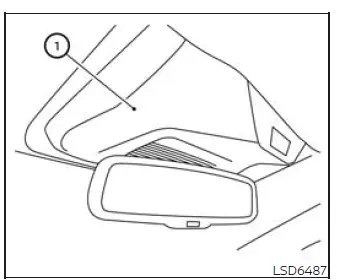
Lane camera unit 1 used by the I-LI system is located above the inside rearview mirror. To maintain reliable operation, support accurate detection of lane markings, and reduce the possibility of a system malfunction, observe the following precautions:
- Keep the windshield clean at all times, particularly the area directly in front of the lane camera. Dirt, moisture, snow, ice, or other contamination may obstruct the camera's view.
- Do not attach stickers, including transparent films or materials, and do not install accessories near the camera unit. Any object placed in this area may interfere with the camera's field of vision.
- Do not place reflective objects, such as white paper, polished items, or mirrors, on the instrument panel. Reflected sunlight may enter the camera and reduce its ability to recognize lane markings correctly.
- Do not strike, modify, or damage the windshield or trim surrounding the camera unit. Do not touch the camera lens or remove the screw installed on the camera. If the camera unit or nearby area is damaged in a collision, NISSAN recommends having the Nissan Murano inspected by a NISSAN dealer.
See also:
Auto closure
If the lift gate is pulled down to a partly open
position, the lift gate will pull itself to the closed
position.
Do not apply excessive force when the
auto closure is operating. Excessive force
...
Battery
If the battery is not fully charged during
extremely cold weather conditions, the battery
fluid may freeze and damage the battery. To
maintain maximum efficiency, the battery should
be checked reg ...
Washing
Wash dirt off with a wet sponge and plenty of
water. Clean the vehicle thoroughly using a mild
soap, a special vehicle soap or general purpose
dishwashing liquid mixed with clean, lukewarm
(never ...