
Basic Information. BSW system operation
Basic Information
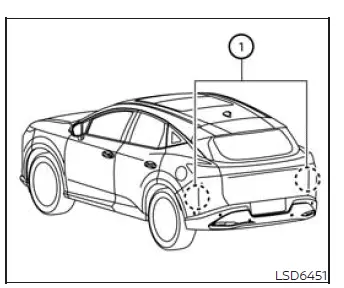
WARNING Failure to follow the warnings and instructions for proper use of the Blind Spot Warning system could result in a collision, serious injury, or death.
- The BSW system does not replace correct lane-changing procedures and cannot prevent contact with another vehicle or object. Before changing lanes, always check the side and rearview mirrors, activate the appropriate turn signal, and look over your shoulder in the direction the Nissan Murano will move. Confirm that the adjacent lane is clear and never rely solely on the BSW system.
The Blind Spot Warning system helps alert the driver when another vehicle is detected in an adjacent lane during a potential lane change. The warnings are intended to supplement the driver's own visual checks and awareness of surrounding traffic.
The BSW system uses radar sensors 1 installed near the rear bumper to monitor the areas beside and behind the Nissan Murano. These sensors detect vehicles traveling within the system's defined blind-spot zones.
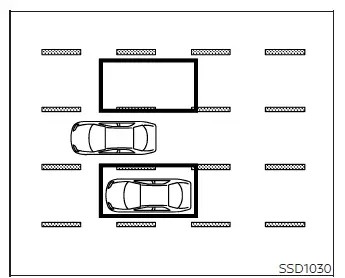
Detection
zone
The radar sensors can detect vehicles on either side of the vehicle within the detection zones shown in the illustration. Each zone begins near the corresponding outside mirror and extends approximately 10 ft (3.0 m) behind the rear bumper and approximately 10 ft (3.0 m) outward from the side of the vehicle.
The monitored area may extend farther behind the vehicle when another vehicle in an adjacent lane approaches rapidly from the rear. This allows the BSW system to provide an earlier alert when closing speed is high.
BSW system operation
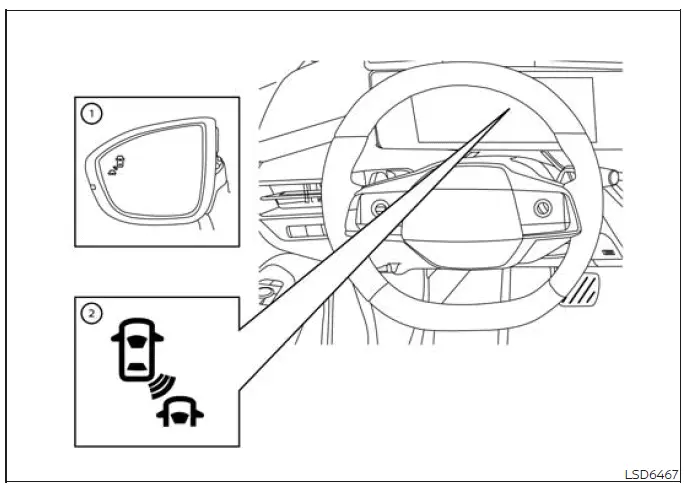
- Side BSW/RCTA indicator light
- BSW Indicator
The BSW system operates when the vehicle is traveling at approximately 20 mph (32 km/h) or faster.
If a radar sensor detects another vehicle within a monitored zone, side BSW/RCTA indicator light 1 illuminates on the corresponding side. If the driver then activates the turn signal toward the detected vehicle, the system sounds two chimes, the side BSW/RCTA indicator light flashes, and BSW indicator 2 flashes yellow in the vehicle information display. The side indicator continues flashing until the detected vehicle leaves the monitored area.
The side BSW/RCTA indicator lights illuminate for several seconds when the ignition switch is placed in the ON position. This brief illumination allows the driver to confirm that the indicators are capable of operating.
The brightness of each side BSW/RCTA indicator light is adjusted automatically according to the surrounding ambient light, helping keep the warning visible in both bright and dark driving conditions.
How to enable/disable the BSW system
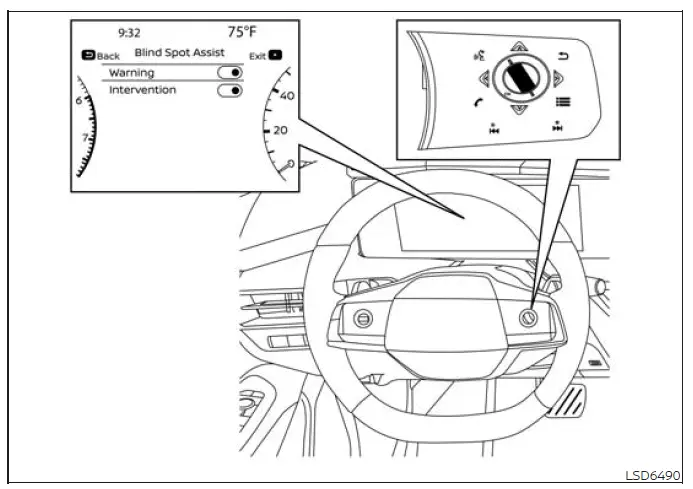
Follow the steps below to enable or disable the Blind Spot Warning system:
1. Press the  button repeatedly
until "Settings" appears in the vehicle information display, and then press the OK button. Use the scroll dial
to highlight "Driver Assistance," and press the OK button to open the menu.
button repeatedly
until "Settings" appears in the vehicle information display, and then press the OK button. Use the scroll dial
to highlight "Driver Assistance," and press the OK button to open the menu.
2. Select "Blind Spot Assist," and then press the OK button to access the available blind-spot settings.
3. Select "Warning" and press the OK button to switch the BSW system on or off. Confirm the selected status in the vehicle information display before leaving the settings menu.
NOTE:
- The Nissan Murano retains the current BSW setting after the engine is restarted. The system will remain enabled or disabled according to the driver's last selection until that setting is changed again.
See also:
NISSAN Intelligent Key® Operation
You can lock or unlock the doors without taking
the Intelligent Key out of your pocket or bag.
When you carry the Intelligent Key with you, you
can lock or unlock all doors by pushing the door
...
General maintenance
During the normal day-to-day operation of the
vehicle, general maintenance should be performed
regularly as prescribed in this section. If
you detect any unusual sounds, vibrations or
smell, be su ...
Opening the top using the Intelligent Key
The soft top can be opened using the door
handle request switch.
Opening the soft top
Push the ignition switch to the OFF position and
make sure to carry the Intelligent Key with you.
Make su ...