
System temporarily unavailable
Under any of the conditions described below, a warning chime will sound, a corresponding message will appear in the vehicle information display, and the I-BSI system will switch off automatically because normal operation cannot be maintained.
The I-BSI system will remain unavailable until the condition responsible for the temporary interruption has ended. During this period, the driver must monitor surrounding traffic directly and should not rely on blind-spot intervention assistance.
- "Unavailable Slippery Road"
- This message may appear when the VDC system, excluding the TCS function, or the ABS operates. The I-BSI system is temporarily disabled while these systems are actively responding to current driving conditions.
- "Currently Unavailable"
- This message appears when the VDC system is turned off, preventing the I-BSI system from providing its normal intervention function.
- "Unavailable Camera Temperature High": This message may appear if the Nissan Murano is parked in direct sunlight under high-temperature conditions exceeding approximately 104ºF (40ºC). The camera may require time to return to a suitable operating temperature before the system becomes available again.
- "Unavailable Side Radar Obstruction": This message appears when the system detects that one or both side radar sensors are blocked or unable to monitor the surrounding area reliably.
After the condition has ended, turn the I-BSI system off and then turn it on again. Confirm that the warning message has disappeared and that the system is available before relying on its warning and intervention functions.
System malfunction
If the I-BSI system develops a malfunction, it will switch off automatically and a warning chime will sound. The "Malfunction See Owner's Manual" warning message, together with the orange BSW indicator, will appear in the vehicle information display to inform the driver that the system requires attention.
Action to take:
Stop the Nissan Murano in a safe location away from moving traffic, place the shift position in P (Park), turn off the engine, and then restart it. Check whether the "Malfunction See Owner's Manual" message and the orange BSW indicator have cleared. If the warning continues to be displayed after restarting the engine, have the I-BSI system inspected. It is recommended that you visit a certified NISSAN dealer for this service.
System maintenance
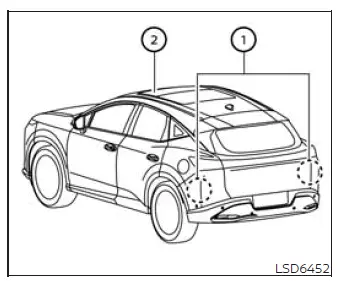
Basic information
The two radar sensors 1 used by the I-BSI system are located near the rear bumper. Always keep the areas around both sensors clean and unobstructed so that they can monitor vehicles traveling beside and behind the Nissan Murano.
The radar sensors may become temporarily blocked by environmental conditions such as splashing water, heavy road spray, mist, or fog. These conditions can interfere with radar operation even when the sensors are not damaged.
A blocked-sensor condition may also be caused by ice, frost, snow, mud, dirt, or another object covering or obstructing the radar sensor areas.
Inspect both radar sensor locations when an obstruction warning appears, and carefully remove any visible material or object that may be interfering with the sensors. Avoid using any method that could scratch, deform, or otherwise damage the surrounding bumper surface.
Do not attach stickers, including transparent films or protective materials, install accessories, or apply additional paint near the radar sensors. Even thin or transparent materials may interfere with radar signals and reduce detection performance.
Do not strike, press against, or damage the areas surrounding the radar sensors, as an impact may affect their position or operation.
If the rear bumper or the area around either radar sensor is damaged in a collision, it is recommended that you visit a certified NISSAN dealer for an inspection. Sensor alignment or performance may be affected even when the exterior damage appears minor.
The lane camera unit 2 used by the I-BSI system is located above the inside rearview mirror. To maintain proper I-BSI operation and reduce the possibility of a malfunction, observe the following precautions:
- Always keep the windshield clean, particularly the area directly in front of the lane camera unit, so the camera has an unobstructed view of the road and lane markings.
- Do not attach a sticker, including transparent material, or install an accessory near the camera unit or within its field of view.
- Do not place reflective materials, such as white paper or a mirror, on the instrument panel. Reflected sunlight may enter the camera and reduce its ability to detect lane markers accurately.
- Do not strike or damage the area around the camera unit. Do not touch the camera lens or remove the screw located on the unit. If the camera or its surrounding area is damaged in an accident, it is recommended that you contact a certified NISSAN dealer for inspection and service.
Radio frequency statement
For USA
This device complies with Part 15 of the FCC Rules.
Operation is subject to the following two conditions:
1. This device may not cause harmful interference, and
2. This device must accept any interference received, including interference that may cause undesired operation.
FCC Warning
Changes or modifications that have not been expressly approved by the party responsible for compliance could void the user's authority to operate the equipment.
For Canada
This device contains licence-exempt transmitter(s)/receiver(s) that comply with the licence-exempt RSS standard(s) of Innovation, Science and Economic Development Canada.
Operation is subject to the following two conditions:
1. This device may not cause interference.
2. This device must accept any interference, including interference that may cause undesired operation of the device.
Radiofrequency radiation exposure information: This equipment complies with the applicable radiation exposure limits established for an uncontrolled environment. It should be installed and operated with a minimum distance of 20 cm between the radiator and the body of any person, including the user or a bystander.
See also:
Vehicle load capacity
Do not exceed the load limit of your vehicle
shown as “The combined weight of
occupants and cargo” on the Tire and
Loading Information label. Do not exceed
the number of occupants shown as
†...
Precautions on supplemental restraint system
This Supplemental Restraint System (SRS) section
contains important information concerning
the following systems:
● Driver and passenger supplemental frontimpact
air bag (NISSAN Advanced Air ...
Engine cooling system
The engine cooling system is filled at the factory
with a pre-diluted mixture of 50% Genuine
NISSAN Long Life Antifreeze/Coolant (blue) and
50% water to provide year-round anti-freeze
and coolant ...