
Intelligent Cruise Control (ICC)
Basic Information
Intelligent Cruise Control (ICC) is an integrated part of ProPILOT Assist. Before using ICC, read the entire ProPILOT Assist section to understand the operating procedures, controls, displays, warnings, and system limitations. Familiarity with this information is essential because ICC provides driving assistance but does not replace the driver's attention, judgment, or responsibility for controlling the Nissan Murano.
The ICC system uses a forward-facing radar sensor to monitor traffic ahead and system uses a forward-facing radar sensor to monitor traffic ahead and is designed to operate as follows:
- When no vehicle is detected ahead in the same traveling lane, the ICC system maintains the speed selected by the driver, subject to current road and operating conditions.
- When a vehicle is detected ahead in the same lane, ICC adjusts the speed of the Nissan Murano to help maintain the following distance selected by the driver. If the detected vehicle slows to a stop, the system decelerates your vehicle to a standstill. After the vehicle has stopped, ICC continues holding it stationary while the applicable operating conditions remain satisfied.
- When the vehicle ahead moves into another lane and the travel path becomes clear, ICC can accelerate the vehicle and maintain speed up to the driver-selected setting. The maximum set speed is 90 mph (144 km/h). The ICC system can apply no more than approximately 40% of the vehicle's total braking capability and should be used only when traffic conditions allow speeds to remain relatively steady. When greater acceleration is required, the driver may override ICC at any time by pressing the accelerator pedal. While the driver is accelerating, the system will not apply the brakes. At speeds below approximately 15 mph (24 km/h), ICC requires a detected vehicle ahead to continue operating. The Nissan Murano must be traveling at approximately 20 mph (30 km/h) before ICC can initially be set.
NOTE: The vehicle's brake lights illuminate whenever braking is applied automatically by the ICC system, informing drivers behind that the Nissan Murano is slowing down.
For additional information about related speed-management functions, refer to the following sections:
- "Speed Adjust by Route - a feature of ProPILOT Assist with Navi-link (if so equipped)," which can adjust vehicle speed according to road curvature on freeway interchanges and freeway curves.
- "Speed Limit Assist - a feature of ProPILOT Assist with Navi-link (if so equipped)," which helps notify the driver when a speed-limit change is detected and can adjust the vehicle's set speed according to the selected operating mode.
System operation
Basic Information
The ICC system can be operated in either of the following two cruise-control modes, depending on the type of assistance the driver requires:
- Conventional fixed-speed cruise-control mode, which maintains the selected speed without controlling the distance from a vehicle ahead.
- Intelligent Cruise Control adaptive mode, which can adjust vehicle speed according to the detected traffic ahead and the selected following-distance setting.
NOTE: Steering Assist is not available while conventional fixed-speed cruise control is selected.
To use Intelligent Cruise Control without Steering Assist, activate ProPILOT Assist and then switch off Steering Assist using the dedicated switch or the corresponding option in the settings menu.
To select conventional fixed-speed cruise control, press and hold the ProPILOT Assist switch for longer than approximately 1.5 seconds, and then set the desired vehicle speed. In this mode, the driver must monitor traffic ahead and adjust speed manually whenever necessary.
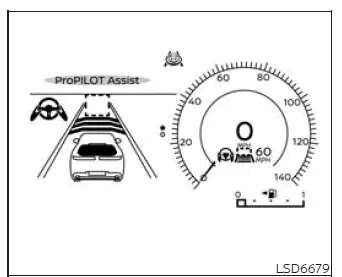
System set display - no vehicle detected ahead (for ProPILOT Assist 1.1)
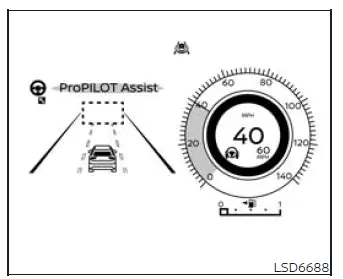
System set display - no vehicle detected ahead (for ProPILOT Assist 2.1)
If no vehicle ahead detected
When no vehicle is detected in the same traveling lane, the ICC system maintains the speed selected by the driver in a manner similar to conventional cruise control. The driver must continue monitoring traffic and remain prepared to adjust the speed of the Nissan Murano whenever road or traffic conditions require manual intervention.
If a previously detected vehicle moves out of the lane or is no longer recognized ahead, the vehicle gradually accelerates toward the driver-selected set speed. Acceleration continues only up to the stored speed unless another applicable speed-control function changes the target.
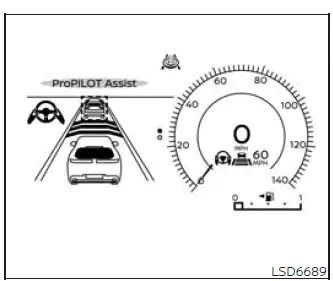
System set display - vehicle detected ahead (for ProPILOT Assist 1.1)
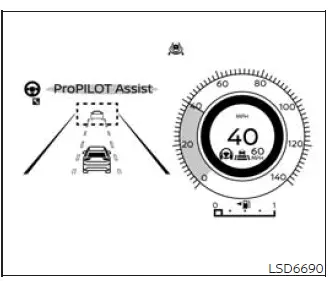
System set display - vehicle detected ahead (for ProPILOT Assist 2.1)
If vehicle ahead is detected
When the ICC system detects a vehicle traveling ahead in the same lane, it controls the throttle and applies the brakes as needed to reduce speed and match the slower vehicle. The system then adjusts vehicle speed to help maintain the following distance selected by the driver.
If the vehicle ahead stops
If the detected vehicle ahead gradually slows to a stop, the Nissan Murano also decelerates to a standstill. Once the vehicle is stationary, the "(RES+-) Follow Vehicle Ahead" message appears in the vehicle information display, indicating the available procedure for continuing ICC operation.
- If the vehicle ahead stops and your vehicle remains stationary for less than approximately 30 seconds on the freeway, the "Follow Vehicle Ahead" message appears in the vehicle information display. When the detected vehicle ahead begins moving again, your vehicle will automatically begin to move, provided the required operating conditions remain satisfied.
To resume ICC operation after the vehicle has stopped, operate the RES+- switch in either direction or lightly press the accelerator pedal. Before allowing the vehicle to move, check the roadway and surrounding traffic to confirm that the path ahead remains clear.
WARNING If another vehicle cuts into the lane after your vehicle has been brought to a stop by the ICC system, the system may not detect it because of the cut-in vehicle's position, angle, or direction of movement. When your vehicle begins moving again, it may approach the newly entered vehicle before reliable detection occurs.
Monitor the area ahead carefully and apply the brake pedal whenever necessary to maintain a safe following distance and prevent a collision.
Cut-in detection
If another vehicle moves into your traveling lane close to the Nissan Murano, the ICC system may alert the driver by flashing the vehicle-ahead detection indicator. Detection may not be immediate, so the driver must continue observing surrounding traffic and respond manually when required.
Passing a slower vehicle
When passing a slower-moving vehicle on the left, the ICC system may temporarily accelerate to support the lane-change maneuver. The system will not accelerate beyond the driver-selected set speed during the lane change, and the driver remains responsible for confirming that the adjacent lane is clear.
Approach warning
If your vehicle moves too close to the vehicle ahead because that vehicle decelerates rapidly or another vehicle enters the lane, the ICC system warns the driver with a chime and a visual indication in the ICC display. Apply the brake pedal and reduce speed manually to restore a safe following distance under any of the following conditions:
- The approach warning chime sounds.
- The vehicle-ahead detection indicator flashes.
- The driver determines that braking is necessary to maintain a safe distance from the vehicle ahead.
The approach warning chime may not sound in certain situations even when the distance between vehicles is relatively short. Examples include the following:
- When both vehicles are traveling at approximately the same speed and the distance between them remains nearly constant.
- When the vehicle ahead is traveling faster than the Nissan Murano and the distance between the two vehicles is gradually increasing.
NOTE: The approach warning chime may sound and the system display may flash when the radar sensor detects an object beside the vehicle or along the edge of the road. This type of detection may cause the ICC system to decelerate or accelerate the Nissan Murano unexpectedly. The radar sensor may identify roadside objects while the vehicle is traveling on winding, narrow, or hilly roads, or while entering or leaving a curve. Under these conditions, the driver must control vehicle speed manually and maintain an appropriate distance from the vehicle ahead.
Radar sensitivity and detection performance may also be influenced by vehicle operation, including steering input and the vehicle's position within the lane, as well as surrounding traffic or the physical condition of nearby vehicles. For example, detection may be affected when another vehicle has an unusual shape or visible damage.
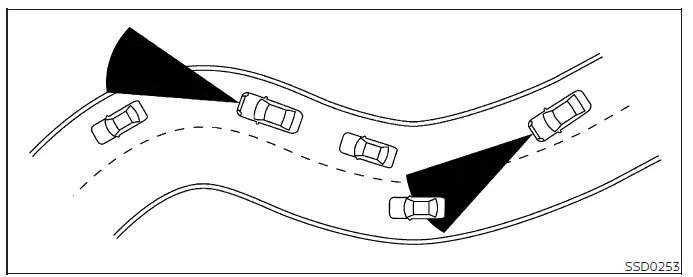
NOTE: Before each drive, make sure the radar sensors, cameras, and sonar sensors are clean, undamaged, and free from obstructions. Dirt, ice, snow, water, physical damage, and environmental conditions can reduce detection accuracy, limit system performance, or cause one or more assistance functions to become temporarily unavailable.
Warnings and malfunctions
Under any of the following conditions, the ICC system is canceled automatically. A warning chime sounds, and the system cannot be set again until the condition responsible for the cancellation has been corrected:
- No vehicle is detected ahead while your vehicle is traveling below approximately 15 mph (24 km/h). On Nissan Murano vehicles equipped with ProPILOT Assist 1.1, when driving on a limited-access freeway identified by the navigation map data, ICC is canceled and a warning chime sounds if the vehicle remains stopped for more than approximately 3 seconds without a vehicle detected ahead.
- Any vehicle door is open or not securely closed.
- The driver's seat belt is unfastened.
- The vehicle has been held at a stop by the ICC system for approximately 3 minutes or longer.
- The transmission is shifted out of D (Drive) or manual shift mode.
- The electronic parking brake is applied.
- SNOW mode is selected.
- The Vehicle Dynamic Control (VDC) system is turned off.
- The VDC system, including the traction control function, begins operating.
- One or more wheels lose traction or begin to slip.
- The AEB with Pedestrian Detection system applies stronger braking.
- The front radar signal is temporarily interrupted, blocked, or otherwise unavailable.
If none of the listed limitations or cancellation conditions is present and all required operating conditions have been satisfied, but the ICC system still does not function correctly, stop using the system and have it inspected.
See also:
NISSAN customer care program
NISSAN CARES ...
Both NISSAN and your NISSAN dealer are dedicated to serving all your
automotive needs. Your satisfaction with your vehicle and your NISSAN dealer are
our primary concerns. Your NI ...
2nd row bench seat adjustment
Forward and backward
Pull the center of the bar 1 up and hold it while
you slide the seat forward or backward to the
desired position. Release the bar to lock the seat
in position.
Reclining
To ...
FM-AM radio with Compact Disc (CD) changer
1. CD EJECT button
2. ON·OFF/VOLUME control knob
3. Radio station and CD selector buttons
4. Radio tuning / MP3/WMA folder selector /
AUDIO control knob
5. CD LOAD button
6. AM·FM band selec ...