
Lane Change Assist
Basic information
Lane Change Assist is a ProPILOT Assist 2.1 feature designed to support the driver during certain lane-change maneuvers. Before using this feature in the Nissan Murano, read the complete ProPILOT Assist section, including the operating instructions, display descriptions, warnings, and system limitations.
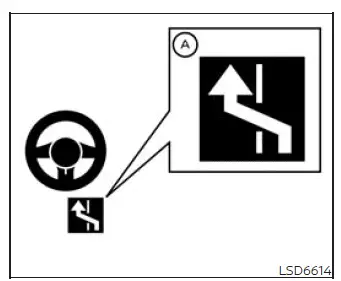
When ProPILOT Assist is active and status indicator A is illuminated in blue, Lane Change Assist can provide steering support for a lane change after the driver operates the turn signal. The feature assists with the maneuver only when the required operating conditions are satisfied.
Before initiating the lane change, the driver must place their hands on the steering wheel, check surrounding traffic, and confirm that the target lane is clear. The driver remains responsible for judging whether the maneuver is safe and must maintain control throughout the entire lane change.
The Lane Change Assist status indicator will illuminate under the following conditions:
- When the ProPILOT Assist 2.1 display is blue, indicating that Hands Off mode is available.
- When the vehicle is traveling at more than approximately 37 MPH (60 km/h).
- When driving on a roadway with more than two lanes.
- When the target lane to the right or left, or both available target lanes, is separated by a dotted white lane marking.
- When the Nissan Murano is traveling on a straight road or through a gentle curve that the system can recognize.
- When driving on a road with a posted speed limit of 45 MPH (70 km/h) or higher.
- When either "Activate by turn signal" or "Passing Assist" is enabled in the vehicle settings.
Lane Change Assist may cancel or not be available under the following conditions:
- When driving through a newly constructed freeway curve or interchange that is not identified in the available navigation map data.
- When "Lane Change Assist" is disabled in the vehicle information display settings, even if the Lane Change Assist status indicator is illuminated in blue.
- When another vehicle is detected in the intended target lane and the system determines that the lane change should not continue.
- When the required lane markings can no longer be detected clearly.
- When vehicle speed falls below approximately 37 MPH (60 km/h).
- When the system does not detect the driver's hands on the steering wheel.
- When the ICC system or ProPILOT Assist is canceled or becomes unavailable.
- When an obstacle is detected near the lane marking on the side of the intended target lane.
How to enable/disable Lane Change Assist:
Vehicle information display
1. Press the  button on the
steering wheel repeatedly until "Settings" appears in the vehicle information display.
button on the
steering wheel repeatedly until "Settings" appears in the vehicle information display.
2. Use the scroll dial to highlight "Driver Assistance." Then press the OK button to open the Driver Assistance menu.
3. Use the scroll dial to select "Lane Change Assist." Then press the OK button to display the available Lane Change Assist settings.
4. Use the scroll dial to select "Activate by turn signal", and then press the OK button to switch the function on or off. Confirm the selected setting in the vehicle information display before returning to the main screen.
WARNING Failure to follow the warnings and operating instructions for Lane Change Assist may result in a collision, serious injury, or death.
- Lane Change Assist only supports the driver during a lane-change maneuver. It does not steer the vehicle to avoid a collision and cannot determine that every surrounding condition is safe. Keep your hands on the steering wheel, monitor the target lane and nearby traffic, and move into another lane only after confirming that the maneuver can be completed safely.
NOTE: Manual steering input from the driver always takes priority over Lane Change Assist. If the system does not detect the driver's hands on the steering wheel, it issues a warning requesting that the driver restore proper hand contact and remain ready to steer.
If the driver's hands are not detected within the required period, Lane Change Assist cancels and will no longer provide steering support for the lane-change maneuver.
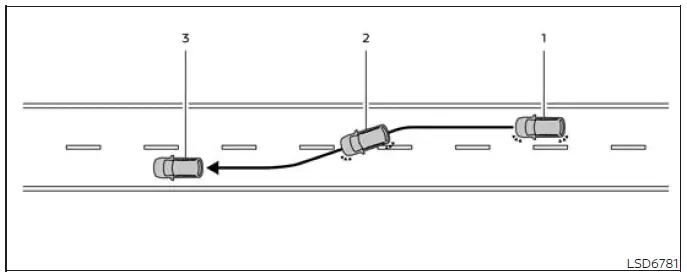
System operation
Before beginning a lane change, carefully check the mirrors and surrounding traffic, confirm that the intended target lane is clear, and make sure there is enough space to complete the maneuver safely. The driver remains responsible for monitoring the road throughout the entire Lane Change Assist operation.
1. Keep your hands on the steering wheel and activate the turn signal in the direction of the intended lane change.
2. The Lane Change Assist display appears and flashes green. When all operating conditions are satisfied, the system begins applying steering assistance to help guide the Nissan Murano toward the selected target lane.
3. After the lane change is completed, the turn signal cancels automatically*1.
Steering Assist then resumes operation when its required conditions remain satisfied.
*1: If the turn signal lever was moved into a latched position, return the lever to the neutral position after completing the lane change.
4. Hands Off mode, indicated in blue, resumes automatically as soon as all conditions required for that operating mode are met again.
Lane Change Assist stops operating and the Lane Change Assist display turns off under any of the following conditions:
- When the turn signal is operated in the direction opposite to the intended lane change.
- When the turn signal lever is returned to the neutral position before steering assistance begins, provided the lever was latched to activate the turn signal.
- When the driver operates the steering wheel and manually overrides the system.
- When another vehicle is detected in the intended target lane.
- When the required lane markings can no longer be detected clearly.
- When vehicle speed falls below approximately 37 MPH (60 km/h).
- When the system no longer detects the driver's hands on the steering wheel.
- When the Intelligent Cruise Control (ICC) system or ProPILOT Assist is canceled or becomes unavailable.
- When the lane marking between the current lane and the target lane is not a dotted white line.
- When an obstacle is detected near the lane marking on the side of the intended target lane.
- When Lane Change Assist stops before the Nissan Murano has left its original lane, the system may apply steering control to help return the vehicle toward the center of that lane. The driver must continue monitoring the maneuver and take manual control whenever necessary.
See also:
Antenna
The antenna cannot be shortened, but can be
removed. When you need to remove the antenna,
turn the antenna rod counterclockwise B .
To install the antenna rod, turn the antenna rod
clockwise A ...
Precautions on seat belt usage
If you are wearing your seat belt properly adjusted
and you are sitting upright and well back in
your seat with both feet on the floor, your chances
of being injured or killed in an accident and/or ...
Giving voice commands
1. Press the switch located on
the steering
wheel.
2. A list of commands appears on the screen,
and the system announces, “Would you like
to access Phone, Navigation, Information,
Audio ...