
Passing assist
Basic information
Passing Assist is a ProPILOT Assist 2.1 feature designed to support the driver when overtaking a slower-moving vehicle under suitable highway conditions. Before using this feature in the Nissan Murano, read the complete ProPILOT Assist section, including the operating procedures, display descriptions, warnings, and system limitations.
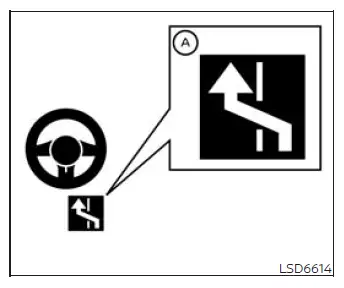
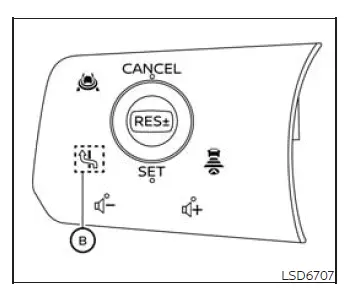
When ProPILOT Assist is active and status indicator A is illuminated in blue, Passing Assist can support the driver while preparing to overtake a slower vehicle in the following ways:
1. The system detects a slower vehicle ahead and may suggest passing on the left when no vehicle is detected in the relevant blind-spot area or intended lane.
2. After the driver accepts the suggestion by operating Lane Change Assist switch B on the steering wheel, the system can provide lane-change support through Lane Change Assist. The driver must confirm that the maneuver is safe before accepting the suggestion and remain responsible throughout the lane change.
WARNING The driver is responsible for leaving the passing lane when required by applicable traffic laws and current road conditions. Passing Assist does not replace the driver's judgment or legal responsibility.
All conditions must be met in order for Passing Assist to operate:
- ProPILOT Assist must be active and operating normally.
- The Lane Change Assist status indicator must be illuminated in blue.
- No vehicle can be detected in the intended target lane.
- The required lane markings must be clearly detected by the system.
- The Nissan Murano must be traveling above approximately 37 MPH (60 km/h).
- The system must detect the driver's hands on the steering wheel.
- Passing Assist must be enabled through the vehicle settings.
The system may suggest passing when it detects that the vehicle ahead is traveling more slowly than the Nissan Murano. The required speed difference depends on the selected response setting:
- Sport:
- A passing suggestion may appear when the lead vehicle is at least 3 MPH (5 km/h) slower.
- Standard:
- A passing suggestion may appear when the lead vehicle is at least 6 MPH (10 km/h) slower.
- Comfort:
- A passing suggestion may appear when the lead vehicle is at least 9 MPH (15 km/h) slower.
After an overtaking maneuver, the system may suggest that the driver return to the right lane when all of the following conditions are satisfied:
- The vehicle continues traveling in the passing lane after overtaking.
- The Lane Change Assist indicator remains illuminated in blue.
- No vehicle is detected in the right lane into which the vehicle would move.
NOTE: Steering input from the driver always takes priority over Passing Assist. The driver can override the system at any time by operating the steering wheel and must remain prepared to take immediate control.
How to enable/disable Passing Assist:
Vehicle information display
1. Press the
 button on the steering wheel
repeatedly until "Settings" appears in the vehicle information display.
button on the steering wheel
repeatedly until "Settings" appears in the vehicle information display.
2. Use the scroll dial to highlight "Driver Assistance." Then press the OK button to open the Driver Assistance menu.
3. Use the scroll dial to select "Lane Change Assist." Then press the OK button to display the available Lane Change Assist and Passing Assist settings.
4. Use the scroll dial to highlight "Passing Assist", and then press the OK button to switch the feature on or off. Confirm the selected setting in the vehicle information display before leaving the menu.
How to change Passing Assist mode:
Vehicle information display
1. Press the  button on the steering
wheel repeatedly until "Settings" appears in the vehicle information display.
button on the steering
wheel repeatedly until "Settings" appears in the vehicle information display.
2. Use the scroll dial to select "Driver Assistance." Then press the OK button to open the Driver Assistance settings.
3. Use the scroll dial to highlight "Lane Change Assist." Then press the OK button to access the related lane-change options.
4. Use the scroll dial to select "Passing Setting", and then press the OK button. Choose Sport, Standard, or Comfort mode according to the preferred passing-suggestion response.
System operation
1. When the system detects a slower-moving vehicle ahead and the necessary operating conditions are satisfied, the message "Slow Vehicle Ahead Change Lanes Left" appears in the vehicle information display.
2. Before accepting the suggestion, check the mirrors and surrounding traffic and confirm that moving into the left lane is safe. Keep your hands on the steering wheel, and press the Lane Change Assist switch on the steering wheel. The turn signal begins flashing immediately to indicate the intended lane change.
- If the blind-spot area and target lane are clear, the system proceeds to step 3 and prepares to provide steering assistance.
- If another vehicle is detected in the blind spot, the system searches for a suitable opening for approximately 30 seconds. If an acceptable space does not become available during that period, Passing Assist cancels the maneuver.
- If the system does not detect the driver's hands on the steering wheel, a warning is issued. If the driver does not restore hand contact within the required time, Lane Change Assist may cancel and the driver must continue controlling the Nissan Murano manually.
3. The Lane Change Assist display flashes green. When the target lane remains available and all operating conditions continue to be met, the system applies steering assistance to help guide the vehicle into the left lane. The driver must monitor the maneuver and remain ready to override the system at any time.
4. After the lane change is completed, the turn signal cancels automatically. Steering Assist then resumes when its operating requirements remain satisfied.
5. Hands Off mode, indicated by the blue display, resumes automatically as soon as all required conditions are met again.
To stop Passing Assist operation:
Passing Assist stops operating and the Lane Change Assist display turns off under any of the following conditions:
- When the turn signal is operated in the direction opposite to the intended lane change.
- When the driver operates the steering wheel and manually overrides the assisted maneuver.
- When another vehicle is detected in the target lane after the turn signal has been activated.
- When the system can no longer detect the required lane markings clearly.
- When vehicle speed falls below approximately 37 MPH (60 km/h).
- When the driver's hands are no longer detected on the steering wheel.
- When the Intelligent Cruise Control (ICC) system or ProPILOT Assist is canceled or becomes unavailable.
- When the vehicle being overtaken accelerates or moves into another lane, changing the conditions on which the passing suggestion was based.
- When an obstacle is detected near the lane marking on the side of the target lane after the turn signal has been activated.
The turn signal also cancels automatically when Passing Assist stops operating. If the assisted maneuver is discontinued before the Nissan Murano has moved out of its original lane, the system may provide steering support to help guide the vehicle back toward the center of that lane. The driver must continue monitoring surrounding traffic and remain prepared to take full steering control.
System maintenance
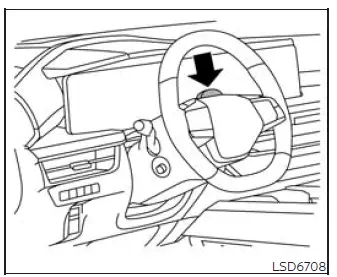
Keep the driver monitor area clean and unobstructed so the camera can maintain a clear view of the driver. If dirt, dust, fingerprints, or other residue collects on the surface, remove it carefully using a clean, soft cloth suitable for cleaning lenses. Avoid using materials that could scratch or damage the camera area.
Radio frequency statement
For USA
This device complies with Part 15 of the FCC Rules.
Operation is subject to the following two conditions:
1. This device may not cause harmful interference, and
2. This device must accept any interference received, including interference that may cause undesired operation.
Changes or modifications made to this equipment that are not expressly approved by Robert BOSCH GmbH may void the user's FCC authorization to operate the equipment.
This equipment has been tested and found to comply with the limits established for a Class A digital device under Part 15 of the FCC Rules. These limits are intended to provide reasonable protection against harmful interference when the equipment is operated in a commercial environment. The equipment generates, uses, and can radiate radio frequency energy. If it is not installed and used in accordance with the instruction manual, it may cause harmful interference to radio communications.
Operation of this equipment in a residential area is likely to cause harmful interference. If such interference occurs, the user may be required to correct the interference at their own expense.
Radiofrequency radiation exposure information: This equipment complies with the FCC radiation exposure limits established for an uncontrolled environment. It should be installed and operated with a minimum distance of 20 cm between the radiator and the user's body.
The transmitter must not be located or operated together with any other antenna or transmitter.
For Canada
Legal warning for RF equipment: This device contains licence-exempt transmitter(s)/receiver(s) that comply with the licence-exempt RSS standards of Innovation, Science and Economic Development Canada.
Operation is subject to the following two conditions: (1) This device may not cause harmful interference. (2) This device must accept any interference received, including interference that may cause undesired operation of the device.
See also:
Power outlet
Instrument panel
Center console (if so equipped)
The power outlet is located in the instrument panel and the center console (if
so equipped).
- The outlet and plug may be hot during or imme ...
HomeLink® universal transceiver (Type A) (if so equipped)
The Type A system does not have an IV 1 on the
back of the mirror. Move the mirror to see if the IV
is present. If the IV is not on the mirror, use the
procedure in this section to program the
H ...
Parking/parking on hills
WARNING
● Do not stop or park the vehicle over
flammable materials such as dry grass,
waste paper or rags. They may ignite
and cause a fire.
● Safe parking procedures require that
...