
Basic Information. RAB system operation
Basic Information
WARNING Failure to follow the warnings and operating instructions for the Rear Automatic Braking (RAB) system could result in a collision, serious injury, or death.
- The RAB system is a supplemental driver-assistance feature and does not replace proper reversing
procedures or careful observation.
Always check the side and rearview mirrors, turn your head, and look in the direction the Nissan Murano will travel before beginning to reverse and throughout the maneuver. Never depend solely on the RAB system to detect obstacles or prevent a collision.
The driver remains responsible for staying alert, reversing safely, controlling vehicle movement, and responding to surrounding conditions at all times.
- The detection and braking capabilities of the RAB system are limited. The feature cannot identify every obstacle or operate effectively in every reversing situation.
- Severe weather and nearby ultrasonic sources may interfere with system operation. Equipment such as an automatic car wash, compressed-air brakes on a truck, or a pneumatic drill may reduce detection performance or cause the system to activate when no immediate obstacle is present.
The RAB system can support the driver while the Nissan Murano is reversing and approaching an object located directly behind the vehicle. Its assistance is intended to supplement, rather than replace, direct observation and careful brake control.
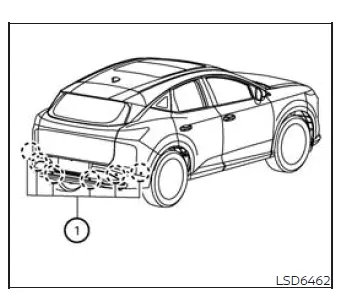
The RAB system monitors the area immediately behind the vehicle using parking sensors 1 installed in the rear bumper. These sensors detect certain obstacles within their operating range while the vehicle is backing up.
NOTE: The sonar function and the RAB system can be temporarily canceled using the available vehicle controls.
RAB system operation
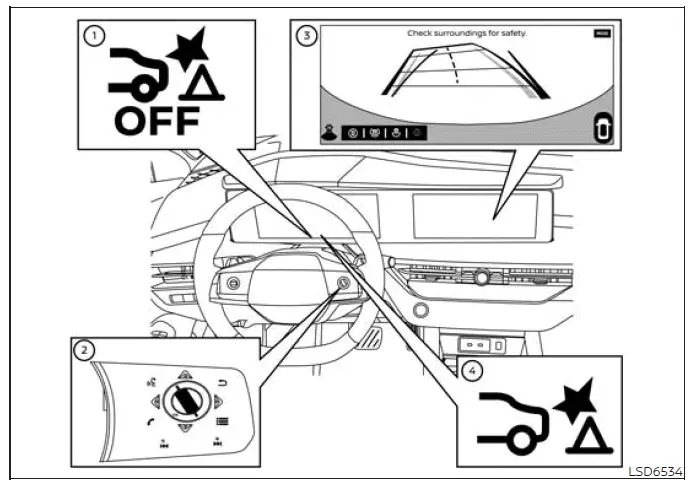
- RAB system warning light
- Steering-wheel-mounted controls on the right side
- Center display
- RAB system indicator
The RAB system operates when the shift position is set to R (Reverse) and vehicle speed is below approximately 9 mph (15 km/h). The driver must continue controlling speed with the brake pedal and monitor the complete area behind the vehicle.
If the system determines that there is a risk of colliding with an obstacle while the vehicle is reversing, the RAB warning indicator flashes in the vehicle information display. On vehicles equipped with the Intelligent Around View Monitor, a red frame also appears in the center display, and three warning chimes sound. The system then applies the brakes automatically. After automatic braking occurs, the driver must press and hold the brake pedal to maintain braking pressure and keep the vehicle stopped.
NOTE:
- The vehicle's brake lights illuminate when braking is applied by the RAB system, warning road users behind the Nissan Murano that the vehicle is slowing or stopping.
- A mechanical or operating sound may be heard while the system applies the brakes. This sound is a normal part of RAB operation and does not indicate a malfunction.
How to temporarily cancel the RAB system
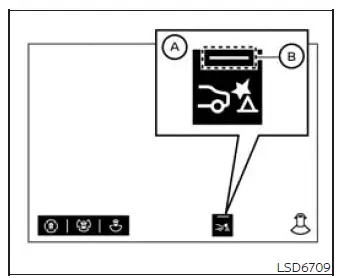
The Front and Rear Sonar system can be switched on or off temporarily by touching the RAB temporary ON/OFF key A on the touch-screen display. When the RAB system is enabled, indicator B illuminates to show that the feature is available.
NOTE:
- Indicator B turns off and a warning message appears only when the driver intentionally switches off the RAB system. If RAB becomes unavailable because of a system malfunction or because the Vehicle Dynamic Control (VDC) system has been deactivated, indicator B does not turn off and no warning message is displayed in the same manner.
- The RAB system switches on automatically when the engine is restarted, even if the feature was temporarily canceled during the previous drive.
See also:
Replacing
Replace the wiper blades if they are worn.
1. Lift the wiper arm away from the windshield.
2 Push the release tab, then move the wiper
blade down the wiper arm to remove.
3 Remove the wiper ...
If your vehicle is stolen
If your vehicle is stolen, you should change the
codes of any non-rolling code device that has
been programmed into HomeLink®. Consult the
Owner’s Manual of each device or call the
manufacturer ...
Maximum load limits
Maximum trailer loads
Never allow the total trailer load to exceed the
value specified in the “Towing Load/Specification”
chart. The total trailer load equals trailer
weight plus its cargo wei ...