
Turning the AEB with Pedestrian Detection system on/off
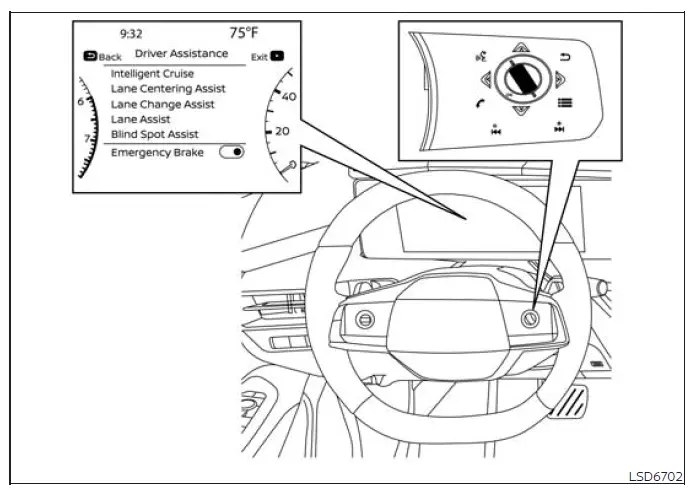
Follow the steps below to enable or disable the Automatic Emergency Braking (AEB) with Pedestrian Detection system through the vehicle information display.
1. Press the  button repeatedly
until "Settings" appears in the vehicle information display, and then press the OK button. Use the scroll dial
to highlight "Driver Assistance", and press the OK button again to open the Driver Assistance menu.
button repeatedly
until "Settings" appears in the vehicle information display, and then press the OK button. Use the scroll dial
to highlight "Driver Assistance", and press the OK button again to open the Driver Assistance menu.
2. Select "Emergency Brake", and then press the OK button to switch the AEB with Pedestrian Detection system on or off. Confirm the selected setting in the vehicle information display before leaving the menu.
When the AEB with Pedestrian Detection system is switched off, its warning light illuminates to inform the driver that automatic forward-collision braking assistance is unavailable. The driver must continue monitoring traffic and control the Nissan Murano without relying on this feature.
NOTE:
- The AEB with Pedestrian Detection system switches on automatically whenever the engine is restarted, even if the feature was disabled during the previous drive.
- The Intelligent Forward Collision Warning (I-FCW) system is integrated with the AEB with Pedestrian
Detection system.
There is no separate I-FCW setting in the vehicle information display. Switching off the AEB with Pedestrian Detection system also disables the I-FCW system.
- The AEB with Pedestrian Detection system cannot be enabled or disabled while the vehicle is being driven. Make the required setting change while the Nissan Murano is stationary.
See also:
Brake pad wear warning
The disc brake pads have audible wear warnings.
When a brake pad requires replacement, it
will make a high pitched scraping sound when
the vehicle is in motion. This scraping sound will
first oc ...
Child safety rear door lock
Child safety locks help prevent the rear doors
from being opened accidentally, especially when
small children are in the vehicle.
The child safety lock levers are located on the
edge of the re ...
Rear-facing child restraint installation
using the seat belts
WARNING
The three-point seat belt with Automatic Locking Retractor (ALR) must be used when installing a child
restraint. ALR mode helps hold the restraint firmly in place after the belt has b ...