
Basic Information. I-FCW system operation
Basic Information
WARNING Failure to follow the warnings and operating instructions for the Intelligent Forward Collision Warning (I-FCW) system could result in a collision, serious injury, or death.
- The I-FCW system can alert the driver to a developing collision risk, but it cannot prevent or avoid a collision. The driver remains responsible for staying attentive, maintaining a safe following distance, driving according to traffic and road conditions, and keeping control of the Nissan Murano at all times.
The I-FCW system can warn the driver when it detects sudden braking by a second vehicle traveling ahead of the vehicle directly in front, provided both vehicles are traveling in the same lane. This extended monitoring can help identify a developing hazard that may not yet be clearly visible to the driver.
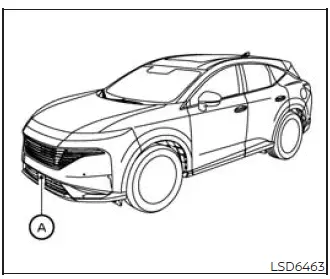
The I-FCW system uses radar sensor A, located at the front of the vehicle, to measure the distance to the vehicle directly ahead and monitor traffic farther forward in the same lane. The warning is intended to give the driver additional time to assess the situation and respond with appropriate braking or steering.
I-FCW system operation
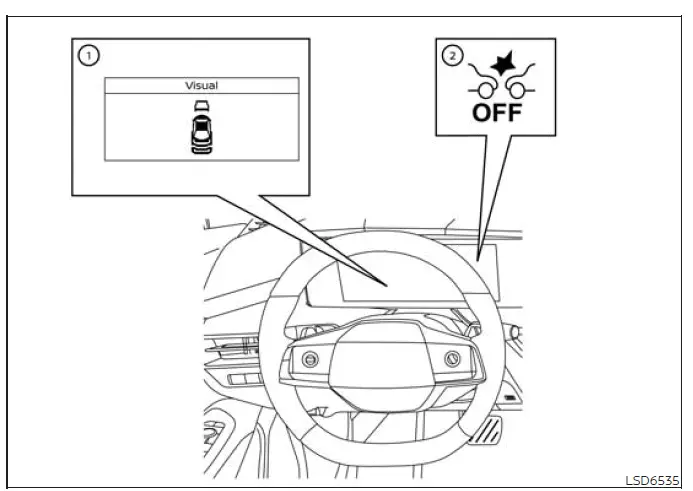
- Vehicle ahead detection indicator
- I-FCW system warning light
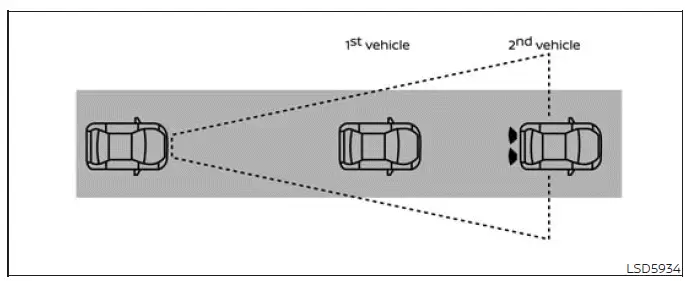
The Intelligent Forward Collision Warning (I-FCW) system operates when the Nissan Murano is traveling at speeds above approximately 3 mph (5 km/h). While the vehicle is moving within its operating range, the system monitors traffic conditions ahead for situations that may indicate an increased risk of a forward collision.
If the I-FCW system identifies a potential forward-collision risk, it alerts the driver by flashing the vehicle ahead detection indicator and sounding an audible warning. These alerts are intended to draw the driver's immediate attention to changing traffic conditions so that appropriate action can be taken.
Turning the I-FCW system on/off
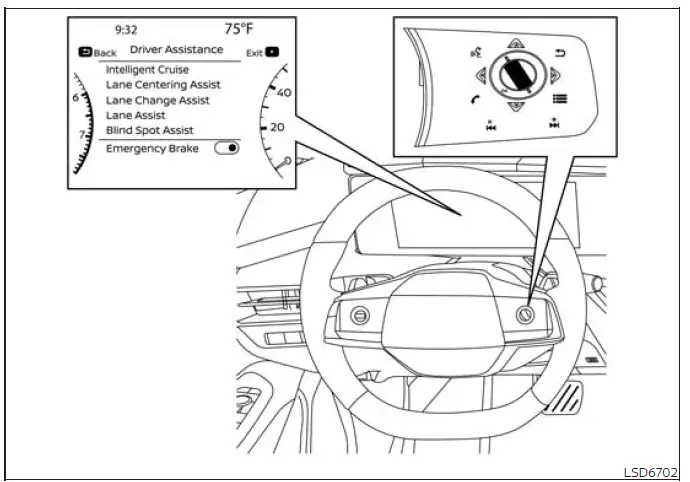
Use the following procedure to turn the I-FCW system on or off through the vehicle information display:
1. Press the  button repeatedly until “Settings” appears in the
vehicle information display, and then press the OK button. Use the scroll dial to highlight “Driver Assistance,”
and press the OK button to open the corresponding settings menu.
button repeatedly until “Settings” appears in the
vehicle information display, and then press the OK button. Use the scroll dial to highlight “Driver Assistance,”
and press the OK button to open the corresponding settings menu.
2. Select “Emergency Brake,” and then press the OK button to turn the system on or off. The selected setting also controls the operation of the I-FCW function because the systems are integrated.
When the I-FCW system is switched off, the I-FCW system warning light illuminates to indicate that forward-collision warning assistance is currently unavailable.
NOTE:
- The I-FCW system is automatically turned on whenever the engine is restarted, even if the system was manually switched off during the previous drive.
- The I-FCW system is integrated with the AEB with Pedestrian Detection system. There is no separate I-FCW selection in the Nissan Murano vehicle information display. When AEB with Pedestrian Detection is turned off, the I-FCW system is turned off at the same time.
- The I-FCW system cannot be turned on or off while the vehicle is being driven. Make the desired selection while the vehicle is safely stopped.
See also:
Jump starting
To start your engine with a booster battery, the instructions and precautions
below must be followed.
- If done incorrectly, jump starting can lead to a battery explosion, resulting
in severe i ...
How to adjust the screen
To adjust the Display ON/OFF, Brightness, Tint,
Color, Contrast and Black Level of the RearView
Monitor, press the SETTING button with the
RearView Monitor on and select the “Display”
key. Sel ...
Bluetooth® Hands-Free Phone System without Navigation System (if so
equipped)
WARNING
● Use a phone after stopping your vehicle
in a safe location. If you have to use a
phone while driving, exercise extreme
caution at all times so full attention may
be given to vehic ...