
Sonar limitations
WARNING The operating limitations of the sonar system are described below. The driver must understand these limitations and maneuver the Nissan Murano accordingly. Failure to observe the surrounding area or relying on the system in conditions where detection may be reduced could result in a collision, serious injury, or death.
- Read and understand all sonar-system limitations explained in this section. Rain, snow, fog, ice, and other adverse weather conditions may interfere with ultrasonic sensing, reduce detection accuracy, delay a warning, or cause the system to activate when no relevant obstacle is present.
- The sonar system is deactivated when vehicle speed exceeds approximately 6 mph (10 km/h). It is reactivated after the Nissan Murano slows below this operating threshold. Do not expect sonar warnings while traveling above the specified speed.
- Adverse weather or nearby ultrasonic sources may affect sonar operation. Automatic car-wash equipment, compressed-air brakes on trucks, pneumatic drills, sonar from other vehicles, and similar sources may reduce system performance or trigger a false warning.
- The sonar system is not designed to prevent contact with every small, low, or moving object. Always maneuver slowly and remain prepared to stop. The sensors may not detect small objects located below bumper level, objects lying flat on the ground, or obstacles that move suddenly into the vehicle’s path.
- The sonar system may be unable to detect soft or sound-absorbing objects such as snow, fabric, cotton, or glass wool. Detection may also be unreliable for thin objects such as rope, wire, or chain; wedge-shaped or irregularly shaped obstacles; complex surfaces; or several objects positioned very close together.
- The sonar system may not reliably detect obstacles when the vehicle is moving faster than approximately 3 mph (5 km/h). Certain objects positioned at an angle to the sensors or moving across the detection area may also be missed or detected later than expected.
- The sonar system may not operate correctly under the following conditions:
- Rain, snow, ice, mud, dirt, or another substance is attached to or covering one or more sonar sensors.
- A loud sound or strong ultrasonic noise is present near the Nissan Murano and interferes with the reflected signal used for obstacle detection.
- The surface of an obstacle is angled away from the front or rear of the vehicle, preventing the sound wave from reflecting directly back toward the sensor.
- A sonar sensor or the surrounding bumper area becomes extremely hot or extremely cold, which may temporarily reduce sensing performance.
- The sonar system may activate unintentionally under the following conditions:
- Tall or overgrown grass is close to the vehicle and reflects ultrasonic signals toward the sensors.
- The road surface contains bumps, raised sections, protrusions, manhole covers, or similar features that enter the sensor’s detection area.
- The vehicle passes through or close to a hanging flag, curtain, or another flexible object that moves near the bumper.
- Snow or ice has accumulated behind the vehicle and is detected as a nearby obstacle.
- The Nissan Murano is being maneuvered on a steep incline, where the road surface or surrounding terrain may enter the sonar detection zone.
System temporarily unavailable
If the system detects that one or more sonar sensors are blocked or unable to monitor the surrounding area reliably, the sonar function will be deactivated automatically. During this condition, visual and audible obstacle warnings may not be available.
The system will remain unavailable until the condition affecting the sensors has cleared and normal detection can resume.
Temporary environmental conditions, including splashing water, mist, or fog, may interfere with the sonar sensors. A blocked condition may also occur when ice, frost, mud, dirt, or another material covers the sensor surface and prevents ultrasonic signals from being transmitted or received correctly.
Action to take:
Inspect the sonar sensors and remove any visible obstruction when it is safe to do so. Once the environmental condition has cleared or the sensor surfaces are no longer blocked, the Nissan Murano sonar system will resume operation automatically.
System maintenance
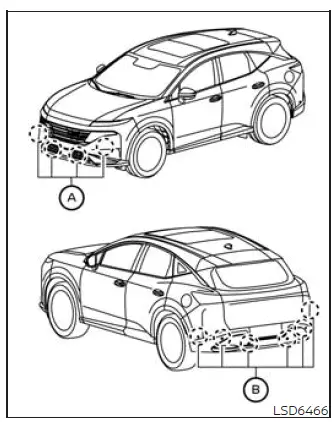
Sonar sensors A and B are installed in the front and rear bumpers. Keep the sensors and the surrounding bumper areas clean so the system can detect nearby obstacles as accurately as possible.
Temporary environmental conditions such as splashing water, road spray, mist, or fog may cover the sensors or interfere with their ultrasonic signals, causing reduced performance or temporary system deactivation.
Ice, frost, snow, mud, dirt, or other material on the sensor surfaces can also block sonar operation and prevent the Nissan Murano from providing reliable obstacle warnings.
Regularly inspect the areas around the sonar sensors and carefully remove any material that may obstruct them. Clean the sensors without using sharp objects or methods that could scratch, deform, or damage their surfaces.
Do not attach stickers, including transparent films, near or over the sonar sensors. Do not install accessories or apply additional paint in these areas, as even a thin covering may interfere with ultrasonic signal transmission and reduce detection accuracy.
Do not strike, press against, or otherwise damage the sonar sensors or the surrounding bumper areas. If the front or rear bumper is damaged, bent, displaced, or misaligned after a collision, the sensing direction may change and cause inaccurate warnings or false activation. It is recommended that you visit a NISSAN dealer to have the Nissan Murano sonar sensors and surrounding components inspected.
See also:
Precautions on child restraints
WARNING
● Failure to follow the warnings and instructions
for proper use and installation
of child restraints could result in
serious injury or death of a child or
other passengers in a ...
Panoramic sunshade (if so equipped)
The panoramic sunshade operates when the ignition
switch is in the ON position. The sunshade
switch is located near the roof console. When
opening or closing the sunshade the switch need
not be ...
Three-way catalyst
The three-way catalyst is an emission control
device installed in the exhaust system. Exhaust
gases in the three-way catalyst are burned at
high temperatures to help reduce pollutants.
WARNING
&# ...