
Cockpit
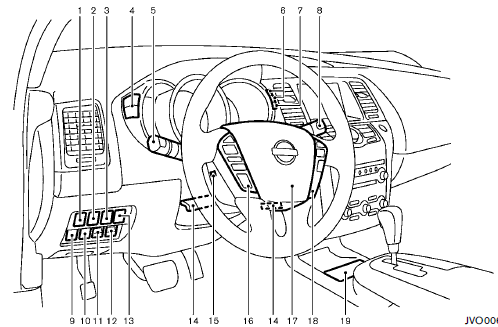
1. Heated steering wheel switch
2. Power lift gate switch (Hardtop models)
or trunk lid release switch (Cross-
Cabriolet models)
3. Warning systems switch
— Lane Departure Warning (LDW) system
— Blind Spot Warning (BSW) system
4. Instrument brightness control switch
5. Headlight, fog light and turn signal switch
— Headlight
— Turn signal light
— Fog light
6. Trip computer switch
7. TRIP/RESET switch
8. Wiper and washer switch
9. Vehicle Dynamic Control (VDC) off switch
10. Power lift gate main switch (Hardtop models)
or All-Wheel Drive (AWD) LOCK
switch (CrossCabriolet models)
11. Power rear seatback switch (Hardtop models)
12. Power rear seatback switch (Hardtop models)
or Remote walk-in switch (CrossCabriolet
models)
13. Fuel-filler door opener switch
14. Manual tilting/telescopic steering wheel lever
15. Electric tilting/telescopic steering wheel switch
16. Steering-wheel-mounted controls (left side)
— Audio control
— Bluetooth® Hands-Free Phone System control
(models with navigation system)
— Bluetooth® Hands-Free Phone System control
(models without navigation system)
17. Steering wheel
— Horn
— Driver supplemental air bag
— Power steering system
18. Steering-wheel-mounted controls (right side)
— Cruise control switches
19. Center-console mounted controls
— Heated seat switches
— All-Wheel Drive (AWD) LOCK switch
(Hardtop models)
— Soft top operating switch (CrossCabriolet
models)
*: if so equipped
See also:
Spark plugs
Be sure the engine and ignition switch are off and that the parking brake
is engaged securely.
Be sure to use the correct socket to remove the spark plugs. An incorrect
socket can damage the ...
How to park with predictive course lines
WARNING
• Always turn and check that it is
safe
to do so before backing up. Always
back up slowly.
• Use the displayed lines as a reference.
The lines are highly affected
by the number o ...
Repairing a flat tire (models with
emergency tire puncture repair kit)
Basic information
WARNING
After using Genuine NISSAN Emergency Tire Sealant to temporarily repair a minor puncture, do not drive
the Nissan Murano faster than 50 mph (80 km/h). Exceeding ...