
Manual operation
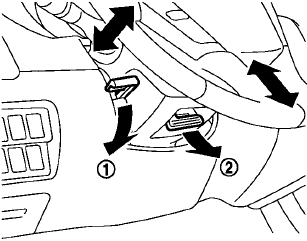
Manual operation
Pull the lock lever 1 down and adjust the steering wheel forward or rearward to the desired position.
Push the lock lever up securely to lock the steering wheel in place.
Pull the lock lever 2 and adjust the steering wheel up or down to the desired position.
Release the lock lever to lock the steering wheel in place.
See also:
Sunglasses holder (Hardtop models)
WARNING
Keep the sunglasses holder closed
while driving to prevent an accident.
To open the sunglasses holder, push1 .
CAUTION
• Do not use
for anything other than
glasses.
• Do not lea ...
Satellite radio reception (if so equipped)
When the satellite radio is used for the first time
or the battery has been replaced, the satellite
radio may not work properly. This is not a malfunction.
Wait more than 10 minutes with satellit ...
Troubleshooting guide
The system should respond correctly to all voice commands without difficulty.
If problems are encountered, follow the solutions given in this guide for the
appropriate error.
Where the solutions ...