
Troubleshooting guide
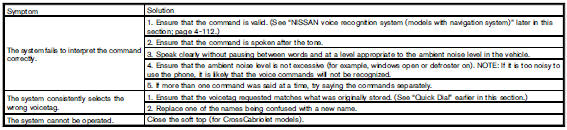
The system should respond correctly to all voice commands without difficulty. If problems are encountered, try the following solutions.
Where the solutions are listed by number, try each solution in turn, starting with number 1, until the problem is resolved.
See also:
Checking bulbs
With all doors closed, apply the parking brake
and push the ignition switch to the ON position
without starting the engine. The following lights
will come on (if so equipped):
The following ligh ...
Vehicle Dynamic Control (VDC) system
Basic Information
The Vehicle Dynamic Control (VDC) system uses multiple sensors to monitor the driver’s steering and pedal inputs
together with the movement and response of the Nissan Murano. ...
Spark plugs
Replacing spark plugs
Iridium-tipped spark plugs
It is not necessary to replace iridium-tipped A
spark plugs as frequently as conventional type
spark plugs because they last much longer. Follow
...