
Passenger compartment
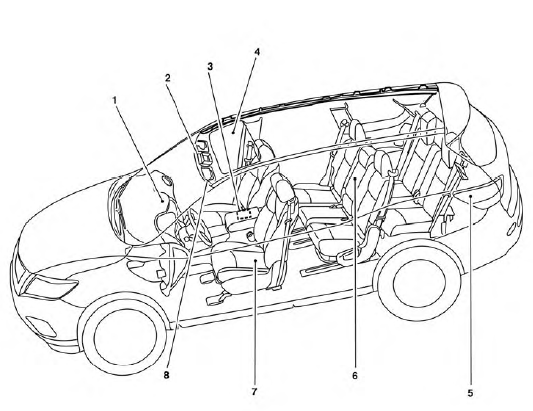
1. Glove box, Console box
2. Map lights
3. Storage
4. Moonroof (if so equipped)/Panoramic
sunshade (if so equipped)
5. Luggage hooks
6. Cup holders
7. Seats
8. Sun visors
See the page number indicated in parentheses for operating details.
See also:
Fuel recommendation
Use unleaded regular gasoline with an octane
rating of at least 87 AKI (Anti-Knock Index) number
(Research octane number 91).
CAUTION
● Only vehicles with the E-85 filler door
label can ope ...
Trunk lid (CrossCabriolet models)
WARNING
• Do not drive with the trunk lid
open.
This could allow dangerous exhaust
gases to be drawn into the vehicle.
See “Exhaust gas (carbon monoxide)”
in the “5. Starting and dr ...
Changing the meter screen view
Tachometer
Engine coolant temperature gauge
Speedometer
Fuel gauge
For models with the full-screen display, the
meter screen view can be changed to expand
the vehicle ...