
How to park with predictive course lines
WARNING
● Always turn and check that it is safe to
do so before backing up. Always back
up slowly.
● If the tires are replaced with different
sized tires, the predictive course lines
may be displayed incorrectly.
● On a snow-covered or slippery road,
there may be a difference between the
predictive course line and the actual
course line.
● The distance guide line and the vehicle
width line should be used as a reference
only when the vehicle is on a level
paved surface. The distance viewed on
the monitor is for reference only and
may be different than the actual distance
between the vehicle and displayed
objects.
● When backing up the vehicle up a hill,
objects viewed in the monitor are further
than they appear. When backing up
the vehicle down a hill, objects viewed
in the monitor are closer than they appear.
Use the inside mirror or glance over your shoulder to properly judge distances to other objects.
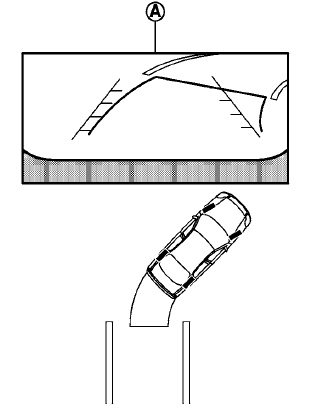
1. Visually check that the parking space is safe
before parking your vehicle.
2. The rear view of the vehicle is displayed on
the screen A when the shift lever is moved
to the R (Reverse) position.
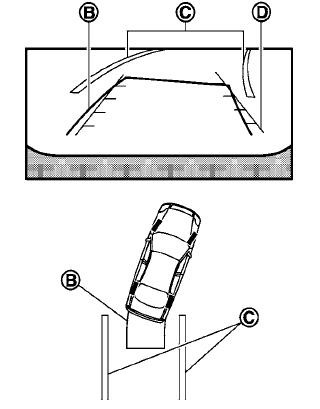
3. Slowly back up the vehicle adjusting the
steering wheel so that the predicted course
lines B enter the parking space C .
4. Maneuver the steering wheel to make the
vehicle width guide lines D parallel to the
parking space C . When the back of the
vehicle enters the parking space C , maneuver
the steering wheel to make the vehicle
width guide lines D parallel to the parking
space C .
5. When the vehicle is parked in the space
completely, move the shift lever to the P
(Park) position and apply the parking brake.
See also:
Manual operation
Fan speed control
Turn the fan speed control dial
to manually
control the fan speed.
Press the AUTO button to return to automatic
control of the fan speed.
Air recirculation
Press the air ...
Environmental factors influence the rate of corrosion
Moisture
Accumulation of sand, dirt and water on the
vehicle body underside can accelerate corrosion.
Wet floor coverings will not dry completely
inside the vehicle, and should be removed for
d ...
Trunk release power cancel switch
When the switch located inside the glove box is
in the OFF position A , the power to the trunk
lid will be canceled and the trunk lid cannot be
opened by the trunk lid release switch, the trunk
...