
Heater and air conditioner (automatic) (Type B)
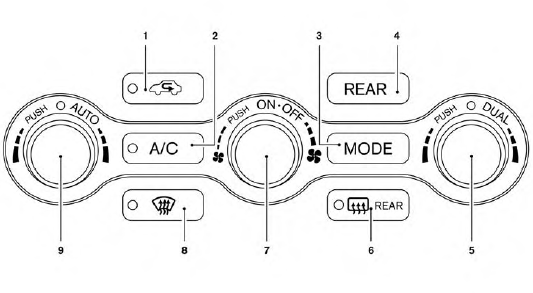
1.  Air recirculation button
2. A/C (air conditioner) ON/OFF button
3. MODE (manual air flow control) button
4. REAR button
5. Temperature control buttons (passenger’s
side)/DUAL (passenger’s side
temperature control) ON/OFF button
6.  (rear window defroster) button
7.  (fan speed control) dial/ON/OFF
button
(fan speed control) dial/ON/OFF
button
8.  (front defroster) button
9. Temperature control dial (driver’s side)/
AUTO (automatic) climate control ON
button
WARNING
● The air conditioner cooling function operates
only when the engine is running.
● Do not leave children or adults who
would normally require the assistance
of others alone in your vehicle. Pets
should also not be left alone. They
could accidentally injure themselves or
others through inadvertent operation of
the vehicle. Also, on hot, sunny days,
temperatures in a closed vehicle could
quickly become high enough to cause
severe or possibly fatal injuries to
people or animals.
● Do not use the recirculation mode for
long periods as it may cause the interior
air to become stale and the windows to
fog up.
Start the engine and operate the controls to activate the air conditioner.
See also:
AWD warning light
The AWD warning light is located in the meter.
The AWD warning light illuminates when the
ignition switch is pushed to the ON position. It
turns off soon after the engine is started.
If any ...
How to use touch screen (models with navigation system)
CAUTION
• The glass screen on the liquid
crystal display may break if it is hit
with a hard or sharp object. If the
glass screen breaks, do not touch it.
Doing so could result in an injury.
...
How to use brightness control and display ON/OFF button
Push the “ OFF” button to switch
the display
brightness to the daytime mode or the nighttime
mode, and to adjust the display brightness using
the multi-function controller while the indicator ...