
CD care and cleaning
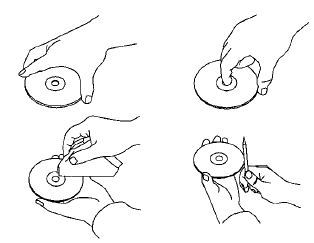
● Handle a CD by its edges. Do not bend the
disc. Never touch the surface of the disc.
● Always place the discs in the storage case
when they are not being used.
● To clean a disc, wipe the surface from the
center to the outer edge using a clean, soft
cloth. Do not wipe the disc using a circular
motion.
● Do not use a conventional record cleaner or
alcohol intended for industrial use.
● A new disc may be rough on the inner and
outer edges. Remove the rough edges by
rubbing the inner and outer edges with the
side of a pen or pencil as illustrated.
See also:
CrossCabriolet models
1. Dual pop-up roll bar system
2. Seat belts
3. Head restraints
— Front-seat Active Head Restraints
4. Door-mounted curtain side-impact and rollover
supplemental air bags
5. Supplemental f ...
Hazard warning flasher switch
Press the hazard warning flasher switch to alert other road users when the Nissan Murano must be stopped or
parked because of an emergency. When the switch is activated, all turn signal l ...
Moonroof (if so equipped)
- In an accident you could be thrown from the vehicle through an open moonroof.
Always use seat belts and child restraints.
- Do not allow anyone to stand up or extend any portion of their body o ...